


One of the cool things about the Mac Finder is that you can create shortcuts, or bookmarks, to folders that you visit frequently. This is cool, because instead of clicking around to get to your commonly used directories, you can get to them with just one mouse click. That's as fast I can think to make it.
How to create a Finder shortcut
The left side of the Finder is technically called the "Sidebar", and you can create your own bookmarks/shortcuts in the "PLACES" section of the Sidebar. There are two ways to do this: The Safe Way, and The Faster Way.
The safe way to create a folder bookmark/shortcut
The safe way to create a shortcut to a folder in the PLACES section of the Finder Sidebar is to follow these steps:
- In the right side of the Finder, select the folder that you want to create a shortcut to.
- With that folder selected, click the File menu, then select "Add to Sidebar".
As you'll see, this creates a new shortcut/bookmark entry for you in the PLACES section of the Sidebar.
The faster but more dangerous way to create a bookmark/shortcut
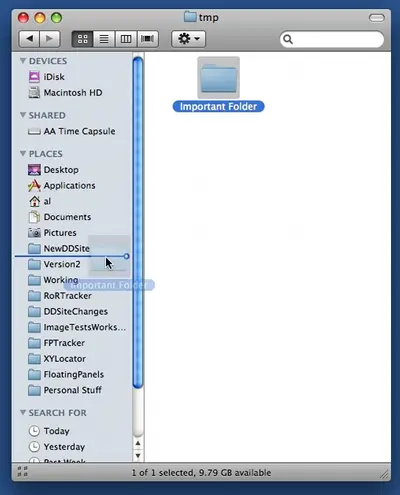
With the faster approach you just drag the folder icon from the right side of the Finder view over to the Sidebar, carefully placing it in the "PLACES" section of the Finder. To create a shortcut using this approach, just follow these steps:
- In the right side of the Finder, select the folder that you want to create a shortcut to.
- Click and drag that folder icon, and drop it in the "PLACES" section of the Finder, being sure to place it above, between, or below any folders that are currently in that section. The following image shows what your system should look like just before you drop your folder into this area:
books by alvin
 |
 |
 |
 |
