


Apple/macOS Terminal/Finder tip: This tutorial shows how to open a Mac Terminal window in the current Finder folder by using AppleScript.
AppleScript code to open a Terminal in the current Finder folder
For a while I have wanted to be able to open a Mac Terminal window in the same directory as the Mac Finder folder that I’m currently looking at. I couldn’t find any other way to do this, so I finally wrote an AppleScript script to do it. Fortunately the script code is relatively readable. Here's the code:
tell application "Finder"
    set myWin to window 1
    set thePath to (quoted form of POSIX path of (target of myWin as alias))
    tell application "Terminal"
        activate
        tell window 1
            do script "cd " & thePath
        end tell
    end tell
end tell
When I have a Mac Finder window in the foreground and run this script from the AppleScript menu on the macOS menubar, it opens a new Mac Terminal window, and automatically places me in the same directory as the current Finder folder. Sweet.
Putting the script in the right location
Here in April, 2023, I named this file OpenTerminalInFinderDir.scpt, and put it in either /Library/Scripts/AlsScripts or ~/Library/Scripts/AlsScripts. When you combine this with enabling AppleScript in the Mac menubar (see the link below), the result looks something like this:
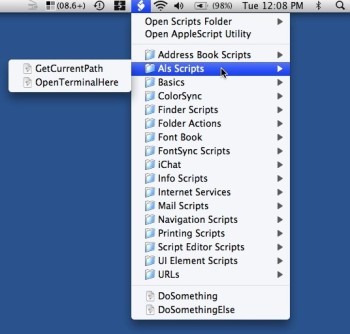
I’m too lazy to provide a new screen snapshot today, but here in 2023, my OpenTerminalInFinderDir.scpt script appears at the bottom of a similar-looking menu on the menubar.
Related
- If you don’t know where to save your AppleScript scripts (programs), see my tutorial, Where to save AppleScript programs so you can access them on the Mac/AppleScript menu bar
- If you don’t know how to show the AppleScript menu in the macOS menu bar, see my tutorial, How to enable the AppleScript menu on the macOS menu bar
In summary, if you wanted to see how to open a macOS Terminal window in the current Mac Finder path, I hope this helps!
books by alvin
 |
 |
 |
 |
