


I've been using Mac OS X since 2005, and the things I've always loved about it were:
- It looked great.
- It was simple to use.
- It didn't crash.
- It had the power of Unix under the hood.
Flash forward to Mac OS X Lion, and the simplicity and quality are gone. Beyond that, it doesn't look as good as previous versions of OS X (but at least in that case, you can argue that beauty is in the eye of the beholder).
Here are just a few of the problems I've run into in only ten days of using Lion.
"Sleep" prompts to re-open windows
The first Windows Vista-like annoyance is that when you put your Mac to sleep, it prompts you with a checkbox, "Reopen windows when logging back in?" Here's the annoying dialog, featuring the unnecessary checkbox:
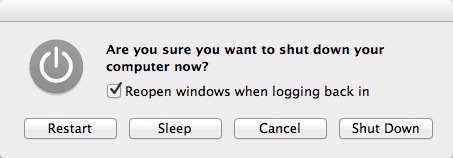
First, what the heck does that even mean? (It doesn't get much easier than this: Go to sleep, save open windows; wake up, restore windows.)
Second, what does this setting do? I've tried checking it and not checking it, and it doesn't seem to make a difference. Maybe it's supposed to apply to Restart, and doesn't apply to Sleep? If so, why is it here?
Third, after I un-check it, I expect it to be unchecked the next time, but it always comes back checked.
In the immortal words of Steve Jobs, this is crap.
Window-opening craziness
The second major annoyance has to do with re-opening windows I don't want re-opened. As a simple test, if you haven't seen this behavior yet, follow these steps:
- Put two image files (JPEG, PNG, etc.) on your desktop.
- Double-click one file to open it in Preview, then quit Preview.
- Double-click the second file.
What would you expect to happen? It should just open the second file, right? Nope, it reopens both files.
Now, imagine you're actually trying to work on a project, and you're going back and forth between 10-20 files. Yep, that's insanely annoying.
Unfortunately this doesn't just happen in Preview, the Mac Pages application also works the same way. Once again, run that same simple test and you'll see what I mean. I assume that all Mac apps now work this way, and if so ... crap again.
There is a way around this. If you type [Command][W] before closing your documents, and then type [Command][Q], Preview and Pages won't reopen your other documents. However, a) that's really annoying, b) I don't always remember to do that, and c) try explaining why you have to do that to a novice computer user.
This is crap.
Too much help
Today's next annoyance came when I opened a Pages document from the Finder, and when I opened it, I got a message that said something like, "This document has been opened in read-only mode because you haven't accessed it in a while." It then offered a dialog with some checkboxes I didn't bother reading, because by that time I had picked up my MacBook Air and thrown it out the window.
Remember how Kirk yelled out, "Khan! ... Khan!" That was me yelling out, "Steve! ... Steve!"
Dear Apple Vista Guy: I probably work with thousands of files on many different projects, and I'm sorry, but I can't get around to all of them every day.
This is crap.
Many reboots required
Next: I've been using OS X Lion for only ten days, and I've already had to reboot it three times. To be clear, I didn't want to reboot it, I had to reboot it.
I hate to tattle on myself, but it's not like I've been doing anything too difficult. All I've been using is Finder, Preview, Gimp, Safari, and occasionally Pages, Chrome, and Firefox. I've been working with graphics designers on some designs this entire time, and just using those apps has forced me to reboot Lion three times now.
With previous versions of OS X I've gone months in between reboots, usually only rebooting then because I installed an OS update. So far, on average, I 've been forced to reboot Lion every three days.
(Symptoms of the crashes: Drag and drop quit working, followed by other strange Finder behavior; Lion forgot that I had two displays, and the mouse only worked on one display; applications quit responding for long stretches, then I couldn't open any new apps. I have 4GB of RAM, so this shouldn't have been a memory issue.)
You guessed it, this is crap.
Getting away from simplicity and quality
Writing this as someone who likes most Apple products and owns their stock, this is bad news. Without even getting into how much I dislike the changes to Spaces (I currently have Desktop 7 in Space 2), or wondering why my name now appears at the right of the menu bar (um, thanks guys, but I can remember my name), all of this extra, unnecessary "help" really does remind me a lot of Windows Vista, which oh by the way was the last time I bothered to use Windows.
Can you imagine what will happen to Apple if whoever approved these changes gets their hands on other Apple products?
Think about it, the great things about Apple have always been their design simplicity and quality. Remember how they only had one control on the iPod, and it didn't even have an on/off button? That simplicity blew everyone's mind. Now I have an extra checkbox prompt every time I put my Mac to sleep, Lion is unnecessarily making my files read only and then warning me about it like it's my fault, and I have to use extra keystrokes when closing apps just to get them to work the proper way.
If this is how Apple works without Steve Jobs, they're in a lot of trouble.
"Steve! ... Steve! ..."
books by alvin
 |
 |
 |
 |
