


As a quick Java tip today, here’s some source code for a simple Java JOptionPane showMessageDialog example, where I use a JTextArea inside of a JScrollPane to show a long text message in the showMessageDialog:
import java.awt.*;
import java.awt.event.*;
import javax.swing.*;

/**
 * A Java class to demonstrate how to put a scrolling text area
 * in a JOptionPane showMessageDialog dialog.
 *
 * Steps are: Create a JTextArea, wrap it in a JScrollPane, and
 * then add the JScrollPane to the showMessageDialog.
 *
 * http://alvinalexander.com
 */
public class ShowMessageDialogWithScrollpane implements Runnable
{
  private JFrame frame = new JFrame("My JFrame Example");
  private String longMessage = "Come and listen to a story about a man named Jed\n"
    + "A poor mountaineer, barely kept his family fed,\n"
    + "Then one day he was shootin at some food,\n"
    + "And up through the ground came a bubblin crude.\n"
    + "Oil that is, black gold, Texas tea.\n"
    + "Well the first thing you know ol Jed\'s a millionaire ...\n";

  public static void main(String[] args)
  {
    ShowMessageDialogWithScrollpane example = new ShowMessageDialogWithScrollpane();
    SwingUtilities.invokeLater(example);
  }

  public void run()
  {
    // start building a jframe
    frame.setDefaultCloseOperation(WindowConstants.EXIT_ON_CLOSE);
    frame.setPreferredSize(new Dimension(450, 300));

    // add a button to the jframe
    JButton button = new JButton("Click Me");
    button.addActionListener(new ShowDialogListener());
    frame.getContentPane().add(button);

    // display the jframe
    frame.pack();
    frame.setLocationRelativeTo(null);
    frame.setVisible(true);
  }

  /**
   * Our button listener. Show a scrolling text area in a
   * JOptionPane showMessageDialog dialog.
   */
  class ShowDialogListener implements ActionListener
  {
    public void actionPerformed(ActionEvent e)
    {
      // create a JTextArea
      JTextArea textArea = new JTextArea(6, 25);
      textArea.setText(longMessage);
      textArea.setEditable(false);

      // wrap a scrollpane around it
      JScrollPane scrollPane = new JScrollPane(textArea);

      // display them in a message dialog
      JOptionPane.showMessageDialog(frame, scrollPane);
    }
  }
}
When this JOptionPane showMessageDialog dialog is displayed on Mac OS X 10.5, it looks like this:
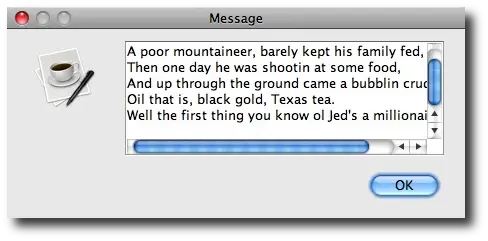
Steps to create a showMessageDialog with scrolling text
The steps to creating this dialog with a scrolling text area is straightforward:
- Create a JTextArea
- Wrap that JTextArea with a JScrollPane
- Place that JScrollPane on the showMessageDialog (as the "Object message" parameter to the showMessageDialog call)
Of course there are many more things you can do to make this scrolling textarea look better, but I just wanted to share some code here to help you get started. I worked on a Java application a few years ago where our customer wanted us to show detailed messages to our users, so we adopted an approach like this to show scrolling text on our showMessageDialog dialogs.
A Java method to show a long message
If you just need a Java method to show a long message using a JOptionPane, this method can help get you started:
private void showLongTextMessageInDialog(String longMessage, Frame frame) {
    JTextArea textArea = new JTextArea(6, 25);
    textArea.setText(longMessage);
    textArea.setEditable(false);
    JScrollPane scrollPane = new JScrollPane(textArea);
    JOptionPane.showMessageDialog(frame, scrollPane);
}
Just call that method with your long string message and a Frame reference.
Also note that you’ll want to make sure that this method is called on the EDT (Event Dispatch Thread). One way to make sure that happens is to invoke the code inside the method using the SwingUtilities.invokeLater() method, like this:
private void showLongTextMessageInDialog(String longMessage, Frame frame) {
    SwingUtilities.invokeLater(() -> {
        JTextArea textArea = new JTextArea(6, 25);
        textArea.setText(longMessage);
        textArea.setEditable(false);
        JScrollPane scrollPane = new JScrollPane(textArea);
        JOptionPane.showMessageDialog(frame, scrollPane);
    });
}
books by alvin
 |
 |
 |
 |