


Mac OS X programming FAQ: How can I create a Mac ICNS file for my Mac application?
Lately I've been creating a series of small Mac applications, and as part of that I needed to learn how to make Mac ICNS files from standard image files (PNG, JPG, other). Today I offer a quick tip of my hat to the makers of a Mac application named FastIcns that lets you do just this.
FastIcns is a small, free application from a company named Digital Waters that lets you create a Mac ICNS file from a PNG, JPEG, or other image file very easily. Here's how to do it.
How to create a Mac ICNS file with FastIcns
To create a Mac ICNS file from a PNG or JPEG image file using FastIcns, just follow these steps:
- Start FastIcns. You'll see a spinning cube, which isn't really funny at first, but you'll get the idea soon.
- Find a picture or other JPG, PNG, or TIFF you want to convert to a Mac ICNS file. Have that image file on your desktop, or otherwise in your Mac Finder.
- Drag the image file onto the FastIcns spinning cube.
- Once your image shows up on the sides of the spinning cube, double-click the cube to save your file.
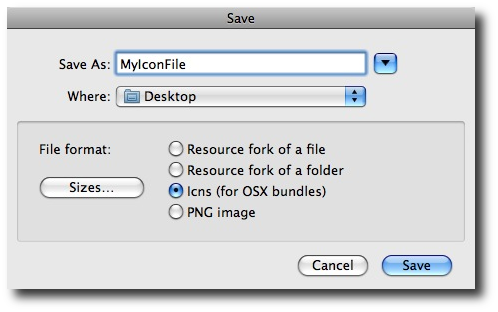
- A dialog will come up asking what type of file you want to save this as. (See the image below.) Choose "ICNS", then give your file a name, and save it as usual.
- Once your ICNS file is created, you can double-click it, and it will open up in Preview (or whatever default application you have configured to display ICNS files. I assume it's Preview, because I don't recall ever specifying that ICNS files should be opened in Preview.) You should see the multiple images that make up an ICNS file now stored in your ICNS file.
Once you have a properly created ICNS file like this, you can place it in your Mac OS X application bundle, and the ICNS images should show up properly in all the usual places -- your application icon, the Dock, and anywhere else you might see your application, such as in the Finder.
For the record, here's the FastIcns file-save dialog:
More Mac OS X ICNS file information
For today I'm going to run with the assumption that you won't be reading this article unless you know what an ICNS file is, so I'm skipping all that introductory information. For more Mac ICNS file format information, see this Mac Icons Wikipedia page.
Download FastIcns
To download the FastIcns application, follow this link:
Again, many thanks to the people at Digital Waters for making FastIcns available as a free Mac ICNS file creator.
books by alvin
 |
 |
 |
 |