


Mac Finder FAQ: Is there a simple way to go to a folder when using the Mac Finder?
If you're using the Finder on Mac OS X, and you know the path of the folder you want to open, you can do this quickly using the "go to folder" command. With a Finder window open (or, you can just click on the Desktop), press the [Shift][Command][G] key sequence, and you'll see this window displayed:
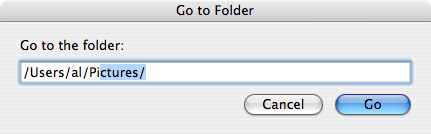
In the sample image I'm showing I've typed the path /Users/al/Pi, and the auto-complete feature of the Go To Folder window is filling in the rest of the path as I type. If I just want to open a Finder window in that folder right now I can just hit [Enter] to open a Finder window. Or, if I want to go to a sub-folder under the Pictures folder I can hit the [Tab] key to go to the end of the textfield and continue typing. Or, if the Pictures folder isn't the correct sub-folder that begins with the letters "Pi" I can just keep typing the correct name.
This is a great shortcut for getting to a known sub-folder fast.
books by alvin
 |
 |
 |
 |
