


iPhone HTML app icon FAQ: I'm creating an iPhone HTML web app, and I want users to be able to save my HTML app icon to their iPhone home screen; how can I add a custom iPhone app icon to my web application?
The iPhone Mobile Safari web browser recognizes a special HTML tag that lets you add an iPhone app icon to your HTML application. Here's the syntax that lets you add an iPhone app icon to your web app:
<link rel="apple-touch-icon" href="/my-app-icon.png" />
This HTML link tag with the apple-touch-icon in the REL field tells the iPhone Mobile Safari browser to use this icon as the app icon for your web app.
iPad and iPhone app icon pixel size
To support the higher-resolution iPhone 4, your iPhone app icon should be a 114 by 114 pixel icon. Older iPhones used 56x56 pixel icons (or possibly 57x57), and the iPad uses a 72x72 pixel icon, and the image you supply will be scaled down and work on all of these devices. Here's a quick summary:
- iPhone 4 - 114x114 pixels
- Older iPhone - 57x57 pixels
- iPad (version 1) - 72x72 pixels
If you prefer a little more control of your app icon size, Apple's documentation shows the following examples:
<link rel="apple-touch-icon" href="touch-icon-iphone.png" />
<link rel="apple-touch-icon" sizes="72x72" href="touch-icon-ipad.png" />
<link rel="apple-touch-icon" sizes="114x114" href="touch-icon-iphone4.png" />
Here are two blurbs from their documentation page:
To specify multiple icons for different device resolutions—for example, support both iPhone and iPad devices—add a sizes attribute to each link element...
The icon that is the most appropriate size for the device is used. If no sizes attribute is set, the element’s size defaults to 57 x 57.
For more information, here's a link to Apple's developer documentation on configuring web applications.
iPhone HTML app home screen icon example
Here's an example of what an iPhone app icon (home screen icon) looks like. In the image below, the iPhone app icon in the upper-right corner is for an app named Mini-Me, which is an HTML web app that I'm currently creating:
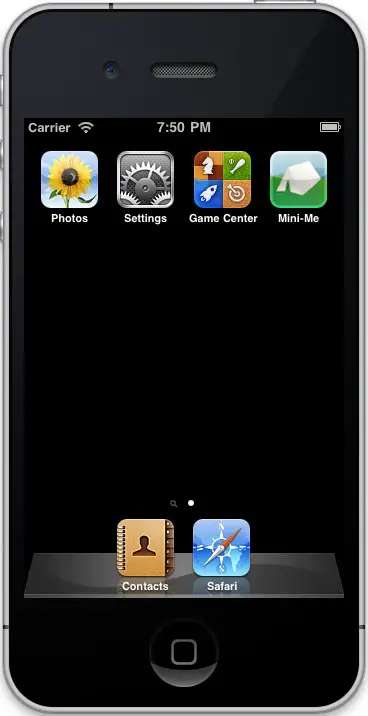
(As I've mentioned in other articles that use this image, I don't remember where I got the image currently shown on that icon, but it's not an image I created.)
iPhone HTML app home screen icon - Summary
As you can see, by adding this simple iPhone Mobile Safari meta tag, you can add an iPhone app icon to your HTML/web application, which helps make your web app look more like a native iPhone app.
books by alvin
 |
 |
 |
 |