


I gave myself two gifts for Christmas: A set of new bathroom rugs, and a few guilt-free days to learn the LibGDX game framework so I can eventually rewrite my football game. (Usually I think, “You need to finish writing XYZ,” so “a few guilt-free days” means not having those thoughts, or having them but ignoring them.)
Scala, Java, Unix, MacOS tutorials (page 144)
| The Bill Gates Bestseller | |

|
How to Avoid a Climate Disaster |
I just started working with LibGDX, so I don’t know if there’s a better way to create a LibGDX Scene2d ImageButton, but I can confirm that this approach works:
Texture hikeTexture = new Texture(Gdx.files.internal("hike_btn.jpg"));
Texture hikeTexturePressed = new Texture(Gdx.files.internal("hike_btn_pressed.jpg"));
hikeButton = new ImageButton(
    new TextureRegionDrawable(new TextureRegion(hikeTexture)),
    new TextureRegionDrawable(new TextureRegion(hikeTexturePressed))
);
hikeButton.setPosition(60, 300);  //hikeButton is an ImageButton
stage.addActor(hikeButton);
I currently use this code in the show() method of a class that implements Screen, and it works as desired.
If you like ThinkGeek, they’re having an “up to 75% clearance sale” right now (December 27, 2017).

Apple is getting sued — and rightfully so — for intentionally slowing down iPhones with older batteries. The ironic things are a) if they let people easily change the batteries, or b) made this a software setting, people would be happy with them. Their own pride (ego) created this problem.
Following a few other articles I’ve read recently about the “AI chip market,” techcrunch has an article, The AI chip startup explosion is already here.
“Most important, have the courage to follow your heart and intuition.”
~ Steve Jobs
A well-said “Merry Christmas and Happy Monday” greeting by Neil deGrasse Tyson.

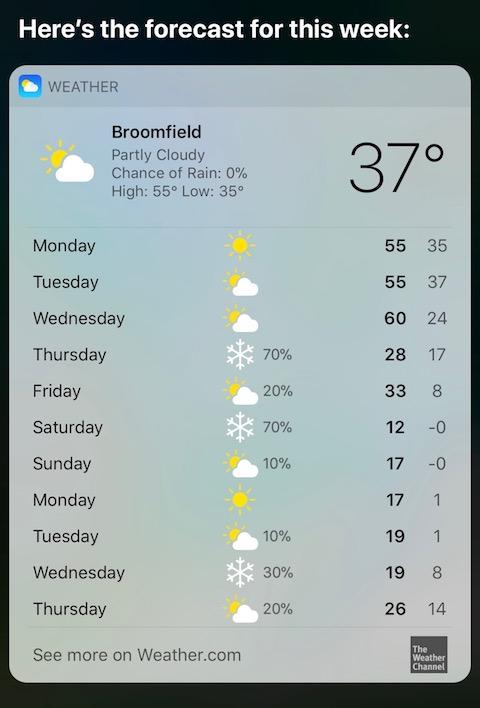
It’s going to be a white Christmas here in the Boulder/Broomfield, Colorado area, ho ho ho.

From the back cover of, Two Zen Classics: The Gateless Gate (Mumonkan) and The Blue Cliff Records (Hekiganroku):
“Katsuki Sekida (1893–1987) was by profession a high school teacher of English until his retirement in 1945. Zen, nevertheless, was his lifelong preoccupation.”
Similarly, my work these days involves computer programming, and my preoccupation is Zen and meditation. Unless you’re willing to go live in a monastery, we all have to work to pay the bills, but that doesn’t mean we can’t practice.
Just added a few more lessons to “Hello, Scala” including tuples, Scala + Swing, and a complete little OOP example. Also started a Github repo for it.
If you ever wanted to use Scala with Java Swing classes (like JFrame, JTextArea, JScrollPane, etc.), the process is pretty seamless. Here’s an example of a simple Scala/Swing application where I show a text area in a JFrame:
import java.awt.BorderLayout
import java.awt.Dimension
import javax.swing.JFrame
import javax.swing.JScrollPane
import javax.swing.JTextArea

object SwingExample extends App {

    val textArea = new JTextArea("Hello, Swing world")
    val scrollPane = new JScrollPane(textArea)

    val frame = new JFrame("Hello, Swing")
    frame.getContentPane.add(scrollPane, BorderLayout.CENTER)
    frame.setDefaultCloseOperation(JFrame.EXIT_ON_CLOSE)
    frame.setSize(new Dimension(600, 400))
    frame.setLocationRelativeTo(null)
    frame.setVisible(true)

}
Technically you’ll want to display the JFrame the way I show in How to create, center, and display a Java JFrame, but this code gives you an idea of how the process works.
I’ve written much larger applications with Scala and Swing, but for today I just wanted to share some code to show that it’s a very straightforward process.
When elephants see a human, their brain lights up in the same way a human’s brain lights up when they see a puppy.
In today’s important news, there’s What happens when you put Coke in your gas tank; there’s a weird string in the center of our galaxy; scientists discover a new material that can’t be explained by classical physics; and of course, without telling anyone, Apple intentionally slows down iPhones with old batteries.
Brock Osweiler on the Denver Broncos quarterback situation, circa December, 2017: “There’s a lot of things that take place in this business that you can’t control,” Osweiler said. “And I think the sooner you learn that, the better mindset you’ll have toward situations like this. So I support whatever the front office decides, the coaches decide. I’m just here to work hard and play quarterback when my number is called.”
As a brief note about the Linux/Unix sed command, today I learned how to append multiple lines of text to an HTML (or XML) file on macOS. The short answer is that I created a sed commands file named changes.sed with these contents:
/<head>/ a\
    <!-- Global site tag (gtag.js) - Google Analytics --> \
    <script> \
      window.dataLayer = window.dataLayer || []; \
      function gtag(){dataLayer.push(arguments);} \
      gtag('js', new Date()); \
    </script>
That sed command can be read as, “When you find the <head> tag, append the following text after it.”
Once you have that file you just need to run it with sed on the file (or files) you want to edit. I just edited a bunch of HTML files with this little shell script:
for i in `ls *html`
do
  echo "working on $i ..."
  sed -f changes.sed < $i > ${i}.tmp
  mv ${i}.tmp $i
done
I’m sure there are other/better ways to run that sed script, but hey, it works.
An important part of the solution is knowing that you have to add the backslash character at the end of each line that you want to append. If you don’t do that you’ll get an “invalid command code” error when you run the script. As it says in O’Reilly’s sed & awk book:
“To input multiple lines of text, each successive line must end with a backslash, with the exception of the very last line.”
In summary, if you ever need to append multiple lines of text with sed on macOS, I hope this little example is helpful. (The same command should work on Linux and Unix systems.)
“The best way to find yourself is to lose yourself in service to others.”
~ Mahatma Gandhi
“We are who we protect, I think. What we stand up for.”
I use Gimp to work on images all the time, but I was just reminded of Inkscape as a free tool for drawing and illustrating.
“As a young teacher, I would sometimes complain about the kids. Then I awoke to the reality that I was the one who had to change, not them. It was only when I changed the way I viewed my students that the students themselves changed in front of me.”
| The Bill Gates Bestseller | |
|
|
How to Avoid a Climate Disaster |