Just some quick notes on Play Framework controller form field mappings ... I’ll add more here as I have more time, but right now this is a reference page for my Cato application.
1) The ResearchLink form from my “Finance” application:
| A Programming Classic! | |

|
Head First Design Patterns |
Just some quick notes on Play Framework controller form field mappings ... I’ll add more here as I have more time, but right now this is a reference page for my Cato application.
1) The ResearchLink form from my “Finance” application:
As a quick note, the following code shows how to create a Sencha Touch (or ExtJS) store class with static data:
Sencha ExtJS FAQ: How do I enable the use of the [Enter] key in the textfields of a form?
To let users hit the [Enter] key to submit a Sencha ExtJS form, I followed the example from the excellent book, Mastering ExtJS. First, I add this code to the this.control block of my form controller:
I don’t know if this is the best way to do this, but if you want a column in a Sencha ExtJS grid to display a URL field that the user can click, I can confirm that this code works:
This code is not mine, but I find it very hard to find Sencha ExtJS examples, including form examples, so here's the source code for an example ExtJS form with a vbox layout that fills the entire form window:
One of the most important things I’ve read in the book, Mastering ExtJS, is this: “For ExtJS, success is when the server returns a response, and failure is when the server returns an HTTP error status.” So if the server returns some form of ‘success’ -- regardless of what its JSON looks like -- ExtJS will think of the transaction as a success, and you should handle that in an ExtJS success function.
Greenpeace gives Amazon and Twitter an ‘F’ for their energy policies; gives Apple an ‘A’. The story is here on Mashable.

Health food at Krispy Kreme? This must be a leftover photo from yesterday. :)

The Play Framework session cookie name is PLAY_SESSION. You can find this in the Play docs here.
Here’s a quote from that page:
When you upgrade a Play Framework application from one version to another, such as from 2.1.x to 2.2.x, you have to update a few files. I’m currently upgrading an app from 2.1.x to 2.2.x, and had to change my project/build.properties file to this:
sbt.version=0.13.1
I also had to upgrade my project/plugins.sbt file to this:
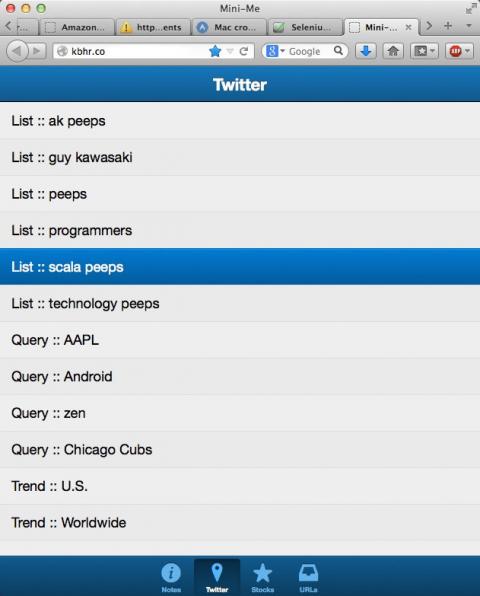
I’ve written a simple Sencha Touch mobile app (with a Play Framework back end) that lets me see my Twitter lists more and stored queries easily. When I have some more free time I’ll improve the navigation so I don’t have to keep going back and forth between the menu and the results, i.e., every list and query will be accessible with one touch.
As I get back into working with a MySQL database in a Java (Scala, actually) development project and also in adding functionality to Cato, I found these MySQL to Java data type mappings, via this link:
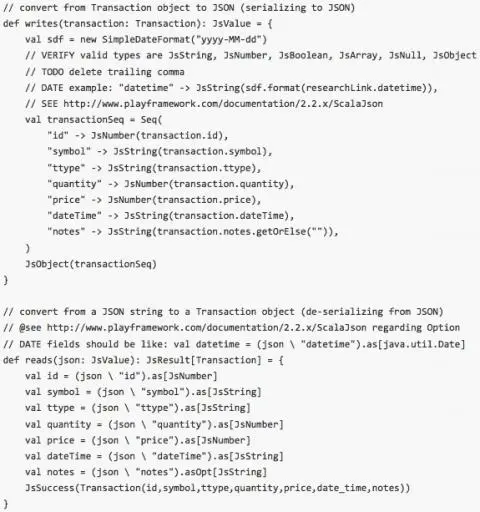
Cato can now generate Play Framework JSON code. See my new Cato ‘Play Framework’ doc on Github for more information.
sbt FAQ: How do I load multiple library dependencies in sbt? That is, what is the correct syntax to have multiple dependencies in the sbt build.sbt file?
Solution: Use a Seq with the libraryDependencies syntax in your build.sbt file:
The following source code shows a few examples of how to use numeric fields with Sencha ExtJS. First, here are some field definitions from a Ext.grid.Panel class:
Today I’m just sharing some Sencha ExtJS code that shows how to use a date field in several Sencha ExtJS components.
First, here’s a Sencha model class where I define a date field:
If you want to write “async” Play Framework controller methods, I hope the following example code will help you get started. I’ll offer it here without much description today, other than to say that the list and add methods are written to work asynchronously by invoking Action.async and using a Scala Future:
| A Programming Classic! | |
|
|
Head First Design Patterns |