


The most common reason to use a StringBuffer instead of a String in your Java programs is when you need to make a lot of changes to a string of characters. For instance, a lot of times you’ll be creating a string of characters that is growing, as shown in this sample example program:
Scala, Java, Unix, MacOS tutorials (page 407)
| Conquer Public Speaking With the Classic Bestseller! | |
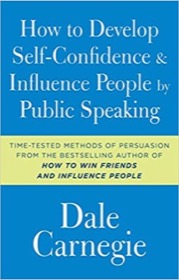
|
How to Develop Self-Confidence and Influence People By Public Speaking |
Recently I started using Fink on Mac OS X to install Unix open source software. Fink is easy to use, and simplifies the process of installing open source software applications on Mac OS X.
To learn about how to use Fink, just open a Terminal window and type this command:
fink --help
That brings up the following help text (the fink man page):
Java FAQ: How do I access/read system properties and environment variables?
If you've ever seen a Java compiler error message like "Cannot make a static reference to the non-static method doFoo" or "Cannot make a static reference to the non-static field foo", here's a quick explanation of these messages.
Java array FAQ: How do you create an array of Java int values (i.e., a Java “int array”)?
Answer: There are several ways to define an int array in Java; let’s take a look at a few examples.
1) Declare a Java int array with initial size; populate it later
If you know the desired size of your array, an you'll be adding elements to your array some time later in your code, you can define a Java int array using this syntax:
When using Eclipse straight out of the box, if you click on a Java-provided class, like the FileWriter class, you won't get much help when the Eclipse Class File Editor is shown. All you'll see is some binary information, with these messages at the top of the file:
Source not found
The jar file classes.jar has no source attachment.
You can attach the source by clicking the Attach Source below:
(The message really should end with "by clicking the Attach Source button below:")
If you're just getting started with Java it may help to have a simple first class to look at. In the code below I'm showing a sample Java class named HelloWorld.
public class HelloWorld
{

  public static void main(String[] args)
  {
    System.out.println("Hello, world");
  }

}
To use this class, save it to your system in a file named HelloWorld.java. Then, compile it to Java bytecode with this command:
Question: How can I tell what version of Java I'm using?
You can actually do different things on different platforms to figure out which version of Java you're using, and which versions of Java may be installed, but the one cross-platform (Unix, Linux, Mac OS X, Windows) thing you can do is open up a command-line window (a terminal on Unix and Mac, a Command windows on Windows) and type this command:
java -version
On my current Mac OS X version (10.4.10) the output from this command looks like this:
Converting a numeric IP address to a hostname with Java is straightforward, just use the InetAddress class. Here's a Java example that demonstrates this:
Looking for a gift for your favorite geek? How about a robot?
Just thumbing through a Sharper Image catalog, they're featuring robots like never before. Here are the robot toys, er, gifts, that they're featuring (with direct links to the robot URLs):
The == operator doesn't work when comparing two Java String objects, even if the Strings store the same content, because the == operator compares the two object references to each other. Since they aren't the same reference, they aren't equal.
In short, when comparing two Java String objects, compare them like this:
if (s1.equals(s2))
{
  // your code ...
}
and specifically do not compare two String objects like this:
An abstract class in Java cannot be directly instantiated; only its subclasses can be instantiated.
An abstract class may contain zero or more abstract methods. An abstract method is not defined in the abstract class. Instead its signature is declared, but it has no body. The implementation is left to the subclasses that are created from this abstract class.
Here's an example of an abstract class definition:
In short, static Java variables and methods are instantiated only once for a class. Because of this you’ll hear these referred to as class variables, as opposed to the more common instance variables. That’s because you can deal with these directly at the class level, without needing to have an instance of the class instantiated.
Java exception FAQ: What is a Java NoSuchMethodException?
Answer: Using Java, you can get a NoSuchMethodException when you're using reflection and try to dynamically use a method on a class, and the method does not actually exist. The following example Java class shows how this NoSuchMethodException can be generated:
Java Exception FAQ: What is a ClassNotFoundException?
Answer: A ClassNotFoundException can happen when you use Java's Reflection capability to dynamically create a class. Here's some example code where I intentionally throw a ClassNotFoundException by trying to create and use a class ("FooClass") that I know doesn't exist:
Java Exception FAQ: What is a Java IOException?
An IOException can occur in a variety of ways when you try to access the local filesystem. In the following Java code segment an IOException can be thrown by the br.readLine() method, so a try/catch wrapper is used around that portion of code to trap (and arguably deal with) the potential problem:
Java exceptions FAQ: What is a Java ClassCastException?
A Java ClassCastException is an Exception that can occur when you try to improperly convert a class from one type to another. Here’s an example Java program which throws a ClassCastException intentionally:
Java exception FAQ: What is a Java NumberFormatException?
Answer: A Java NumberFormatException usually occurs when you try to do something like convert a String to a numeric value, like an int, float, double, long, etc.
The best way to show a NumberFormatException is by example, so here’s an example where I intentionally write bad Java code to throw a NumberFormatException:
Question: How do I convert a String to an int or a float?
Short answer: You want to use the Integer.parseInt() or Float.parseFloat() methods.
Here's an example Java program that shows how to convert a String to either an int or a float:
Can you show me a Java StringTokenizer example?
Sure. The Java StringTokenizer class can be used to split a Java String into tokens. Here's a simple StringTokenizer example:
// start with a String of space-separated words
String tags = "pizza pepperoni food cheese";

// convert each tag to a token
StringTokenizer st = new StringTokenizer(tags," ");

while ( st.hasMoreTokens() )
{
  String token = (String)st.nextToken();
  System.out.println(token);
}
This segment of code will have this output:
| Conquer Public Speaking With the Classic Bestseller! | |
|
|
How to Develop Self-Confidence and Influence People By Public Speaking |