


“Many functions in Lisp are list-eaters.”
From the book, Land of Lisp
(The same can be said about pure functions in Scala.)
| A Microservices Bestseller! | |
|
Building Microservices |
“Many functions in Lisp are list-eaters.”
From the book, Land of Lisp
(The same can be said about pure functions in Scala.)
“Look, I have no illusions, okay? I know that the life I live ... I know how it’s gonna end for me. Whatever. I’m okay with that. But I wanted you to know ... that when I do picture myself happy ... it’s with you.”
(Dean)
And it can dwell on moonlight glimmer,
On evening shade and loneliness;
And, while the sky grows dim and dimmer,
Feel no untold and strange distress —
Only a deeper impulse given,
By lonely hour and darkened room,
To solemn thoughts that soar to heaven
Seeking a life and world to come.
~ from Evening Solace, but Charlotte Brontë
If you ever wanted to see a panda playing in the snow, here you go.
“All of us have to learn how to invent our lives, make them up, imagine them. We need to be taught these skills; we need guides to show us how. If we don’t, our lives get made up for us by other people.” —Ursula K. Le Guin, The Wave in the Mind (Talks and Essays on the Writer, the Reader, and Imagination), 2004.
If you ever need to convert HTML to plain text using Scala or Java, I hope these Jsoup examples are helpful:
import org.jsoup.Jsoup
import org.jsoup.nodes.{Document, Element}

object JsoupHtmlToPlainTextTest extends App {

    val html =
        """
          |<html>
          |  <head><title>Hello, world</title></head>
          |  <body>
          |    <h1>Hello, world</h1>
          |    <p>Hello, world.</p>
          |    <p>This is a test.</p>
          |  </body>
          |</html>
        """.stripMargin

    // Example 1: this works, but all output is on one line
    val doc: Document = Jsoup.parse(html)
    //val s: String = doc.text()     //include <head> and <body> text
    val s: String = doc.body.text()  //<body> text only
    //println(s)

    // Example 2: this works, output is on multiple lines
    val formatter = new JsoupFormatter
    val plainText = formatter.getPlainText(doc)
    //println(plainText)

    // Example 3: this works as a way to select the <body> only
    val body: String = doc.select("body").first.text()
    //println(body)

    // Example 4: works: gets text from paragraphs only
    // https://jsoup.org/cookbook/input/parse-body-fragment
    val doc4 = Jsoup.parseBodyFragment(html)
    val body4 = doc4.body()
    val paragraphs = body4.getElementsByTag("p")
    import scala.collection.JavaConverters._
    val scalaParagraphs = asScalaBuffer(paragraphs)
    for (paragraph <- scalaParagraphs) {
        println(paragraph.text)
    }

}
While this is just some test code that I’m currently working on to understand Jsoup, the code shows four different ways to convert the given HTML into plain text. Hopefully the comments explain how the HTML to plain text conversion processes work, so I won’t write more about them. I just wanted to share this code snippet here today a) so I can find it again, and b) in hopes it might help others that need to convert HTML to text using Jsoup.
In case you ever need to read an Atom or RSS feed using Scala, this example code shows how to use the Java ROME library in your Scala code:
import java.net.URL
import com.rometools.rome.feed.synd.{SyndFeed}
import com.rometools.rome.io.SyndFeedInput
import com.rometools.rome.io.XmlReader
import scala.collection.JavaConverters._

object AtomAndRssReader extends App {

    // NOTE: code can throw exceptions
    val feedUrl = new URL("https://www.npr.org/rss/rss.php?id=100")
    val input = new SyndFeedInput
    val feed: SyndFeed = input.build(new XmlReader(feedUrl))
    //println(feed)


    // `feed.getEntries` has type `java.util.List[SyndEntry]`
    val entries = asScalaBuffer(feed.getEntries).toVector

    for (entry <- entries) {
        println("Title: " + entry.getTitle)
        println("URI:   " + entry.getUri)
        println("Date:  " + entry.getUpdatedDate)

        // java.util.List[SyndLink]
        val links = asScalaBuffer(entry.getLinks).toVector
        for (link <- links) {
            println("Link: " + link.getHref)
        }

        val contents = asScalaBuffer(entry.getContents).toVector
        for (content <- contents) {
            println("Content: " + content.getValue)
        }

        val categories = asScalaBuffer(entry.getCategories).toVector
        for (category <- categories) {
            println("Category: " + category.getName)
        }

        println("")

    }

}
A few notes:
"com.rometools" % "rome" % "1.8.1")Here’s an abridged version of what the output from this code looks like today:
Title: Episode 820: P Is For Phosphorus
URI:   https://www.npr.org/sections/money/2018/01/26/581156723/episode-820-p-is-for-phosphorus?utm_medium=RSS&utm_campaign=storiesfromnpr
Date:  null
Content: <img src='https://media.npr.org/assets/img/2018/01/26/gettyimages-168997967_wide-3e6007bd49a94a161553cba256335550e12cfb37.jpg?s=600' /><p>Phosphate is a crucial element, for farming, and for life ...

Title: The 10 Events You Need To Know To Understand The Almost-Firing Of Robert Mueller
URI:   https://www.npr.org/2018/01/26/580964814/the-10-events-you-need-to-know-to-understand-the-almost-firing-of-robert-mueller?utm_medium=RSS&utm_campaign=storiesfromnpr
Date:  null
Content: <img src='https://media.npr.org/assets/img/2018/01/26/mueller-2013_wide-ea9e74cdb89431d2e2ebd476acc67cce3cd67167.jpg?s=600' /><p>Everything about this story revolves around obstruction of justice ...
Note that the Date output is null. I haven’t looked into that yet — it’s not important for my needs — but as you can see, the rest of the output looks just fine, and the code works as intended.
Next invasive medical procedure is Monday morning. I have to admit, I’m not looking forward to this one, or what comes after it. But it needs to be done.
With the Earth’s atmosphere getting warmer, NPR has an article, Is there a ticking time bomb under the Arctic? (The short story is that there’s twice as much carbon in the thawing permafrost as their is in the Earth’s atmosphere.)
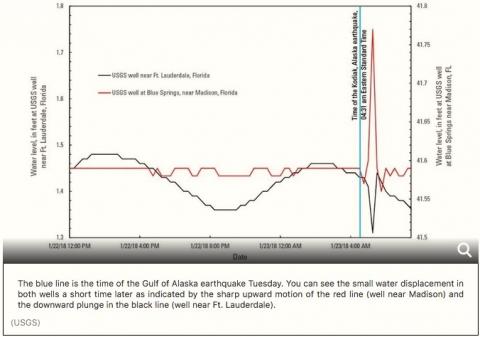
Cool: Tuesday’s earthquake in Alaska affected the levels of water wells in Florida. weather.com has the story.
In case you ever wondered where salt comes from, here’s an article titled, How is salt made?
“Talk is cheap. Show me the code.”
~ Linus Torvalds
If Apple’s “Upgrade your OS” notifications are driving you insane, osxdaily.com has an article on How to Stop “Upgrade to MacOS High Sierra” Notifications Completely on a Mac.
The Google blog has this new article, Making AI accessible to every business., which describes their new cloud offering, Cloud AutoML.
In case you ever need to manually a certificate to your ${JAVA_HOME}/jre/lib/security/cacerts file, it turns out the password for that file when using the Java keytool command is changeit.
To add a certificate to that file, you’ll want to use a command like this:
keytool \
    -import \
    -alias "foobar.com" \
    -keystore ${JAVA_HOME}/jre/lib/security/cacerts \
    -file foobar.com.crt
I had to do this today for a Java/Scala script that accesses an HTTPS URL, and the site I’m accessing uses a “Let’s Encrypt” certificate.
If you ever need to parse JSON stock data from alphavantage.co using Scala, here’s a test class I just wrote that uses Lift-JSON.
First, here’s the JSON I get back from them:
{
    "Meta Data": {
        "1. Information": "Batch Stock Market Quotes",
        "2. Notes": "IEX Real-Time Price provided for free by IEX (https://iextrading.com/developer/).",
        "3. Time Zone": "US/Eastern"
    },
    "Stock Quotes": [
        {
            "1. symbol": "MSFT",
            "2. price": "91.6000",
            "3. volume": "23511825",
            "4. timestamp": "2018-01-22 16:00:00"
        },
        {
            "1. symbol": "FB",
            "2. price": "186.4000",
            "3. volume": "20946922",
            "4. timestamp": "2018-01-22 16:41:06"
        },
        {
            "1. symbol": "AAPL",
            "2. price": "176.8900",
            "3. volume": "27027474",
            "4. timestamp": "2018-01-22 16:00:00"
        }
    ]
}
I get that array back when I access a URL like this:
Next, here’s how I parse that JSON using Scala and Lift-JSON:
import net.liftweb.json.DefaultFormats
import net.liftweb.json._
import scala.collection.mutable.ArrayBuffer

object Test2 extends App {

    val json = parse(SampleData.data)
    implicit val formats = DefaultFormats

    val elements = (json \\ "Stock Quotes").children

    val stocks = ArrayBuffer[Stock]()
    // keys are: "1. symbol", "2. price", "3. volume", "4. timestamp"
    // i expect 3 stocks, so ...
    for (i <- 0 until 3) {
        val e = elements(0)(i)
        // Map(1. symbol -> MSFT, 2. price -> 91.6000, 3. volume -> 23511825, 4. timestamp -> 2018-01-22...)
        val values = e.values.asInstanceOf[Map[String,String]]   //coercion
//        for ((k,v) <- values) printf("key: %s, value: %s\n", k, v)
//        println("")
        stocks += Stock(values("1. symbol"), values("2. price"))
    }

    stocks.foreach(println)

    case class Stock(symbol: String, price: String)


}
The output of that code looks like this:
Stock(MSFT,91.6000)
Stock(FB,186.4000)
Stock(AAPL,176.8900)
The source code is ugly I write now because I just got it working, but I thought I’d share it here in case you need to parse some JSON data that’s in an array format like this. I’m more used to working with JSON that represents objects — see my other Scala/JSON examples — but this data is more of an “array of arrays” format, so this approach is different than my previous examples.
As a final note, my build.sbt file looks like this:
name := "StockQuotes2018"

version := "1.0"

scalaVersion := "2.12.4"

libraryDependencies ++= Seq(
    "net.liftweb" %% "lift-json" % "3.1.1"
)

scalacOptions += "-deprecation"
It’s almost comical how many people tell me they feel stressed, but they won’t even try yoga or meditation.
(They tell me they’re stressed/anxious/worry-a-lot, I seem relaxed, and ask how I do it. I tell them “yoga and meditation,” but apparently they don’t like that answer.)
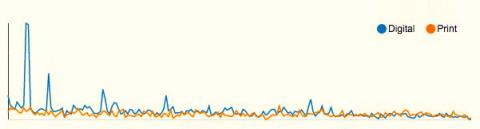
If you ever wondered what Digital and Print book sales look like for a technical book (a computer programming book, in this case), here you go. This is a slightly cleaned up chart that O’Reilly provides to me for sales of the Scala Cookbook over time, showing eBook sales vs the printed book sales.
I wrote a little “Notes” application using Scala and JavaFX to go along with my “Hello, Scala” tutorial. If you’d like to see how it works, here’s a two-minute video:
The source code for the project is at this Github URL:
I won’t describe the application here because a) the video is the best way to show how it works, and b) I include a lengthy README file with the source code.
The build process works on MacOS. It only relies on sbt assembly and javapackager, so I hope it can be easily adapted to work on Windows. In the project’s README file I also discuss how to run the application on Linux.
If you’re new to Scala and interested in a relatively small but complete application you can experiment with, I hope this project is helpful to your Scala learning experience.
| A Microservices Bestseller! | |
|
|
Building Microservices |