Scala, Java, Unix, MacOS tutorials (page 190)

“He’s a little bit of a control freak.”

~ John Elway, talking about Peyton Manning

There’s a well-known sports psychologist in Denver who tells people to feel less stress by focusing on process, not the results of the process. I suspect that’s where this Adam Gase quote comes from:

“We’re just trying to get players better, rather than worrying about the result. We follow our process, and whatever the outcome ends up being, well, it’s been good in the past.”

This quote from Meredith Monk on LionsRoar.com reminds me of writing software and designing things:

“I’ve always thought that making art is like jumping from the edge of a cliff. At the beginning of every new work — and every day of work — is the unknown. Being an artist is being unsure, asking questions, stumbling around with only an inkling of what will manifest and tolerating the fear of hanging out in the unknown. When curiosity and interest become more present than discomfort, the mystery becomes enjoyable and its exploration vivid and vibrant.”

[murder trial]

LAWYER: So you unplugged your wife’s life support for five minutes?

COMPUTER TECH: Sometimes that works.

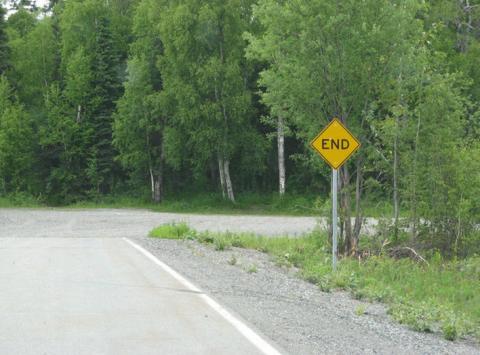
If you ever wondered where the end is, I can tell you that it’s in Talkeetna, Alaska.

'End' sign in Talkeetna, Alaska

From the video notes: “This is footage of Orbital ATK’s QM-2 solid rocket booster test taken by NASA’s High Dynamic Range Stereo X (HiDyRS-X) camera. HiDyRS-X records high speed, high dynamic range footage in multiple exposures simultaneously for use in analyzing rocket engine tests. Traditional high speed video cameras are limited to shooting in one exposure at a time, but HiDyRS-X can record multiple high speed video exposures at once, combining them into a high dynamic range video that adequately exposes all areas of the video image for comprehensive analysis.”

The video doesn’t change much over the three minutes, so if you watch a few seconds of it you can see how it works. As an aerospace engineer who was most interested in propulsion, watching the rocket plume is cool.

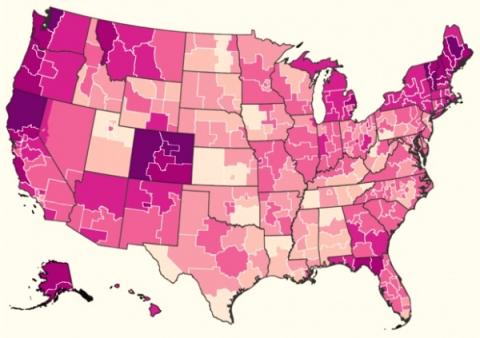
This image shows marijuana use in the United States. I didn’t know that Colorado had such high marijuana use when I moved here, but it quickly became apparent. The image comes from a Boulder Weekly story titled, Where the stoners are in the USA.

Marijuana use in the United States

Cliffnotes of this “Minding Your Mitochondria” TEDx talk:

- A doctor had a very active lifestyle
- She found out she had MS
- She quickly got worse and had to be in a wheelchair
- Things got worse, and she had to be in a zero-gravity chair
- The best modern medicines weren’t helping
- She started researching how to “care for her mitochondria”
- She started eating foods to support her mitochondria
- Three months later she was walking
- Two months after that she was riding a bike, horse-riding, etc.
- Five years later and she’s still walking

Morals: The food you eat has a dramatic effect on your health, and eating well can often be more important than medicine.

I’ve mentioned this before, but if you’re interested in learning Lisp/Scheme programming, the makers of gimphelp.org have a nice collection of plugins for Gimp 2.8 that you can download, and they’re all written in Scheme. (Well, a variation of Scheme.)

Here’s the body of a Gimp plugin file named FU_contrast_auto-contrast.scm:

(define (FU-auto-contrast
        img
        drawable
        merge-flag)

    (gimp-image-undo-group-start img)
    (if (not (= RGB (car (gimp-image-base-type img))))
             (gimp-image-convert-rgb img))   

   ; Create a new layer
   (define value-layer (car (gimp-layer-copy drawable 0)))

   ; Give it a name
   (gimp-item-set-name value-layer "Contrast Adjustment Layer")

   ; Add the new layer to the image
   (gimp-image-insert-layer img value-layer 0 0)

   ; Set opacity to 100%
   (gimp-layer-set-opacity value-layer 100)

   ; Set the layer mode to Value
   (gimp-layer-set-mode value-layer 14)

   ; Adjust contrast
   (gimp-levels-stretch value-layer)

   ; Merge down, if required
   (if (equal? merge-flag TRUE)
       (gimp-image-merge-down img value-layer 1 )
       ()
   )
   (gimp-image-undo-group-end img)
   (gimp-displays-flush)   
)
(script-fu-register "FU-auto-contrast"
    "<Image>/Script-Fu/Contrast/Auto Contrast"
    "Automatically adjust contrast of drawable"
    "Mark Lowry"
    "Mark Lowry"
    "2006"
    "*"
    SF-IMAGE    "Image"         0
    SF-DRAWABLE "Current Layer" 0
    SF-TOGGLE   "Merge Layers?" FALSE
)

If you’re at least a little comfortable with Lisp/Scheme — and also Gimp — that code is relatively easy to understand. For instance, the define function creates a variable named value-layer, and then other Gimp functions like gimp-item-set-name and gimp-image-insert-layer modify value-layer.

At the end of the code, the script-fu-register shows how to register a plugin so that Gimp will find it and display it in the Gimp menu system.

Observations

A few observations come to mind:

1) Like other languages that don’t show their types, you can’t tell value-layer’s type from looking at the code, though you can assume that it’s something like Layer.

2) For some reason Lisp makes it more clear than other languages that you can’t tell what the function parameters are. They’re based on the positions in the list, and seeing "Mark Lowry" in there twice makes you wonder why it’s there twice. The only way to know what the parameters are is (a) guessing by what’s in each field, and (b) looking at the script-fu-register documentation. (This is true in other programming languages, but it really stands out here, possibly because of the formatting.)

Gimp Script-Fu function examples

If you are looking for Gimp Script-Fu function examples (as I was), the Gimp function examples used in this code are:

  • gimp-image-undo-group-start
  • gimp-image-convert-rgb
  • gimp-layer-copy
  • gimp-item-set-name
  • gimp-image-insert-layer
  • gimp-layer-set-opacity
  • gimp-layer-set-mode
  • gimp-levels-stretch
  • gimp-image-merge-down
  • gimp-image-undo-group-end
  • gimp-displays-flush
  • script-fu-register

The complete source code

Here’s the complete source code for this plugin, including the initial comments and license:

; FU_contrast_auto-contrast.scm
; version 2.9 [gimphelp.org]
; last modified/tested by Paul Sherman
; 02/15/2014 on GIMP-2.8.10
;
; 02/15/2014 - convert to RGB if needed
;==============================================================
;
; Installation:
; This script should be placed in the user or system-wide script folder.
;
;    Windows Vista/7/8)
;    C:\Program Files\GIMP 2\share\gimp\2.0\scripts
;    or
;    C:\Users\YOUR-NAME\.gimp-2.8\scripts
;    
;    Windows XP
;    C:\Program Files\GIMP 2\share\gimp\2.0\scripts
;    or
;    C:\Documents and Settings\yourname\.gimp-2.8\scripts   
;    
;    Linux
;    /home/yourname/.gimp-2.8/scripts  
;    or
;    Linux system-wide
;    /usr/share/gimp/2.0/scripts
;
;==============================================================
;
; LICENSE
;
;    This program is free software: you can redistribute it and/or modify
;    it under the terms of the GNU General Public License as published by
;    the Free Software Foundation, either version 3 of the License, or
;    (at your option) any later version.
;
;    This program is distributed in the hope that it will be useful,
;    but WITHOUT ANY WARRANTY; without even the implied warranty of
;    MERCHANTABILITY or FITNESS FOR A PARTICULAR PURPOSE.  See the
;    GNU General Public License for more details.
;
;    You should have received a copy of the GNU General Public License
;    along with this program.  If not, see <http://www.gnu.org/licenses/>.
;
;==============================================================
; Original information
;
; Automatically adjusts contrast of the current
; drawable by duplicating the layer, setting the
; new layer to Value blend mode, then running
; Auto Levels on the Value layer.
;==============================================================

(define (FU-auto-contrast
        img
        drawable
        merge-flag
    )
    (gimp-image-undo-group-start img)
    (if (not (= RGB (car (gimp-image-base-type img))))
             (gimp-image-convert-rgb img))   

   ; Create a new layer
   (define value-layer (car (gimp-layer-copy drawable 0)))

   ; Give it a name
   (gimp-item-set-name value-layer "Contrast Adjustment Layer")

   ; Add the new layer to the image
   (gimp-image-insert-layer img value-layer 0 0)

   ; Set opacity to 100%
   (gimp-layer-set-opacity value-layer 100)

   ; Set the layer mode to Value
   (gimp-layer-set-mode value-layer 14)

   ; Adjust contrast
   (gimp-levels-stretch value-layer)

   ; Merge down, if required
   (if (equal? merge-flag TRUE)
       (gimp-image-merge-down img value-layer 1 )
       ()
   )
   (gimp-image-undo-group-end img)
   (gimp-displays-flush)   
)
(script-fu-register "FU-auto-contrast"
    "<Image>/Script-Fu/Contrast/Auto Contrast"
    "Automatically adjust contrast of drawable"
    "Mark Lowry"
    "Mark Lowry"
    "2006"
    "*"
    SF-IMAGE     "Image"         0
    SF-DRAWABLE "Current Layer" 0
    SF-TOGGLE     "Merge Layers?" FALSE
)

“The secret to any disaster is relaxing into it.”

I’m reminded that people who “play the victim” say things like:

You don’t know ...”

or:

Nobody knows ...”

and no matter what they did, they DON’T say:

“I’m sorry.”

I was just reminded of this when I heard the Elton John song, Sorry Seems to Be the Hardest Word.

ThinkGeek has a “Fifty Years of Star Trek” sale going on through August 7, 2016.

Star Trek sale

Today’s song of the day is Stay Or Leave, by Dave Matthews (and Tim Reynolds). The lyrics are a little bit of a downer, but it’s one of my favorite Dave Matthews songs.

A few days ago I rebooted my watch, television, and phone.

When I was teenager, that sentence didn’t even make sense.

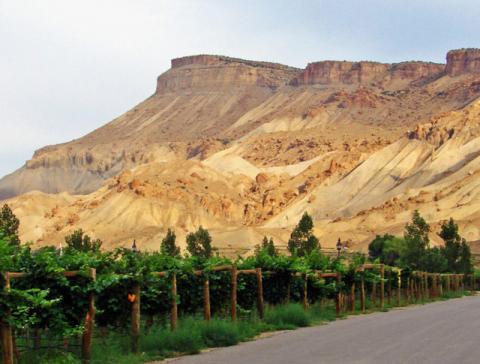
Boulder Weekly has an article titled, The best of Colorado wines. From the article:

“The judges mentioned that they couldn’t tell which ones were the Colorado wines and which ones were the French and the California wines. … They said all the wines were very polished,” says Ulla Merz, co-owner of Bookcliff Vineyards based in Boulder.

Colorado vineyards

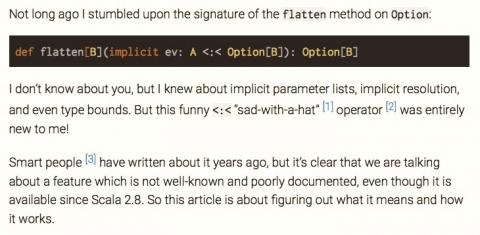
In this article titled, Generalized type constraints in Scala (without a PhD), Erik Bruchez explains Scala’s “sad with a hat” operator.

Scala's sad with a hat operator

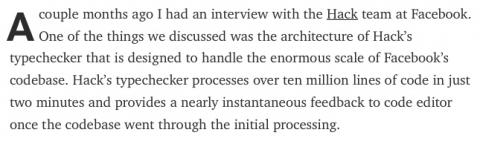
If you’re interested in the details of how Scala works, such as its compiler, this medium.com article by Grzegorz Kossakowski is a good read. In the summary he states:

“I believe the architecture of Hack’s highly parallel and distributed typechecker can be stolen and brought to Scala. Scala’s rich type system poses some challenges that Hack’s typechecker implementators didn’t need to worry about but I don’t see inferred return types or path-depent types as showstoppers.”

Can Scala have a highly parallel typechecker

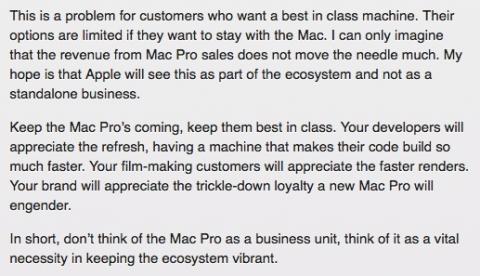
Under Tim Cook, Apple seems much more driven by the bottom line than under Steve Jobs. As this loopinsight.com article points out, “The (MacPro) models on sale today (late 2016) have the exact same specs as the very first ones that rolled off the Texas assembly line back in December 2013.”

I don’t think anyone is craving new body styles for MacBook Pro’s or MacPro’s, but modern, up to date processors and displays would be nice. And by not having those things, it makes a person think, “Hmm, I wonder what Windows’ systems look like these days ...”

As I recall, being driven by the bottom line is what got Apple in trouble under John Sculley and Gil Amelio.

Apple's Macs are getting old

This image comes from this oprah.com story, where they also state that meditation helps people experience “experienced less stress, anxiety, and depression.”

Why meditation is becoming popular in prisons