


Drupal 8 FAQ: What is the correct name for a custom drupal theme file? That is, if I want to create a preprocess_node or template_preprocess_node function, what is the name of the file that those custom Drupal 8 preprocess functions go in?
Scala, Java, Unix, MacOS tutorials (page 202)
| Said to be the only book Steve Jobs had on his iPad | |

|
Autobiography Of a Yogi |
I’m not going to discuss this code much, but in short, the source code below is for a Drupal 8 preprocess_node function that I use to set variables for (a) a custom view and (b) a custom block. I set the variables in this function, and then display them in my node.html.twig file like this:
{{ similar_by_terms }}
and this:
Drupal FAQ: What are the Twig template file naming conventions for Drupal 8? Specifically, how do I need to name a template file so it will be used for the front page of my website?
In short, the Drupal 8 Twig “HTML” template file has this name:
html.html.twig
and if you want to create a custom HTML front page template, use this name:
html--front.html.twig
The same goes for “page” and “node” files, where the default page template file has this name:
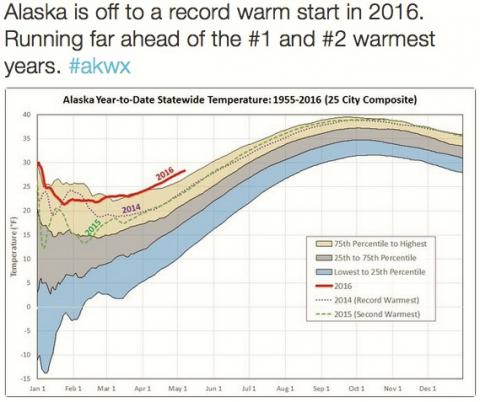
Per climatologist Brian Brettschneider, Alaska is off to a record warm start in 2016 — by a large amount.
Today is a day off for me, so I don’t want to take much time here, but ... these are my latest notes on how to upgrade/migrate a Drupal 6 website to Drupal 8:
I just got the Drupal Similar By Terms module working with Drupal 8, and I want to share my notes here so (a) I can remember how this works, and (b) in case it helps anyone else.
Configuring a View for the “Similar By Terms” module
My configuration Cliffnotes are:
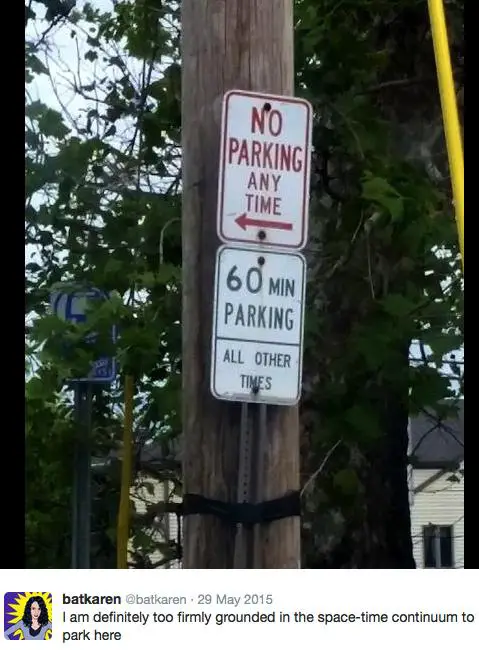
A funny quote about eating ice cream from the carton, from this Twitter page.

Excellent comment. (Image and comment from this Twitter page.)
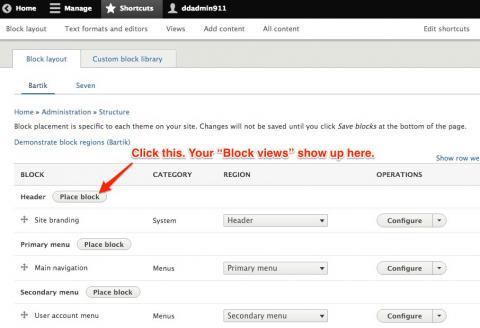
Wow, I’m sorry to be so critical, but after wasting several hours on this I have to say that the handling of “Block Views” in Drupal 8 is wicked-evil bad UI design. While all other blocks show up as you expect them to, block views are nowhere to be found.
Skipping my angst ... if you have created a Block View in Drupal 8, the only way you will find it is by clicking the Place Block button in the Drupal Block Layout interface. Your custom block views don’t show up anywhere else in the Blocks UI, only there.
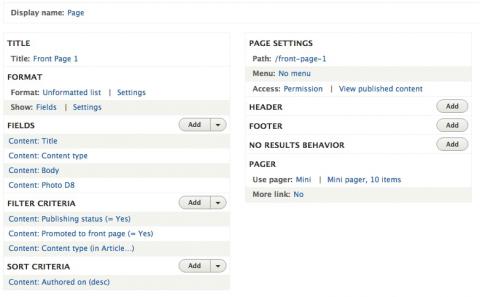
The front page of the next version of this website is being built as a Drupal 8 View. This is what those settings look like now, though I suspect they will change a little bit before the new site goes live. It’s really amazing what you can do with views in Drupal.
Viv was created by two of the original creators of Siri, and their slogan is “Intelligence becomes a utility.”
(Meanwhile, I can’t even get a Drupal 8 migration project to work right.)

MySQL FAQ: How can I find all MySQL database tables that have specific column names?
I found the solution on this SO page, and here’s my take on it. First, assuming that you want to copy and paste those column names after you get them, I recommend starting the MySQL command line client like this:
$ mysql -sN -u root -p
The -sN options get rid of all of the header and formatting information that MySQL typically puts around query results.
Next, this is the MySQL/MariaDB query you want to use:
SELECT DISTINCT TABLE_NAME
FROM INFORMATION_SCHEMA.COLUMNS
WHERE COLUMN_NAME IN ('column1', 'column2')
AND TABLE_SCHEMA='your_database_name';
Example results and output
For example, I was just looking for a column named langcode in all Drupal 8 database tables, so I used this query:
SELECT DISTINCT TABLE_NAME
FROM INFORMATION_SCHEMA.COLUMNS
WHERE COLUMN_NAME IN ('langcode')
AND TABLE_SCHEMA='drupal8';
This returned a very long list of tables. I’ll show only the first five tables, which are listed like this by the MySQL client:
block_content
block_content__body
block_content_field_data
block_content_field_revision
block_content_revision
As mentioned, the -sN options get rid of all the usual MySQL output formatting, so those are the entire results. If you don’t use those options, your output will look like this instead:
+-----------------------------------+
| TABLE_NAME                        |
+-----------------------------------+
| block_content                     |
| block_content__body               |
| block_content_field_data          |
| block_content_field_revision      |
| block_content_revision            |
Summary
In summary, if you want to know how to find one or more column names that are contained in all of your MySQL database tables, I hope you find this helpful.
The main script in this project — MigrateAllD6Photos.php — now seems to be working. The code is ugly and doesn't check for SQL errors, but for my purposes it seems to be working okay. To get that script to work and migrate your Drupal 6 photo content type to a Drupal 8 photo content type, you also need to run a couple of queries shown here.
[toc hidden:1]
| Said to be the only book Steve Jobs had on his iPad | |
|
|
Autobiography Of a Yogi |