


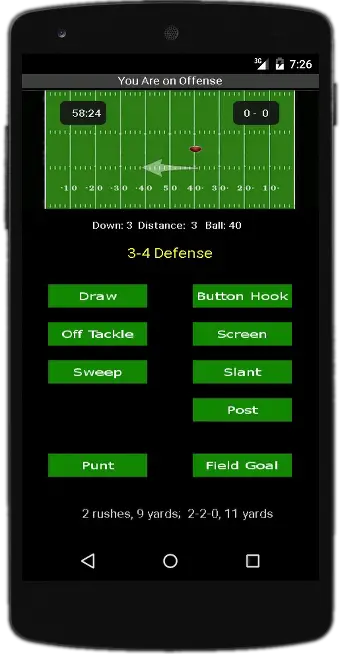
I’ve been working on creating an Android football game lately. It still needs a lot of work, but this is what it looks like at the moment. The UI needs a lot of work, and I need to add more plays, but the basic functionality is there.
Scala, Java, Unix, MacOS tutorials (page 235)
| From John Ousterhout, creator of the Tcl language | |

|
A Philosophy of Software Design |
From time to time I still think about moving to Providence, Rhode Island so I can live as an “outpatient” :) at the Providence Zen Center, and from experiences there I know that Dunkin’ Donuts is big in the northeast. Here’s a story of a behind-the-scenes visit to Dunkin’ Donuts HQ.

Here’s a story on how a service dog has helped a Vietnam veteran in Alaska.

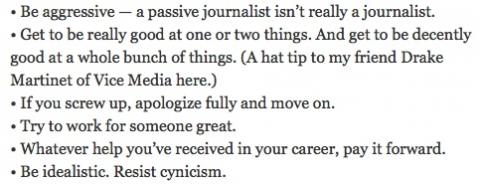
From a NYT article titled, “Everything I know about journalism.” A lot of the advice is good career advice.
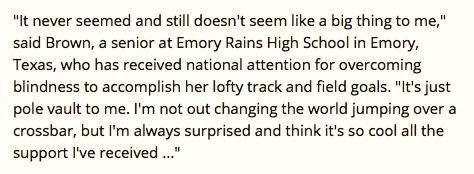
I don’t know how Charlotte Brown does this, but she is an inspiration. The story is here on espn.com.
Continuing along with my great diverticulitis adventure (or, “How I spent the Spring of 2015“), yesterday I took another trip to the ER, had another CT scan, and to my great surprise I found out that I don’t have diverticulitis, but instead I have something called Epiploic appendagitis:
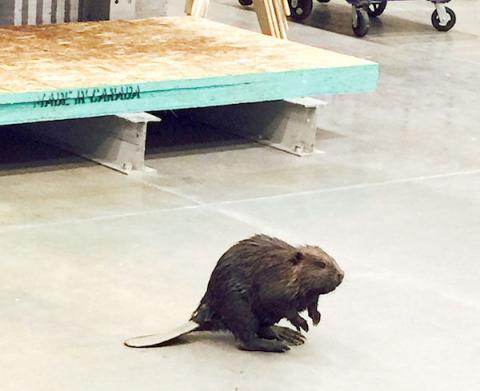
Of course if a beaver walks into a hardware store in Fairbanks, Alaska, it will go directly to the plumbing department ...
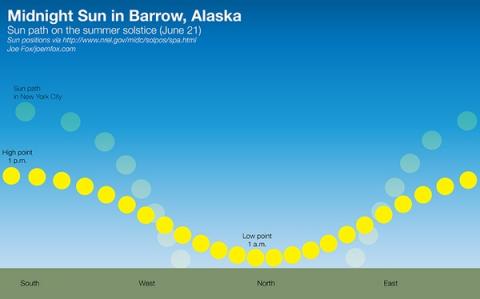
A graphic comparing the Midnight Sun in Barrow, Alaska on June 21 to the Sun in New York City. I think the graphic is a little misleading regarding the high point of the Sun, but it demonstrates the basic idea. Image from this Twitter page.
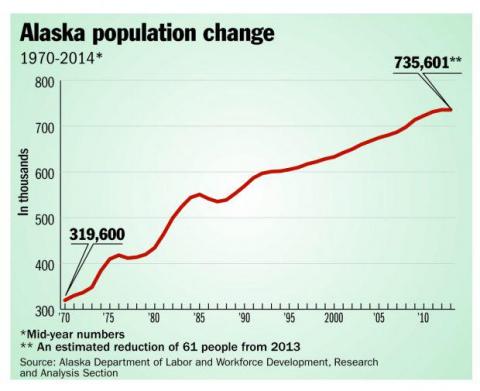
At this rate the population of Alaska will reach one million ... never.
(Bear in mind that these are “summer” numbers. The population in Alaska in the winter is more like 300K or so.) Image from this Twitter page.
Android FAQ: How do I “pin” a screen in Android?
Pinning a screen in Android requires a setting change. Once you’ve made that change, you can “pin” a screen so it is always shown when you log into your Android device. Here’s how to do it.
Android screen pinning setting
To pin a screen in Android, you first have to go into your settings and make a change. So go to the Settings app, then tap Security. When you scroll down you’ll see a “Screen pinning” setting, as shown here:
“I feel like this is the most exciting single year, between the Alzheimer’s in a dish and the Biogen result, since the discovery of the last major Alzheimer’s gene in 1995. So it’s the most exciting year in 20 years.” From this article on harvard.edu.

Android FAQ: How do I write a custom View class in Android? (Or, how do I extend a View class?)
If you need to write an Android onTouchEvent method inside a View class, here’s some example source code (boilerplate/skeleton code) that shows how to implement this method, including how to use the MotionEvent in the method, and how to get the x and y location of the touch event:
I was just looking through some old pictures, and found this “Just be” image that’s written on a chalkboard. It reminded me of my Just Be app, but I remember keeping this photo when I saw it because it reminded me of my yoga instructor, who passed away last December. There were several phrases she would say when we would practice Savasana at the end of a yoga session, and “Just be” was one of my favorites. (Sorry, I don’t know the original source of this image.)

Android FAQ: How do I make my Android app display in landscape mode only?
To get an Android application to display in landscape mode only (to lock it in landscape mode), add this line to your Activity definition in the AndroidManifest.xml file:
android:screenOrientation="landscape"
For example, I’m writing an Android football game right now, and this is the definition for my main activity in the Android manifest file:
| From John Ousterhout, creator of the Tcl language | |
|
|
A Philosophy of Software Design |