


I thought this might be harder, but if you have a file URL like “file:///Users/al/SherlockHolmes.txt”, and want to read those file contents as a Java URL, the process in Java and Scala is simple, as shown in this Scala code:
Scala, Java, Unix, MacOS tutorials (page 277)
| One of My “Top-5” Meditation Books | |

|
Practicing the Jhanas |
As a quick example today, the following source code is for a Python feedparser script I wrote, based on the URL shown:
I’ll write more about this as time goes on, but I’ve finished the first round of software (and hardware) development on my “Radio Pi” project (which, thanks to a friend, I now refer to as my “RadioPi” system). This project lets me play local FM radio stations, online radio streams, recorded radio streams, and podcasts, all from a little Raspberry Pi (RPI) computing system.
Video
First, here’s a short video of my RPI Radio in action:
[toc hidden:1]

This isn’t a blog post as much as it is just some notes on how I got streamripper working the way I want to on my Raspberry Pi “AlRadio” project. That project is a little like a radio in that it plays FM radio stations, but it also plays live radio streams, makes and plays recorded radio streams, and plays podcasts.
Streamripper in production
I installed streamripper with apt-get like this:
To see what’s running on a Mac OS X port, use this lsof command:
$ sudo lsof -i :5150
This command shows what’s running on port 5150. Just change that to whatever port you want to see.
To build a Sencha ExtJS application, move to your project’s root directory, then run this command:
$ sencha app build
Assuming that the build works fine, you can test the production build in your browser at a URL like this:
About a month ago I shared some code for my Wikipedia Reader application, which reads Wikipedia pages out loud to you. As I thought about what I want from that application, I thought, “Why limit it to reading Wikipedia pages? What if it could read a book?”
The Bolder Boulder 10K run is Boulder, Colorado’s version of the Kentucky Derby.

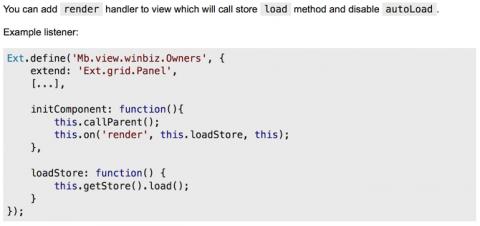
Lesson learned yesterday: Never use Sencha ExtJS autoLoad, especially when working with a Grid panel. I ran into a problem where my grids kept showing a “loading” message, but never loaded the data. Or, more accurately, I should say that they rarely loaded the data. Sometimes they would load the data, but I could never get them to load the data consistently. Then I found this solution, which seems to work well.
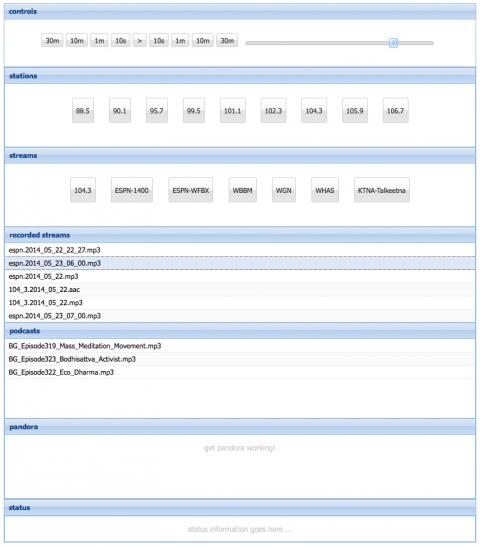
I’ve spent most of the last week building a radio-like device out of a Raspberry Pi. I got an FM radio chip, soldered it, then wrote a bunch of software. The result is that the device works, and I have a web-based UI, as shown. I can listen to live FM radio, online radio streams, recorded radio streams, and podcasts. I may take a little more time to get Pandora working, but it’s not a high priority at this point. The web UI is created with Sencha ExtJS, and the back end is written with the Play Framework, along with a Python script, and a handful on Unix/Linux utilities. A nice benefit of this approach is that I can control my “radio” from any device with a browser, i.e., a PC, tablet, or phone.
I just tried a quick test of transparency/translucency on Mac OS X using Java, and in short, here is the source code I used to create a transparent/translucent Java JFrame on Mac OS X 10.9:
One thing I’ve learned over the years is that baseball is a game of adjustments, and in 2014 Mark Buehrle has adjusted his pitch usage, and he’s off to a great start. They showed this graphic on MLB.tv during one of his recent starts.

When you first work with a Sencha ExtJS or Touch Store and Proxy, you’ll quickly find that when you create GET and POST REST services, by default the store/proxy adds extra parameters to the end of the URLs you’re accessing.
Thoughts from the Dalai Lama on home, helping others, and living a meaningful life.

As I noted yesterday, I got a Play Framework application running on a Raspberry Pi (RPI) this weekend. It was pretty easy; I just deployed the application to a production server as usual, and on the RPI I only had to install Java, and control the RAM usage.
I’m working on an application/system where I have an FM radio chip in a Raspberry Pi, and I control the radio chip with a web service. The web service is written in Python, and is powered by the Python “Bottle” web server.
Here’s the Python/Bottle source code for my radio web application:
Here’s a quick look at how to read Play Framework application.conf configuration properties.
First, given a Play application.conf file with these properties:
foo=42

bar.baz=10

stations = [ 99.5, 102.3, 104.3, 105.9 ]

streams = [
    { "name": "104.3", "file": "104_3.pls" },
    { "name": "WGN",   "file": "wgn.pls" }
]
You can read the foo property (as a String) from your Play code like this:
Here’s a good story on mindfulness becoming mainstream. “The analogy that Kabat-Zinn uses is with jogging. In the 1960s when he started running, people thought him a bit odd. Now on a Sunday morning parks and streets are full of people pounding away. The take-up rate for mindfulness, Kabat-Zinn says, is much sharper than for jogging. In another decade, one can imagine that it will be widely accepted and understood as a valuable way to look after your mental health.”

| One of My “Top-5” Meditation Books | |
|
|
Practicing the Jhanas |