Scala, Java, Unix, MacOS tutorials (page 340)

Yesterday I ran into a pretty obscure situation in my Imagen application where I needed to show a modified Mac menubar, even though I didn't have a Java JFrame displayed at the time. The way Imagen works is that I show a JFrame, then hide it, and the application then waits for the user to do something with the application icon in the Mac Dock, typically dropping an image onto that icon.

I just took a brief look at Ruby Appscript as a potential replacement for AppleScript on Mac OS X. So far it looks promising, and works on Mac OS X 10.6 (Snow Leopard) just fine.

The hardest part about working with it yet has been finding a few examples to get going with. Based on my forty-five minutes of working with it just now, here are a couple of quick Ruby Appscript examples that might help get you going a little faster.

I was just working on my Linux Teleport command (Linux cd command with a history), and ran across the code below, which essentially shows how to use a form of "heredoc" syntax in a Bash shell script. This approach uses the Linux cat command, but functions just like the heredoc syntax in languages like Perl.

Here's the source code I just came across:

vi/vim FAQ: How do I use the vim completion (word completion) feature?

When using the vi/vim editor I'm surprised how many people don't use its built-in vim completion (vim auto complete or vim code complete) feature.

Over time I hope to write more posts about software cost estimating, but for today I just want to list some of the software cost estimating variables from the model of the Cocomo II software application:

This page serves as an index to all of my Drupal module, form, and databases tutorials and examples. In an effort to help supplement the documentation on the Drupal.org website, over time I hope to have good examples for every Drupal module and form problem you'll run into.

Drupal 7 SQL FAQ: How do I perform a SQL DELETE query in Drupal 7?

The short answer is that you use the Drupal 7 db_delete function, like this:

db_delete('projects')
  ->condition('id', 10)
  ->condition('user_id', 5)
  ->execute();

This example assumes that your database fields are named 'id' and 'user_id', and the values of 10 and 5 are the values in your database table you want to delete. If you just want to delete by id, your query is simpler, like this:

In my previous blog post I wrote about how to create an HTML table in a Drupal 7 module form. As promised in that tutorial, once I figured out how to make the table columns sortable, I'd share that secret recipe as well. Here then is how to make an HTML table in a Drupal 7 module/form:

If you're interested in building an HTML table with Drupal, Drupal 7 in this case, here's a quick example of how this can be done.

My Drupal "theme table" approach currently provides the following functionality:

Drupal form FAQ: How do I create an HTML SELECT/OPTIONS field in a Drupal form?

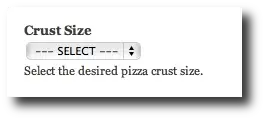
Solution: If you'd like to create an HTML SELECT field (a dropdown box) in a Drupal form that looks something like this:

A Drupal 7 form SELECT OPTIONS field example

there are at least two ways to do so.

Drupal 7 database FAQ: How do I use the Drupal dbquery function to perform a SQL INSERT? (Or, what is the Drupal 7 dbinsert syntax?)

I didn't type db_query in that question by mistake. I just spent 45 minutes trying to use it for a Drupal 7 SQL INSERT, which of course I've now learned doesn't work.

In short, if you're looking for a Drupal 7 db_insert example that shows how to perform a SQL INSERT, and also happens to show some SQL Timestamp fields, here's a 'submit' function I'm currently writing:

PHP date/time FAQ: How do I create a date in the proper format to insert a SQL Timestamp field into a SQL database?

First off, you may not need to create a date in PHP like this. If you're using plain old PHP and a database like MySQL, you can use the SQL 'now()' function to insert data into a SQL timestamp field, like this:

Wow, I've been reminded lately how important deadlines are.

I've been working on this website all summer, but at a moderate pace. Then recently I put together some goals for the end of the year, which, in turn, led to other short-term goals. Now, it turns out that my short term goals are hard to meet, but not impossible.

Summary: How to reverse the meaning of a Linux find command.

I spent last night doing a bunch of work on my source code warehouse. At the end of the night I needed to do a search for all files in many subdirectories whose filenames did not end with "*.java". It's easy enough to find filenames that do end with "*.java", using the find command like this:

I was reading a book recently and I ran across the following quote, which I think comes from Bruce Tate:

Think of a unit test as another client of your application.

That resonates for me on many levels, and it's a great way to think about test code. I also like the following quote, but that may be because I said it:

I know this code is wrong because I can't test it.

Yours in unit testing. ;)


I spent several hours today working with the Gimp software application today, mostly doing work in trying to create textured areas, canvas backgrounds, and irregular lines (like chalk lines), and I'm writing this post for myself so I can remember everything I tried, and specifically what worked.

How to draw a straight line in Gimp

I think I've written this before, but to draw a straight line in Gimp:

As a consultant, you're expected to run a professional business meeting. In the few minutes before a meeting starts you can be as nice as you want, ask your client how their kids are doing and so on, but once the meeting starts it should be as quick and efficient as possible.

The "secret" to making a meeting snappy is simple:

Know what you want out of the meeting before it starts.

One Java programming "best practice" that has been strongly reinforced for me during the last several weeks is making sure you have a declared interface that defines the behavior (signature) of your Dao (data access objects) classes.

Summary: An Apple design secret - the connection between attitude and productivity.

Unfortunately you need a subscription to read the content over at technologyreview.com, but they had a nice article a while ago on "The Secret of Apple Design." I really like a quote they had about a person's attitude, and the relationship of that attitude and the impact on their work:

Mac Java FAQ: How do I report Mac Java bugs?

I just saw this information on the Mac Java mailing list, how to report Mac Java bugs: