


A lot of people have written me to ask how I generate the Drupal categories block on this website. There are probably a lot of different ways to generate a Drupal categories block these days, but the way I do it is with the PHP script shown below. (Sorry, I'm too lazy to look to see if there is a new Drupal categories block module/solution; I'm pretty content with what I have.)
Scala, Java, Unix, MacOS tutorials (page 362)
| A Programming Classic! | |

|
Head First Design Patterns |
After several days of intense programming, I thought I'd take a break for something much less serious: Funny bumper sticker quotes and sayings. :)
These are a variety of funny/joke bumper stickers quotes/sayings that I've seen over the last year or two. A few others were sent to me by friends who know I like a good bumper sticker ... well, as long as it's not on my car.
vim/vimrc FAQ: Can you share an example vim vimrc configuration file?
Sure. I don't use vim for programming much these days, so I don't have the vimrc configuration commands I used to use with various programming languages, but I'll be glad to share my vimrc configuration file that I use every day, along with a few extra lines to demonstrate some of the vim configuration possibilities.
Example vim vimrc configuration file
Here's an example vimrc file:
vim tabs/spaces FAQ: How do I convert vi/vim tabs to spaces?
You can convert tabs to spaces in vim using the usual vim search and replace command. Specifically, this vim "tabs to spaces" command is all you need:
:1,$s/\t/ /g
In short, this command can be read like this:
vim autoindent FAQ: How do I configure vim to automatically indent newlines? That is, if my current line is indented three spaces, and I hit [Enter], I want the next line to autmatically be indented three spaces as well.
To configure vim autoindent, just use this vim command:
vim FAQ: How do I move vim backup files to another directory? (Those files that end with the "~" character.)
To move vim backup files to another directory, just use commands like these in your "vimrc" configuration file:
vim FAQ: How do I delete blank lines in vim?
To delete blank lines in vim (empty lines), use this vim last line mode command:
:g/^$/d
Here's a brief explanation of how this "vim delete blank lines" command works:
vim FAQ: How do I delete all lines in the current text file in vim?
To delete all lines in vim, use this command:
:1,$d
This "vim delete all lines" command can be read like this:
- Beginning at line 1, and
- Ending at the last line in the file (represented by the '$'),
- Delete each line.
I hope this vim "delete all lines" command example has been helpful. If you need any more details/discussion just leave a command below.
vim delete FAQ: How do I delete a line in vim? (Also, how do I delete multiple lines in vim?)
To delete the current line in your vim editor, use this command:
dd
You can use this same command to delete multiple lines in vim. Just precede the command by the number of lines you want to delete. For instance, to delete five lines in vim, use this command:
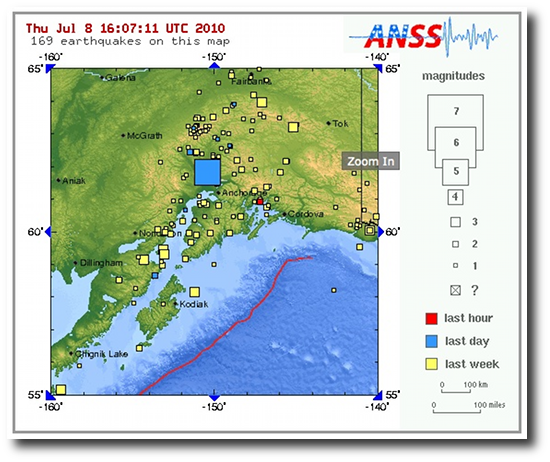
It was nice and sunny in Alaska yesterday, so I took the day off and drove up into the mountains. On the way home I was driving through a cozy little area known as Willow (it's hard to really call it a town, it's more like just an area), and I thought about looking there for a new place to live this fall. But after a long day in the sun, I was tired, so I came home, took a nap, and quickly woke up to a 5.0 earthquake, centered 16 miles WNW of Willow. Here's one of the maps from the U.S.G.S. website:
Minimalist Drupal themes FAQ: Can you recommend any Drupal minimalist themes?
As my website about living in Alaska starts picking up more readers, I've been thinking about changing the website theme to something "lighter". I just published the results of my looking around for clean, minimalist website designs, and in this article, I thought I'd share the results of looking for clean, minimalist Drupal themes.
I started browsing through the book "The Cathedral & the Bazaar
I'm not sure how much call there is for a simplified Nagios web interface (user interface), but I wrote one last year, and I'll be releasing it here soon, after many comments on my Nagios MySQL database design article, along with many, many personal emails.
SQLite dump/backup FAQ: How do I backup (dump) a SQLite database (or database table)?
"How to make a backup of a SQLite database?" is a really interesting question. Because a SQLite database is really just a file, if you truly want to make a backup of that database, it can be as simple as copying that file to a backup location.
But there is more to the story ...
[toc hidden:1]
SQLite script FAQ: How do I read/execute a CREATE TABLES script from the SQLite command line? (How do I read or execute commands in a file from the sqlite3 command line?)
Spring MySQL FAQ: Can you share a Java Spring MySQL example, showing how to create a Spring Framework application context file so a Java standalone application can connect to a MySQL database?
Sure, here's a Java/Spring MySQL example, specifically showing a Spring application context file that sets up a BasicDataSource (connection) to let your Java application connect to a MySQL database.
SQLite table FAQ: How do I drop a SQLite table? (i.e., "What is the SQLite DROP TABLE syntax?")
SQLite comes with the usual DROP TABLE command, so you can drop a SQLite database table named "orders" like this:
SQLite database FAQ: How do I drop a SQLite database?
People used to working with other databases are used to having a DROP DATABASE command, but in SQLite there is no similar command.
The reason? In SQLite there is no "database server" — SQLite is an embedded database, and your entire database is contained in one file. So there is no need for a SQLite “drop database” command, all you have to do to drop the database is to delete the SQLite database file you were accessing.
Mac Dock FAQ: How do I move a commonly used Mac folder to the Dock so I can access it easier?
When you first buy a Mac, the right side of the Dock (the right side of the highway stripe on the Mac Dock) will have just the basic items on it, such as the Applications and Downloads folders. What a lot of people don't know is that you can put links (shortcuts) to your own folders there as well. In fact, this is a great place to put shortcuts to your most commonly used Mac folders.
Mac Dock icon FAQs: How do I move a Mac application icon to the Dock so I can access it easier? Also, how do I remove an application icon from the Mac Dock?
| A Programming Classic! | |
|
|
Head First Design Patterns |