


I was recently reminded of the danger of leaving less-experienced software developers alone to create new functionality in a technical area where they have no prior experience. For instance, suppose you have one or more good but less-experienced developers, and you ask them to work in a technical where they have no prior experience. These aren't totally inexperienced developers; they may each have at least five years experience. Given that their are other people on the team with experience in this area, how do you think this should be handled? Choices include:
Scala, Java, Unix, MacOS tutorials (page 421)
| A Programming Classic! | |

|
Head First Design Patterns |
tar gzip FAQ: Can you show how to extract (un-tar) a tar archive that has been created with tar and gzip?
Say you have a file (archive) named myfile.tar.gz, and you want to unzip it and unpack (un-tar) it in one command. This "tar extract" command should do the trick for you:
tar xzf myfile.tar.gz
That tar command can be read as "use tar and gzip (the 'z' option) to extract the contents of the file (archive) named myfile.tar.gz.
No real introduction here today, just some sample Ruby code I want to have out here so I can remember some syntax for using Ruby to connect to a MySQL database.
In particular I am also using the here document syntax to simplify the writing and reading of a long database query.
Linux wget FAQ: Can you share an example of the Linux wget command?
Suppose you're working on a Unix or Linux machine remotely through an SSH session, and then you need to get a resource (like a tar or gzip file) that's on the Internet over to that machine. You could download that file to your local machine, and then use scp to copy it to your remote Unix box, but that's a lot of work.
Here's a quick look at a "Ruby DB2" program I created to read data from a DB2 database table on an AS/400 (iSeries) DB2 database.
My Ruby DB2 ODBC example program
First, here's the example Ruby program that accesses the As400 DB2 database, with a few names changed to protect the innocent:
While the Targus Chill Pad is a great idea, it is the worst manufactured piece of equipment I can ever recall using. I really can't remember buying anything that was made with such poor quality.
The rubber pads on the top of the Chill Pad constantly fall out. I've tried glueing them in to keep them in, and after the fourth attempt they seem to be staying in.
Mac Java FAQ: I'm currently using Mac OS/X 10.4 with Java 1.5.x. But, for a certain application I need to use a previous version of Java, which I can see is actually installed on the hard drive. Can I use this older Java JVM on Mac OS X 10.4?
Answer: Yes, I was able to do this. The hardest part about this is finding where the previous Java version is installed. There are probably easier ways to do it, but I ended up using the Mac mdfind command, which is the command-line version of Spotlight.
By default, when you create a JFrame in a Java client-side application, and the user presses the exit button on the JFrame, the JFrame window is closed, but the application continues to run, essentially running in the background, as you typically don't have a way of showing that JFrame again.
Summary: How to add a manifest file to a Java jar file.
I just created an executable jar file for a Java client-side application. I hadn't done this in a while, and I always forget about the option to include a manifest file in the jar file. If you're good and remember to include a manifest file, like this:
jar cfm curtain.jar Manifest.txt com/
then users can run your client application very simply, like this:
I recently created something that I think is a new user interface feature. (What's the saying ... if you haven't seen it before it's new to you(?).) I call it a "curtain", as it is essentially a visual curtain between the window of the application you're working in and the rest of your desktop. You can check it out at this URL.
Every once in a while someone will give me a large collection of images (JPG, PNG, GIF) that I need to either look at or print. On the Mac (and recent versions of Windows) there are now tools to look at a group of images, but I still like a little program that I wrote.
I wrote this program in Ruby, and what it lets you do is combine all of your pictures into one web page. Then, with the use of CSS, the HTML document you create lets you print each image on a separate page.
I've created a "predictive text" (type ahead) text editor using Java (a JFC/Swing GUI) that attempts to predict what you're about to type. If you'd like to see it in action -- and learn more about it -- you can find it here: my Java predictive text (type ahead) editor.
macOS FAQ: How can I get access to the full path of the current Mac Finder window? That is, when I’m looking at a Finder window that’s showing the contents of a directory like /Users/Al/foo/bar, how can I easily put that directory path on the macOS clipboard so I can use it in other applications?
Solution
I couldn’t find any way to do this through the Finder, so I wrote an AppleScript script to do it for me. Here’s my script that gets the current path from the Mac Finder and displays the path in a dialog so you can copy it to the MacOS clipboard:
Apple/macOS Terminal/Finder tip: This tutorial shows how to open a Mac Terminal window in the current Finder folder by using AppleScript.
AppleScript code to open a Terminal in the current Finder folder
For a while I have wanted to be able to open a Mac Terminal window in the same directory as the Mac Finder folder that I’m currently looking at. I couldn’t find any other way to do this, so I finally wrote an AppleScript script to do it. Fortunately the script code is relatively readable. Here's the code:
tell application "Finder"
    set myWin to window 1
    set thePath to (quoted form of POSIX path of (target of myWin as alias))
    tell application "Terminal"
        activate
        tell window 1
            do script "cd " & thePath
        end tell
    end tell
end tell
When I have a Mac Finder window in the foreground and run this script from the AppleScript menu on the macOS menubar, it opens a new Mac Terminal window, and automatically places me in the same directory as the current Finder folder. Sweet.
Putting the script in the right location
Here in April, 2023, I named this file OpenTerminalInFinderDir.scpt, and put it in either /Library/Scripts/AlsScripts or ~/Library/Scripts/AlsScripts. When you combine this with enabling AppleScript in the Mac menubar (see the link below), the result looks something like this:
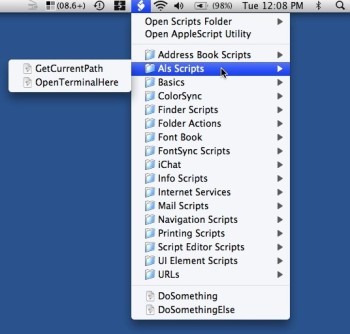
I’m too lazy to provide a new screen snapshot today, but here in 2023, my OpenTerminalInFinderDir.scpt script appears at the bottom of a similar-looking menu on the menubar.
Related
- If you don’t know where to save your AppleScript scripts (programs), see my tutorial, Where to save AppleScript programs so you can access them on the Mac/AppleScript menu bar
- If you don’t know how to show the AppleScript menu in the macOS menu bar, see my tutorial, How to enable the AppleScript menu on the macOS menu bar
In summary, if you wanted to see how to open a macOS Terminal window in the current Mac Finder path, I hope this helps!
Mac Terminal Finder FAQ: How can I open a Mac Finder window from the current directory of a Mac Terminal window?
To open a Finder window in the current directory of your Mac Terminal just issue this Mac open command:
open .
Yes, that is a decimal after the open command. The decimal is the Unix way of referring to the current directory.
If you want to use a self-signed certificate with a Java client, follow steps similar to this:
Recently I ran into a programming situation where I needed to select a node in a Java JTree from my code. As opposed to the usual situation of responding to a user's click on a JTree node, I needed to set the active JTree node based on something that was happening in another area of the application.
Wow, if only 10% of the comments on this page are accurate, there is a huge amount of trouble and turmoil at Microsoft on the Vista project. This blog posting makes me feel even better that I just made the switch to the Mac world.
This post is terrific:
What's the difference between OS X and Vista?
Microsoft employees are excited about OS X...
Ouch.
If you’ve never read the book Use Case Driven Object Modeling with UML by Doug Rosenberg and Kendall Scott, you’re missing one of the most simple and important Model-View-Controller (MVC) diagrams in the software business.
In their discussion of Robustness Diagrams they introduce a figure called “Robustness Diagram Rules” that succintly tells you how to implement an MVC design in your code. In one figure they tell you:
Java jar file reading FAQ: Can you show me how a Java application can read a file from own of its own Jar files?
Here's an example of some Java code I'm using to read a file (a text file) from a Java Jar file. This is useful any time you pack files and other resources into Jar files to distribute your Java application.
Java - read Jar file example #1
The source code to read a file from a Java Jar file uses the getClass and getResourceAsStream methods:
| A Programming Classic! | |
|
|
Head First Design Patterns |