


Scala 2.12.3 has been released, and compiler performance has improved significantly.
Scala, Java, Unix, MacOS tutorials (page 159)
| A Machine Learning Bestseller | |
|
Introduction to Machine Learning with Python |
Dateline: March, 2010.
Not one of my better times. On the drive from the Lower 48 back to Alaska, I got stranded in Canada. The reports said the roads were clear, so I was hoping to make it through with my old tires, but “clear” has a different meaning in the winter in Canada than it has in the Lower 48. “Snow-packed with occasional ice” was a more apt description. My tires weren’t up to the task, and not wanting to die, I was forced to stop in Dease Lake, British Columbia, population 303, one motel, one gas station, one mechanic.

I love this idea from Ryan Carson. From his tweet, “This is what I look at first, every day, when I wake up. It's my WHY.” Reading your life goals/mission first thing in the morning is a great implementation of the idea of a tombstone test.

I’m not yet sure if I like the book Functional and Reactive Domain Modeling, but one thing is for sure: I couldn’t begin to understand it if I didn’t first do the research to write Learning Functional Programming in Scala. The author immediately jumps into monads as if they are commonly understood, and also designs his functions as “modules” in a very Haskell-ish way. I’m not saying the book is bad, just that it has a high barrier to entry.
Android 7 comes with a cool new “split screen” feature where you can look at two apps running at the same time. This little pictorial/tutorial shows how to use this split-screen feature.
I have a couple of Ubuntu Linux systems, including Raspberry Pi systems, test servers, and production servers. It seems like every time I have to use an apt-get or other apt command, I always have to search for the command I need. To put an end to that, I’m creating this “apt-get reference page.” It’s very terse, as I’ve just written it for myself, but I hope it’s also helpful for others.
As a quick note, I was just reminded that you can populate a Scala List using a Range, like this:
scala> (1 to 5).toList
res0: List[Int] = List(1, 2, 3, 4, 5)

scala> (1 to 10 by 2).toList
res1: List[Int] = List(1, 3, 5, 7, 9)

scala> (5 to 11).toList
res2: List[Int] = List(5, 6, 7, 8, 9, 10, 11)

scala> ('d' to 'h').toList
res3: List[Char] = List(d, e, f, g, h)
Those are just a few examples. For many more ways to populate Scala lists with sample data, see How to populate Scala collections with a Range, How to generate random numbers, characters, and sequences in Scala, and Different ways to create and populate Lists in Scala.
In sad news, Talkeetna’s Mayor Stubbs passed away at the age of 20 on July 22, 2017.
I recently read that moose tend to attack dogs, and therefore people with dogs, because they look at dogs as a potential predator. Given that background, here’s a nice story on adn.com about a person and their dog in Alaska.
July 22, 2017 will go down as the day I (finally) switched this website to using HTTPS instead of HTTP. (See the padlock icon in the URL field of your browser.) I’ve been using a self-signed certificate to log in to this site for a long time, but yesterday I finally switched to “HTTPS for everyone.”
The process of updating a Drupal 8 website changed dramatically back in March-April, 2018, so I deleted the older content on this page and replaced it with the content below.
As of April, 2018 you now need to use Composer along with Drush to update your website. Here are my very brief notes on how to do this:
# note to self: use your `drush8` alias rather than `drush`

- Backup your website files
- Backup your Drupal/website configuration files
    ads.txt
    .htaccess
    robots.txt
    sites/default/settings.php
    composer.json
- Backup your database

- Clear the cache
  drush cr

- Put your site in maintenance mode
  drush sset system.maintenance_mode 1

- Do the actual update
  composer update drupal/core --with-dependencies
  drush updatedb

- Take the site out of maintenance mode
  drush sset system.maintenance_mode 0

- Clear the cache again
  drush cr
As one note about this, the process of updating from Drupal 8.5.1 to Drupal 8.5.2 failed with this error:
OUTPUT: Package "drupal/core" listed for update is not installed. Ignoring.
I found the solution to the problem at this SO page. Suffice it to say, if you plan to keep working with Drupal 8, you’ll want to learn about how Composer works.
Installing a Drupal security update with Composer
Today (August 1, 2018) I had a problem trying to get Composer to update my website from Drupal 8.5.5 to Drupal 8.5.6, where 8.5.6 is a security update. This command did not work:
composer update drupal/core --with-dependencies
But I found that this command did work:
composer update drupal/core --with-all-dependencies
Update: I had that same problem on March 20, 2019, with the Drupal 8.6.13 security update, and once again the
--with-all-dependenciesflag solved the Drupal core update problem.
Here’s some information on the differences between --with-dependencies versus --with-all-dependencies, from the Composer documentation:
--with-dependencies: Add also dependencies of whitelisted packages to the whitelist,
                     except those that are root requirements.
--with-all-dependencies: Add also all dependencies of whitelisted packages to the whitelist,
                     including those that are root requirements.
                     ------------------------------------------
This Debug Academy page helped me find that solution. If you need to update Drupal core I hope that information helps.
Drupal/Composer/Drush FAQs
I thought I’d put some Drupal/Composer/Drush FAQs here so I don’t have to keep searching for them.
Q: From this page: What does it mean when `composer outdated` shows components that need updating, but the `composer update` command indicates that nothing needs to be updated?
A: Nothing. In composer.json you can limit which versions you accept for a dependency. Drupal core specifies Symfony 2.8.*, so even though there are newer versions of Symfony, Composer keeps you on 2.8 because that's what core wants.
Q: How do I make a database backup with Drush?
A: Run
drush cr, then this:
drush sql-dump > 2018-10-21.sql
Q: What is Composer, and how does it work with Drush 9?
A: Composer is a dependency manager for PHP. Drupal core uses Composer to manage core dependencies like Symfony components and Guzzle. Drush 9 no longer supports updating Drupal and leaves the work to Composer.
Q: What is the syntax for adding entries to the composer.json file?
A: You can add entries to the composer.json file manually, but I’ve found it easiest to add entries to that file using commands like these at the command line:
composer require 'drupal/token:^1.5'

composer require 'drupal/metatag:^1.7'
Lately I’ve been able to find these commands on Drupal module release pages, like this Token release page.
How to update Drupal modules with Composer, or manually
In theory, you can update Drupal 8 modules with Composer using either of these two commands:
composer update drupal/metatag --with-dependencies
composer require 'drupal/metatag:^1.8'
In practice, those commands didn’t work today (Feb. 21, 2019), so I just wrote a little post about how to update Drupal 8 modules manually from the command line.
Notes from January, 2020
Here are a couple of links from January, 2020, related to updating from Drupal 8.6 to 8.8.1:
And a note on how to update Drush with Composer:
composer update drush/drush
Related links
I’ve currently written this document as a “note to self” about how the Android AsyncTask works. It’s currently incomplete, but if you want to know how an AsyncTask works, most of the answers are generally here. I provide documentation for most aspects of the AsyncTask, though my coverage of (a) updating progress/status and (b) canceling an AsyncTask is a little weak atm.
I just got back into using an Android AsyncTask, and it took me a little while to re-load the concepts in my head. I used AsyncTask’s a few years ago, but haven’t used them since.
To help remember how they work, I created a little AsyncTask example project, and I’ve included all of the source code for that project here. I’ll show all of the source code for my classes and configuration files, and then explain the code at the end.
I was just working with an example of how to use Android’s new Room Persistence Library, and the example I was working with ran some of its code on the main Android thread, also known as its “UI thread.” I knew this was bad, but I wanted to start with someone’s example, and then figure out a good way to get the Room method calls to run on a background thread, such as using an AsyncTask. (The Android docs don’t specify a “best practice” for this atm.)
One way to make sure you don’t accidentally run code like this on the main Android thread is to enable Android’s StrictMode. Per the StrictMode documentation, you can enable StrictMode in the onCreate method of an Activity like this:
@Override
protected void onCreate(Bundle savedInstanceState) {
    super.onCreate(savedInstanceState);

    // detects things you might be doing by accident and brings them to your attention so you can fix them
    // https://developer.android.com/reference/android/os/StrictMode.html
    StrictMode.setThreadPolicy(new StrictMode.ThreadPolicy.Builder()
            .detectDiskReads()
            .detectDiskWrites()
            .detectNetwork()   // or .detectAll() for all detectable problems
            .penaltyLog()
            .build());
    StrictMode.setVmPolicy(new StrictMode.VmPolicy.Builder()
            .detectLeakedSqlLiteObjects()
            .detectLeakedClosableObjects()
            .penaltyLog()
            .penaltyDeath()
            .build());
...
...
...
After I enabled StrictMode in this example application and ran it again, I saw A LOT of logcat output that looks like this:
07-20 10:19:19.775 18278-18278/com.foo.roomdemo D/StrictMode: StrictMode policy violation;
~duration=17 ms: android.os.StrictMode$StrictModeDiskReadViolation: policy=65543 violation=2
      at android.os.StrictMode$AndroidBlockGuardPolicy.onReadFromDisk(StrictMode.java:1293)
      at android.database.sqlite.SQLiteConnection.applyBlockGuardPolicy(SQLiteConnection.java:1041)
      at android.database.sqlite.SQLiteConnection.executeForLong(SQLiteConnection.java:595)
      at android.database.sqlite.SQLiteConnection.setPageSize(SQLiteConnection.java:251)
      at android.database.sqlite.SQLiteConnection.open(SQLiteConnection.java:213)
      at android.database.sqlite.SQLiteConnection.open(SQLiteConnection.java:193)
      at android.database.sqlite.SQLiteConnectionPool.openConnectionLocked(SQLiteConnectionPool.java:463)
      at android.database.sqlite.SQLiteConnectionPool.open(SQLiteConnectionPool.java:185)
      at android.database.sqlite.SQLiteConnectionPool.open(SQLiteConnectionPool.java:177)
      at android.database.sqlite.SQLiteDatabase.openInner(SQLiteDatabase.java:808)
      at android.database.sqlite.SQLiteDatabase.open(SQLiteDatabase.java:793)
      at android.database.sqlite.SQLiteDatabase.openDatabase(SQLiteDatabase.java:696)
      at android.app.ContextImpl.openOrCreateDatabase(ContextImpl.java:652)
      at android.content.ContextWrapper.openOrCreateDatabase(ContextWrapper.java:289)
      at android.database.sqlite.SQLiteOpenHelper.getDatabaseLocked(SQLiteOpenHelper.java:223)
      at android.database.sqlite.SQLiteOpenHelper.getWritableDatabase(SQLiteOpenHelper.java:163)
      at android.arch.persistence.db.framework.FrameworkSQLiteOpenHelper$OpenHelper.getWritableSupportDatabase(FrameworkSQLiteOpenHelper.java:107)
      at android.arch.persistence.db.framework.FrameworkSQLiteOpenHelper.getWritableDatabase(FrameworkSQLiteOpenHelper.java:83)
      at android.arch.persistence.room.RoomDatabase.query(RoomDatabase.java:166)
      at com.foo.persistence.UserDao_Impl.getAll(UserDao_Impl.java:84)
      at com.foo.persistence.MainActivity.lambda$-com_nagarro_persistence_MainActivity_lambda$1(MainActivity.java:46)
      at com.foo.persistence.-$Lambda$0.$m$0(Unknown Source)
      at com.foo.persistence.-$Lambda$0.onClick(Unknown Source)
      at android.view.View.performClick(View.java:5637)
      at android.view.View$PerformClick.run(View.java:22429)
      at android.os.Handler.handleCallback(Handler.java:751)
      at android.os.Handler.dispatchMessage(Handler.java:95)
      at android.os.Looper.loop(Looper.java:154)
      at android.app.ActivityThread.main(ActivityThread.java:6119)
      at java.lang.reflect.Method.invoke(Native Method)
      at com.android.internal.os.ZygoteInit$MethodAndArgsCaller.run(ZygoteInit.java:886)
      at com.android.internal.os.ZygoteInit.main(ZygoteInit.java:776)
That’s what StrictMode does: it shows you when you have long-running tasks such as database, network, and file I/O methods running on the main thread, which again is a no-no.
In summary, if you wanted to see how to enable StrictMode, and what the StrictMode output looks like, I hope this is helpful.
A series of recent emails has me thinking about “life-changing events.” These are events where your life is clearly headed down one path, and then perhaps in an instant it’s no longer on that same path.
For me there is just one “major” event, which happened when I was a teenager. I’ll call this a Level 1 event. After that there are a series of other important events that are all at a similar level of importance (Level 2), but they are not as direction-altering as the Level 1 event(s).
It's been an interesting thought process. There are at least two moments that didn’t seem too important at the time, but when I look back at those events years later I can see how they changed my direction.
FLiB is a fast, free internet browser for Android devices. Read on for more details ...
As a brief note, today I tried to list the files in my Android application, which was running on a physical Android device — a Nexus 9 — with this adb shell command:
adb shell com.alvinalexander.mybrowser ls /data/data/com.alvinalexander.mybrowser
When I did that, I got an Android/ADB “permission denied” error.
The short story is that a solution to this problem is to run the same command, but with the run-as argument, like this:
adb shell run-as com.alvinalexander.mybrowser ls /data/data/com.alvinalexander.mybrowser
As a note to self, I confirmed this run-as command again in February, 2022, while working on a Flutter app:
adb shell run-as com.valleyprogramming.myapp ls /data/data/com.valleyprogramming.myapp/app_flutter
More information
The Android docs describe the run-as option:
Run commands on a device as an app (specified using the package name). This lets you run commands in
adbas if the app you specify is running the command (that is, you have the same device access that the app has), without requiring root access. This might be necessary when usingadbon a non-rooted device or an emulator with a Play store image. The app must be debuggable.
Related commands
I don’t have time to add much more to this right now, but one thing I’ll note is that if you have to run an ADB command where the file path has spaces in it, this command worked:
> adb shell run-as com.alvinalexander.mybrowser ls /data/data/com.alvinalexander.mybrowser/app_webview/Web\\ Data
On the same day I learned that the Cookie Lady of Denver died, I just read that the Remix OS from Jide is also dead. (In inner circles I’m known as a bit of a cookie monster, so I’m sad that I never met or even knew of the Cookie Lady.)
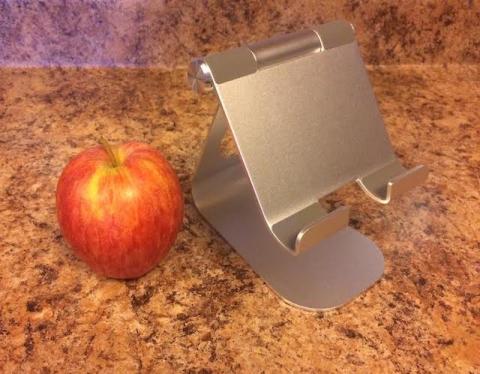
If you like to watch movies and videos on your tablet, this tablet stand is very cool. The up-and-down rotation is nice and stiff, so you can set it at any angle, and it has rubber cushions in the right places to keep your tablet from sliding or getting damaged. I just bought this a few days ago, and it’s a definite “thumbs up.” It works great with my Nexus 9, and an old iPad 2 (that I only use for music these days).
(I show it next to an apple because the shiny images on Amazon may give you the impression that it’s larger.)
Just saw this: “Never let your boss convince you that ‘work ethic’ is working extra hours for free. It’s the same as writing a check to the business owner.”
Technically that’s true, a good observation, and I can’t argue with it.
Conversely, when I got out of college, my wife’s grandfather told me the phrase, “If you do more for what you’re paid to do, you’ll eventually be paid more for what you do.” As an employee, I made a lot of money with his philosophy, rapidly doubling and tripling my income.
Later, as the owner of a small business, I didn’t mind it when employees didn’t work overtime – and we always paid for overtime. I respect people who want to work forty hours a week and have a balanced life. But I also knew that those people would never become partners in our business. I never thought of it as good or bad, just a fact of business life.
| A Machine Learning Bestseller | |
|
|
Introduction to Machine Learning with Python |