


As someone who is dealing with something like Mastocytosis or histamine intolerance, this book, “My Crazy Life: A Humorous Guide to Understanding Mast Cell Disorders,” strikes a chord with me. For a long time you walk around going “WTF?,” and during that entire process you find that American doctors are no help at all.
Scala, Java, Unix, MacOS tutorials (page 186)
| A Programming Classic! | |

|
Head First Design Patterns |

I generally try to avoid this coding style these days, but, if you want to see how to use a Java BufferedReader and its readLine method in a Scala while loop, here you go:
@throws(classOf[IOException])
def readFileToStringArray(canonFilename: String): Array[String] = {
    val bufferedReader = new BufferedReader(new FileReader(canonFilename))
    val lines = new ArrayBuffer[String]()
    var line: String = null
    while ({line = bufferedReader.readLine; line != null}) {
        lines.add(line)
    }
    bufferedReader.close
    lines.toArray
}
For this example, these are the important lines to look at:
val lines = new ArrayBuffer[String]()
var line: String = null
while ({line = bufferedReader.readLine; line != null}) {
    lines.add(line)
}
The most important part of that code — and the biggest difference from Java — is how you need to handle the readLine method inside the Scala while loop, specifically using it in a block of code that’s wrapped in curly braces, where that block of code returns a Boolean value. (The semi-colon inside that block of code helps me include two lines of Scala code inside the curly braces.)
I don’t have much time to explain this code tonight, so I hope it makes sense as is. In summary, if you wanted to see how to use a Java BufferedReader and its readLine method inside a Scala while loop, I hope this example is helpful.
I won’t link to it (because it’s a link-bait article), but I was surprised to see that medium.com ran a little article (very little), titled, “Functional Programmers are Better Programmers.” This image shows the crux of the article. I was surprised that the authors come right out and state, “Yes, FP is more difficult.”

I was looking for a good way to access XML resources (like RSS feeds) in Scala, and I currently like the idea of using ScalaJ-HTTP to access the URL and download the XML content, and then using the Scala XML library to process the XML string I download from the URL.
This example Scala program shows my current approach:
import scalaj.http.{Http, HttpResponse}
import scala.xml.XML

object GetXml extends App
{
    // get the xml content using scalaj-http
    val response: HttpResponse[String] = Http("http://www.chicagotribune.com/sports/rss2.0.xml")
                                        .timeout(connTimeoutMs = 2000, readTimeoutMs = 5000)
                                        .asString
    val xmlString = response.body

    // convert the `String` to a `scala.xml.Elem`
    val xml = XML.loadString(xmlString)

    // handle the xml as desired ...
    val titleNodes = (xml \\ "item" \ "title")
    val headlines = for {
        t <- titleNodes
    } yield t.text
    headlines.foreach(println)

}
A few notes about this application:
- I like using ScalaJ-HTTP to download the content as an HTTP GET request, in part because I like to be able to easily set timeout values on the GET request.
- Once I get the XML from the URL, it’s easy to convert that to a Scala XML object using
XML.loadString. - Once I have the XML like that, I can then process it however I want to.
The build.sbt file
If you want to test this on your own computer, the only other thing you need (besides having Scala and SBT installed) is a build.sbt file to go along with it. Here’s mine:
name := "ScalajHttpXml"

version := "1.0"

scalaVersion := "2.11.7"

resolvers += "Typesafe Repository" at "http://repo.typesafe.com/typesafe/releases/"

libraryDependencies ++= Seq(
    "org.scalaj" %% "scalaj-http" % "2.3.0",
    "org.scala-lang.modules" %% "scala-xml" % "1.0.3"
)

scalacOptions += "-deprecation"
Once you have that Scala source code and build.sbt file, you can test this Scala/HTTP/XML solution on your system. (Note that the Scala XML project is now separate from the base Scala libraries.)
To run external shell commands in SBT, first start SBT from your operating system command line:
$ sbt
Then run the consoleProject task/command:
> consoleProject
After some output you’ll see this prompt:
scala>
Now you can execute shell commands by including them in double quotes, and following them by an exclamation mark, like this:
scala> "ls -al" !
For more information, see the SBT consoleProject documentation page.
Today’s song of the day is Can’t Shake You, by Gloriana:
If for some reason you ever want to print out some HTTP response headers from a HEAD request when using ScalaJ-HTTP as an HTTP client, this example may help point you in the right direction:
import scalaj.http._

object TestHead extends App
{
    val response: HttpResponse[String] = Http("http://www.google.com")
        .method("HEAD")
        .timeout(connTimeoutMs = 2000, readTimeoutMs = 5000)
        .asString
    for ((k,v) <- response.headers) println(s"key:   $k\nvalue: $v\n")
}
I may write more about ScalaJ-HTTP in the future, but for today that’s a quick example of processing the response headers/parameters when making a HEAD request.
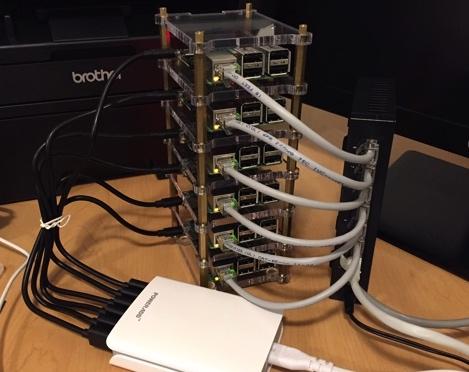
The things people do with Raspberry Pi computers are amazing. This photo shows a cluster of RPI computers someone put together to run Drupal. At some point I hope to put together a similar cluster to run things like Akka and Apache Spark.
Stat of the Year: More Americans have been married to Kim Kardashian than were killed by sharks last year.
As I mentioned in my How to find multiple filenames with Linux find tutorial, you can use find command syntax like this to find files with multiple filename extensions:
find iTunes \( -name "*.mp3" -o -name "*.m4a" \)
As that command shows, I ran this find command to find all of my music files under my iTunes directory, including .mp3 and .m4a filename extensions.
While I’m in the neighborhood, this is the full find command I use to backup all of my iTunes files that have changed or been added in the last 180 days:
find iTunes \( -name "*.mp3" -o -name "*.m4a" \) -type f -mtime -180 -print0 | xargs -0 tar rvf NewMusic.tar
There’s probably an easier way to do this, but that backup command works for me.
This is a dangerous Unix command, but if you want to move a bunch of files from their subdirectories into your current directory, this find and mv command works:
find . -type f -exec mv {} . \;
That command finds all files beneath the current directory, and moves them into the current directory. I just moved a bunch of files from their (iTunes) subdirectories into my current working directory, and that find and move command did the trick. (But again, it’s a dangerous command, be careful out there.)
Back in 2010 and 2011 I lived in Alaska, and I used to talk to people about opening up a Krispy Kreme store in Anchorage. Unfortunately I never did that, but now in 2016 someone else has. Here’s the story of the opening on adn.com.

Today’s song of the day is The Sweetest Taboo, by Sade. Back in my college bartending days, we used to play Sade’s songs during the initial setup time, when very few people were in the nightclub.
As a “note to self,” I wrote two more Textmate commands yesterday, one to capitalize each word in a selection of words, and another to convert a CSV list of words to a simple list. Here’s the source code for the Capitalize command:
#!/bin/sh

perl -ne 'print ucfirst $_'
The $_ portion of that Perl command isn’t required, but I include it as a reminder to myself about how Textmate commands and snippets work.
Here’s the source code for my Textmate command that uses the Unix tr command to convert a CSV list of words (such as a paragraph of comma-separated words) into a simple list of words:
#!/bin/sh

tr , "\n"
As you can see, those commands are fairly simple. If you know Unix/Linux and then know a little about how to write Textmate commands, you can usually get it to do what you want. I like that you can use any Mac/Unix programming language or tool to solve the problem at hand.
“The rightward slant in your handwriting indicates a romantic nature, Audrey. A heart that yearns. Be careful.”

This nih.gov page has good information on mineral and bone problems (pain, easily breaking) for people who have Chronic Kidney Disease (CKD). I talked to my doctor several times within the last year that it felt like my bones were spontaneously breaking for no apparent reason — such as when I was sitting in a chair — and even though she knew I had CKD, she didn’t know any of this information.

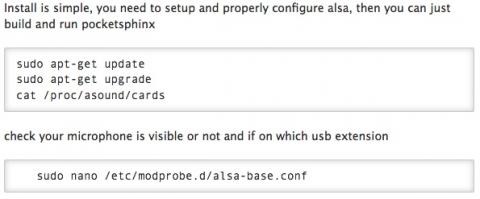
If you’re interested in using speech recognition on the Raspberry Pi, check out this short tutorial on the CMUSphinx project website.

| A Programming Classic! | |
|
|
Head First Design Patterns |