As a quick note to self, I just created a TextMate Bundle snippet to insert some text at the current cursor position. Using TextMate 2.0.x, I did it with the following steps. I’ll go through these steps quickly as I’m just writing this for myself:
Scala, Java, Unix, MacOS tutorials (page 196)
Markdown FAQ: How do I create comments in Markdown? Especially comments that won’t appear in the generated output.
Part 1 of my answer is that technically there is no way — or at least no standard way — to create comments in Markdown documents, other than to use HTML comments like this:
<!--
this is a an html comment.
the bad part of this is that it will appear in
any document you generate from this markdown, such as if
you convert this markdown to HTML with MacDown or Pandoc.
-->
The bad part about using an HTML comment is that most Markdown-to-HTML conversion tools keep those comments in the output you generate. I know that Pandoc and MacDown will both include your comments in the HTML output they generate.
Solution: A trick to create Markdown comments
Part 2 of the answer is that a user on Stack Overflow came up with this way to create Markdown comments that won’t appear in generated output:
[//]: # (This syntax works like a comment, and won't appear in any output.)
[//]: # (It’s a little bizarre, but it works with MacDown and Pandoc.)
As they note on that SO page, this approach uses an “unintended side effect of the use of YAML for metadata, but it works.”
This syntax is ugly and I’ll never remember it, but I guess that’s what macros are for. I’ve read that some people have no idea why someone would want to create comments in Markdown text, and to that I reply, “Try writing a book.”
As a summary, I can confirm that this fake Markdown comment syntax works with both MacDown and Pandoc. When I put comments like this in my Markdown source, they do not end up in my generated HTML or LaTeX output, which is what I want.
Sticks and stones may break my bones
Words will also hurt me
Compliments make me uncomfortable
I have social anxiety
I’m a wreck
Just go.
(a clever poem, from this twitter page)
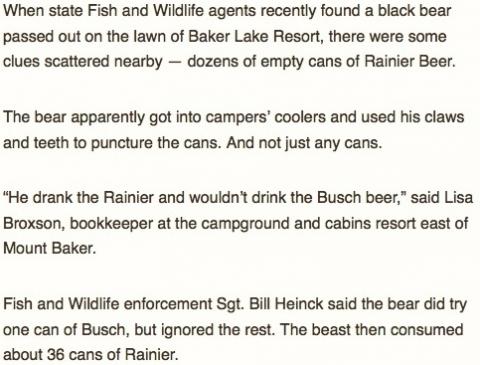
This story is from 2004, but an organization shared it on Facebook today to remind people to be careful around bears, and to keep their campsites in order. All I can add is that I never heard of Rainier beer until I started watching Longmire, and from past experience I can understand why he didn’t drink the Busch beer.
I’m looking into producing my Scala/FP book as a PDF, and as part of that I have been looking into Pandoc. With the exception of converting HTML tables into other formats such as Markdown or LaTeX, Pandoc has been working well so far.
Here are a couple of Pandoc commands to show you how easy this is:
# create a pdf from a markdown doc pandoc test1.md -s -o test1.pdf # create an html doc from a markdown doc, long form pandoc test1.md -f markdown -t html -s -o test1.html # convert markdown to latex pandoc test1.md -s -o test1.tex pandoc test1.md -f markdown -t latex -s -o test1.tex # read a markdown doc and print html to stdout pandoc -s table.md --to html # convert a latex document to html pandoc -s test.tex -o html
As a “note to self,” I confirmed that LaTeX to HTML approach in October, 2019. It creates a large, single-page HTML document. It’s not perfect, but it worked surprisingly well on a large LaTeX project.
As another note to self, this command helps a little bit with the Pandoc HTML to Markdown table conversion problem:
pandoc table.html --to=markdown_github -o table.md
As a better note, both of these commands work when converting tables in ODT and DOCX files to Markdown:
pandoc Test.odt -t markdown-simple_tables-multiline_tables-grid_tables -o ODT.md pandoc Test.docx -t markdown-simple_tables-multiline_tables-grid_tables -o DOCX.md
I can confirm that those commands create pipe-delimited Markdown tables from ODT and DOCX input files.
For more information on Pandoc, see their getting started doc and user’s manual.
If you use MacTex to install pdflatex and all other LaTeX commands, as of mid-2016, the MacTex installation path is:
/usr/texbin
This means that the pdftex and pdflatex commands will be at /usr/texbin/pdflatex, and so on.
“It’s all now, you see.”
~ William Faulkner, getting his Zen on (from the book, Intruder in the Dust)
“There’s a fine line between Saturday night and Sunday morning.”
~ Jimmy Buffett, Fruitcakes
“I had to break up the team for us to move forward in the right direction. That means getting talented players that fit with each other on and off the court. Also getting players who understand that while playing basketball is fun, this is also a business. So we need guys who will ice after practice, watch what they eat, avoid having those three extra beers when they party, and get the rest they need. I think we succeeded in getting this particular cultural change.”
(A quote from Phil Jackson, GM of the Knicks, in this story.)
In recruiting software developers, I generally didn’t think about whether guys would fit well together, but there were a couple of times where I backed off on recruiting guys who expressed certain agendas during the interview process. In two cases that immediately come to mind, one guy declared, “Anything I write is open source,” which you can’t really do as a consulting firm, and another guy seemed to intentionally steer a conversation into politics and got into an argument with one of my co-workers during the interview process.
Another guy wanted us to get into a bidding war with another company, so I said the equivalent of, “Have a nice day, see you around.” I tried playing that game with a guy once before, and I can say from experience that you have to be careful about recruiting a guy who’s only interested in going to the highest bidder.
This is a good quote on teaching, from this espn.com page:
“One thing that we’ve learned as coaches: we’re teachers,” O’Brien said. “He’s the quarterback. If I’m just talking to him, eventually they’ll just see my mouth moving. Blah blah blah. We want them to get up there and actually do it.”
As a quick Nginx configuration example, if you need to configure a 301 Redirect with Nginx, and you also need to account for trailing slash characters in the original URL, I can confirm that this solution works for me:
rewrite /foo/bar/baz/?$ /foo/bar/baz.html permanent;
This Nginx configuration line will forward both of these URIs to the new URI:
/foo/bar/baz # no trailing slash /foo/bar/baz/ # with trailing slash
This works because the ? character means “zero or more instances of the preceding character,” and in this case the character before the ? is the / character.
I don’t know if this is important for a lot of systems, but I just converted a couple of old Drupal websites to use plain, static HTML files, and I needed to make sure I handled the redirect for some URLs that may or may not have had trailing slash characters.
Back in the day, when I first moved to Alaska, I didn’t know it at first, but the Talkeetna Cemetery was a very close neighbor. Once I found out I thought it was pretty cool, as it’s an interesting little place.
Here’s a vimeo.com link to a talk titled, “The Future of Services,” by Jamie Allen, at Scala Italy.
Here’s a description of the talk from its page: “This talk will focus on how to build elastic, resilient service-based applications that can handle tremendous amounts of data in real time, and provide insight on many of the guiding principles that led to Lightbend creating the Lagom framework.”
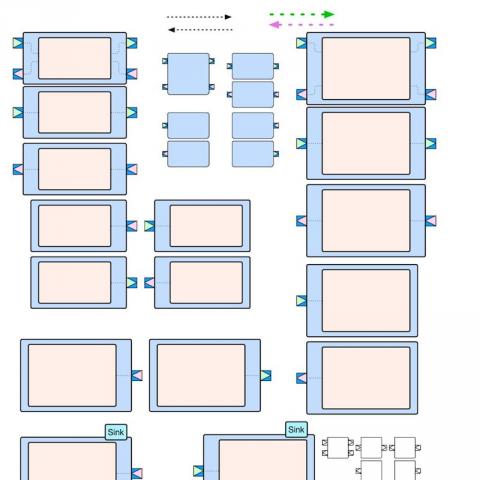
From their Graffletopia project page: “The Akka project has created the Streams toolkit for creating back-pressured, asynchronous stream processors. Diagramming them out can be quite common, and this stencil is designed to help you do that.”
“Why are they repaving perfectly good streets?”
“Election year.”
“Oh, yeah.”
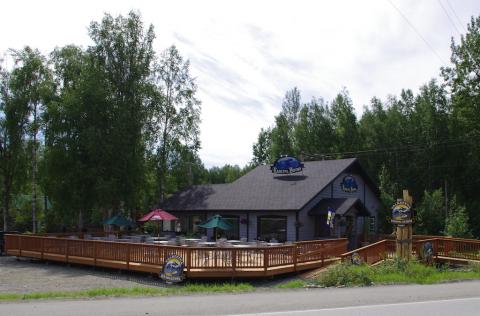
One of the many great reasons to visit Talkeetna, Alaska in the summer is all of the outdoor seating at the restaurants. Most restaurants now have big outdoor patios, like this one at the Kahiltna Bistro.
“You can use an eraser on the drafting table or a sledgehammer on the construction site.”
~ Frank Lloyd Wright
(i saw this quote on this twitter page)
“I’d rather regret the things I've done than regret the things I haven’t done.”
~ Lucille Ball
I ran across the following page in the book Clean Code, and it really caught my attention. In short, there is a programming language named LOGO that apparently used to keyword TO in the same way languages like Scala and Ruby use “def.” This is described near the bottom of the page in the following image, in the area I highlighted:

I’ve never used LOGO, but that sounds like a clever approach, and since I ran across this discussion, I have to say, it’s had an effect on my methods. Every time I type “def,” I think “TO,” and it makes me think a little bit more about how I want to write my method.
For more information on book, check out the Clean Code book.