Scala, Java, Unix, MacOS tutorials (page 197)

The book, After the Ecstasy, the Laundry, isn’t one of my favorite mindfulness books, but I love the title and the cover.

After the Ecstasy, the Laundry

Today’s song of the day is Kele Lao, by an artist named Hooshere. It is featured in a Season 1 episode of the tv series Life named Civil War.

A scary thought for me is that as many as 138,664 people may have learned about the Unix/Linux vi editor by watching my old vi/vim tutorial on YouTube. That was one of the first video tutorials I ever created, and what I should have done is (a) never publish it, and (b) keep re-recording it until I got a lot better.

(I was reminded of this when YouTube sent me an email last night to congratulate me on having over 1,000 followers.)

“When I read commentary about suggestions for where C should go, I often think back and give thanks that it wasn’t developed under the advice of a worldwide crowd.”

~ Dennis Ritchie

“One of my most productive days was throwing away 1,000 lines of code.”

~ Ken Thompson

UPDATE: These days you should put your server configurations in files in the /etc/nginx/sites-enabled directory.

As a short note, if you need to configure Nginx to serve multiple static websites out of one nginx.conf file, I have been using this approach, and it seems to work well:

server {
    server_name  www.howisoldmybusiness.com;
    rewrite ^(.*) http://howisoldmybusiness.com$1 permanent;
}

server {
    server_name  howisoldmybusiness.com;
    listen       80;
    location / {
        root /var/www/howisoldmybusiness.com/html;
    }
    access_log  /var/log/nginx/hismb_access.log  main;
    error_log   /var/log/nginx/hismb_error.log  error;
}

The first server configuration says that I want all requests to www.howisoldmybusiness.com to go to howisoldmybusiness.com. I don’t see the need for the “www” part, so this is my way of forward all requests to howisoldmybusiness.com.

The second server configuration block does the real work. It tells Nginx to listen on Port 80 for requests to howisoldmybusiness.com, and when it gets a request it should look in the /var/www/howisoldmybusiness.com/html directory for the files it should server. It also states that all access requests should be logged to the file /var/log/nginx/hismb_access.log using the “main” format, and all errors should be logged to the file /var/log/nginx/hismb_error.log.

The 'main' access_log logging format

I think the main format came with the default Nginx configuration file. You should find it defined in the main http block like this:

log_format  main  '$remote_addr - $remote_user [$time_local] "$request" '
                  '$status $body_bytes_sent "$http_referer" '
                  '"$http_user_agent" "$http_x_forwarded_for"';

Multiple websites on the same server

If you have Nginx serving up multiple websites on the same server, all you have to do is copy that configuration for the other websites. For instance, I have a website named alaskasquirrel.com on the same server as the howisoldmybusiness.com website, and its configuration is almost identical:

server {
    server_name  www.alaskasquirrel.com;
    rewrite ^(.*) http://alaskasquirrel.com$1 permanent;
}

server {
    server_name  alaskasquirrel.com;
    listen       80;
    location / {
        root /var/www/alaskasquirrel.com/html;
    }
    access_log  /var/log/nginx/aksquirrel_access.log  main;
    error_log   /var/log/nginx/aksquirrel_error.log  error;
}

More information

This is a short blog post, so I’ll leave it at that for now. Here are a few links on configuring Nginx, particularly the Nginx log files:

  • http://nginx.org/en/docs/http/ngx_http_log_module.html
  • https://www.nginx.com/resources/admin-guide/logging-and-monitoring/
  • http://nginx.org/en/docs/ngx_core_module.html#error_log

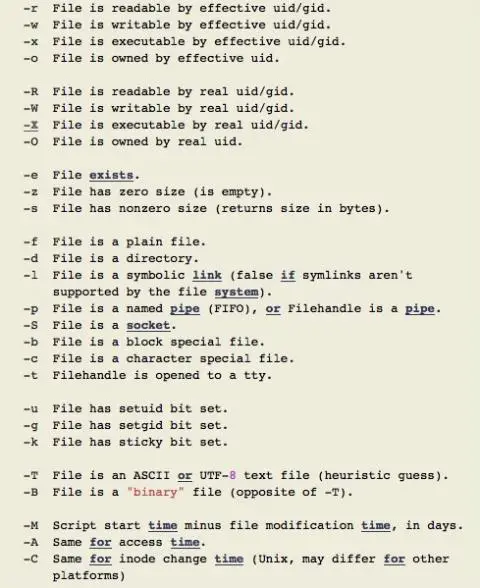
This image comes from this Perl.org web page, and shows the Perl “file test” characters. As I show on this page, an if file test looks like this in Perl:

Perl 'file test' characters (for if/then/else tests)

From this article: The Swiss Federal Institute of Technology in Lausanne (EPFL), in partnership with the Mobility Lab Sion Valais, has just announced that it will begin testing electric driverless buses on public roads for the first time ever in Switzerland, starting today (June 23, 2016) ... the smart buses will travel at a maximum speed of 20 kilometers (approximately 12.4 miles) per hour.

As a quick note and a little bit of source code sharing, I wrote the following Perl script to delete all of the binary files it finds in a list of files it’s given. I named this script deleteBinaryFiles.pl, and it should be called like this:

deleteBinaryFiles.pl listOfFilesToLookAt

where listOfFilesToLookAt is a file that contains a list of filenames, with one filename per line.

Given that brief introduction, here’s the source code:

#!/usr/bin/perl -w

# ---------------------------------------------------------------
# this script takes a filename as input.
# that file should contain a list of all files (not directories)
#      that this script should examine.
# this script will delete all binary files that are in that list.
# ---------------------------------------------------------------

# 1) open the file that has a list of all of the files that need to be looked at.
#    get this filename from the command line.
$num_args = $#ARGV + 1;
if ($num_args != 1) {
    print "\nUsage: deleteBinaryFiles.pl filename\n";
    exit;
}

$listOfFiles = $ARGV[0];


# 2) now go through all of the files in that file.
#    if any of them are binary files, delete them.
open(FILE, $listOfFiles) or die "Could not read from '$listOfFiles', cowardly quitting. $!";

while (<FILE>) {
    chomp;
    $currFile = $_;
    if (-B $currFile) {
        unlink($currFile) or die "Could not delete '$currFile'\n";
        print "   deleted: $currFile\n";
    }
}

close(FILE);

Possibly the only two important things about this example are:

  • The -B file test operator determines if the current file is a binary file.
  • The Perl unlink function is used to delete a file.

I just thought I’d share this source code here, so as a quick summary, if you wanted to see some Perl source code that shows (a) how to check to see if a file is a binary file, and (b) how to delete files in Perl, I hope this is helpful

If you’ve never used AppleScript, here are two iTunes AppleScript examples to get you going. First, This one tells iTunes to play the playlist named “My Favorites”:

tell application "iTunes"
    play playlist "My Favorites"
end tell

That script starts playing a random song from that playlist. If you want to start by playing the first song of that playlist, this script will do the trick:

tell application "iTunes"
    play (first track of playlist "My Favorites")
end tell

Lastly, this script tells iTunes to stop playing whatever it’s playing at the moment:

tell application "iTunes"
    stop
end tell

For many more examples of how this works, see my large collection of iTunes AppleScript examples.

If nothing else comes up, I’ll start working on my “Beginner’s Guide to Functional Programming in Scala” book again on Wednesday.

I’ve been away from it for so long, I honestly have no idea where I left off with it. At one point I felt like I had the book entirely written in my head, and it was just a matter of taking the time to write and edit it. I hope I made some good notes before I had to stop working on it.

When I first started writing this book I didn’t know if there was a need for it, and now that so much time has passed, I seriously wonder if there’s a need for it.

There’s not enough going on in my life, so I get to be tested for prostate cancer today. (And I’m not referring to a PSA test.)

Woo-hoo. #FakeEnthusiasm

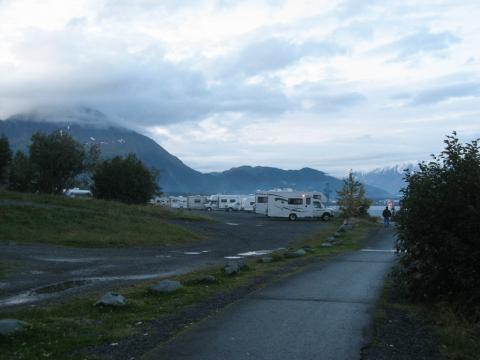
If you ever get an RV and decide to drive around Alaska, make sure you stop at the Resurrection North Campground in Seward, Alaska. You can pull right up next to Resurrection Bay. You’ll thank me later.

(Not to be too morbid, but I have it written in my will that half of my ashes should be spread in Resurrection Bay.)

Campground in Seward, Alaska

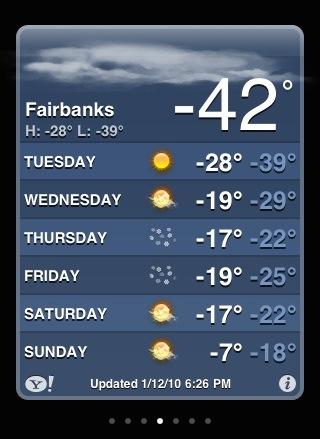
In case the summer’s hot temperatures are making you warm, here’s something to cool you off.

Fairbanks, Alaska - cold temps

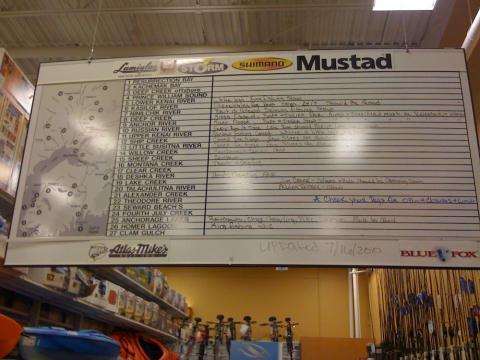
Salmon fishing is kind of a big deal in Alaska. I don’t remember what store I was in when I took this photo, but as it shows, someone in the store kept the fishing information up to date.

Salmon fishing in Alaska

“You don’t have to understand here to be here.”

~ Charlie Crews, in the excellent tv series about Life and Zen

Life tv series

“I know it’s a cornball thing, but love is passion. Obsession. Someone you can’t live without. I say fall head over heels. Find someone you can love like crazy, and who’ll love you the same way back. How do you you find ’em? Well, you forget your head and you listen to your heart. Because the truth is, there’s no sense living your life without this. To make the journey and not fall deeply in love, well, you haven’t lived a life at all. But you have to try, because if you haven’t tried, you haven’t lived.”

~ Spoken by Anthony Hopkins in Meet Joe Black

If you’ve never seen it, Meet Joe Black is a good movie about Death, life, and love.

“You’re a butterfly
And butterflies are free to fly,
Fly away, high away, bye bye.”

Some lyrics from the song of the day, Someone Saved My Life Tonight, by Elton John:

This is a cartoon about “What a husky hears,” from the Dogs of C-Kennel comic. Having known six huskies very well, I can confirm the accuracy of this comic.

What a husky hears