


This is a cartoon about “What a husky hears,” from the Dogs of C-Kennel comic. Having known six huskies very well, I can confirm the accuracy of this comic.
Scala, Java, Unix, MacOS tutorials (page 198)
| A Machine Learning Bestseller | |

|
Hands-On Machine Learning with Scikit-Learn |

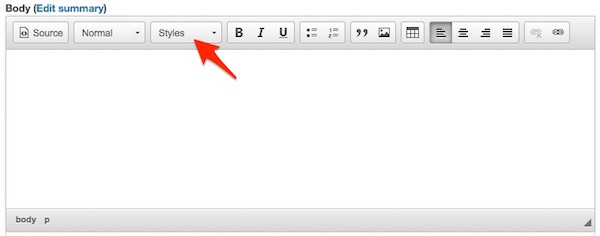
A nice thing about the CKEditor in Drupal 8 is that it’s easy to add your own custom styles to the CKEditor “Styles” drop-down menu. This is the menu in the CKEditor widget you see when you’re editing content at a URI such as node/add/blog, which I’m referring to in this image:
As you can see from the next image, I’ve added several custom styles to my own CKEditor Styles drop-down menu:
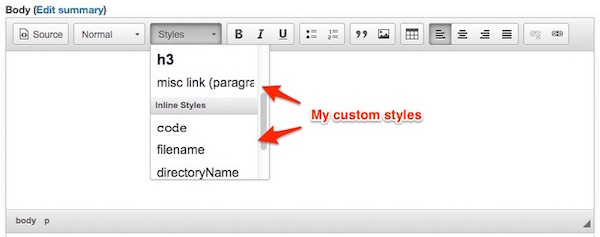
What you can’t tell quite yet is that you can create two different types of custom styles in this menu:
- Block styles, which affect an entire block, such as a
<div>. - Inline styles, which affect a portion of content you select, such as one word, or a couple of words in a paragraph.
I’ll show how to create both of those in this tutorial.
Overview
Adding a new style to the CKEditor Styles drop-down menu is really just a two-step process:
- Add the desired style to your custom stylesheets, i.e., the stylesheets in your Drupal theme.
- Add the proper notation in the CKEditor configuration within the Drupal administration pages.
Step 1: Adding a style to your stylesheets
The first step is to add a desired style to your theme’s stylesheet(s). For example, I just had the need to add a new style that would (a) make an entire paragraph right-aligned, and (b) reduce its opacity. To accomplish this, I added this style to my theme’s main.css stylesheet:
p.opaque-misc-link {
    opacity: 0.35;
    text-align: right;
}
That’s all you have to do for this step, add whatever style you want to your theme’s stylesheet(s), as usual.
Step 2: Configure the CKEditor in Drupal
What you want to do in the next step is configure the CKEditor to recognize this style. In Drupal 8 you do this within the Drupal administration pages.
To do this, either go directly to the admin/config/content/formats URI, or follow these steps:
- Click “Manage”
- Click “Configuration”
- Click “Text formats and editors”
Now, you need to select the “Text Format” that you want to configure. In my case I want to configure the CKEditor in the “Full HTML” text format, which I show here:

To do this, click “Configure.” On the page that comes up, scroll down to the “Text editor” section. In my case, “CKEditor” is already chosen, but if you haven’t chosen the CKEditor already, you’ll need to do so now.
After you do this, scroll down a little bit until you see the “CKEditor plugin settings” section, as shown in this image:
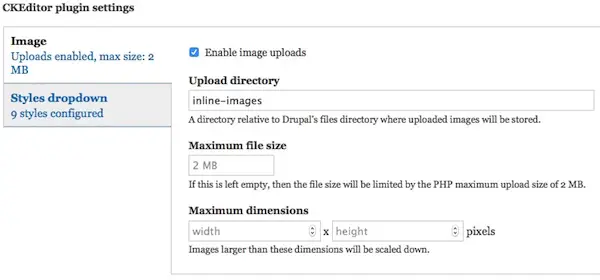
In this section, click the “Styles dropdown” tab, and you should see something like this:
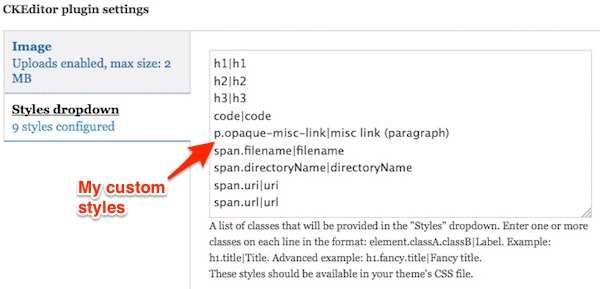
You may not have anything in this textarea initially, but as you can see, I have nine styles in this area. Some of the styles are there because I was testing things, but I use all of these styles on a regular basis:
code|code
p.opaque-misc-link|misc link (paragraph)
span.filename|filename
span.directoryName|directoryName
span.uri|uri
span.url|url
This style is the one that corresponds to the style I just added to my stylesheet in Step 1:
p.opaque-misc-link|misc link (paragraph)
The way this works is that the text before the “|” symbol references the style in the stylesheet:
p.opaque-misc-link
and the text on the right side of the “|” is the text that will show up in the CKEditor “Styles” drop-down menu when you’re editing content. In my case this is the text I wanted to see in the drop-down menu:
misc link (paragraph)
As you can see in the image that I showed earlier, that text does appear in that menu:
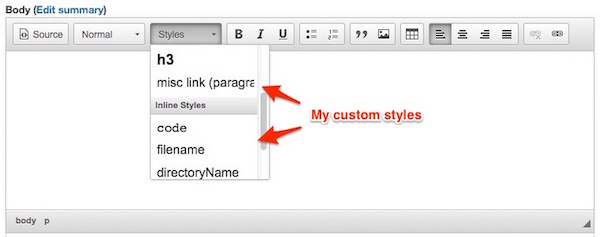
Now, if you’re following with me, if you go ahead and scroll down and click, “Save configuration” here, you can then go back to an add/edit content URL, such as node/add/blog. When you do that, if you click on the CKEditor “Styles” menu, you should see your new style.
Block styles vs Inline styles
The Drupal 8 CKEditor “Styles dropdown” configuration area makes a distinction between (a) styles that affect a “block,” which is roughly something like a <div>, <p>, or other block tag, and (b) styles which affect a smaller region of text, such as one word, or a few words in a paragraph. Drupal 8 refers to the first type as a “Block style,” and the second type as an “Inline style.”
In the nine styles that I showed earlier, these lines will show up in the “Block style” section of the “Styles” drop-down menu:
h1|h1
h2|h2
h3|h3
p.opaque-misc-link|misc link (paragraph)
These styles show up in the “Inline styles” section of the “Styles” drop-down menu:
code|code
span.filename|filename
span.directoryName|directoryName
span.uri|uri
span.url|url
I found it necessary to include the word “span” before most of those inline styles. This was mostly a trial-and-error effort on my part, because when I used this text:
.filename|filename
and then tried to save the form, I got an error that said the syntax was wrong. After trying a few different things, I finally settled on this approach:
span.filename|filename
I use that CSS style to add a style to filenames, such as sites/default/settings.php. It’s possible that I could have also used this approach in that textarea:
p.filename|filename
but I thought the first approach was more accurate, and it works as desired.
Summary
I’ll be glad to write more about this if people are interested, but for now, I’ll just say that in summary, if you wanted to see how to add your own custom styles to the Drupal 8 CKEditor “Styles” drop-down menu, I hope this example is helpful.
— You a private eye?
That’s what the blue neon sign says out front.
— It’s argon. Neon glows orange.
Voiceover: From the start, she was trouble.
(from this twitter page)
I’ve always wondered about the meaning of the song Levon, as performed by Elton John, with lyrics written by Bernie Taupin. After researching this for a while, this is what I’ve been able to find out about the meaning of Levon.
Elton John on Levon’s meaning
The best information I’ve found comes from the songfacts website. There, one contributor states the following:
As of this past Thursday, June 23, 2016, I am now being tested for something called “Systemic Mastocytosis.” rarediseases.org describes this illness as, “Mastocytosis is a rare disorder characterized by abnormal accumulations of mast cells in the skin, bone marrow, and internal organs (liver, spleen, gastrointestinal tract and lymph nodes).”
From the Mayo Clinic website:
“When triggered, these mast cells release substances that can overwhelm your body. You might experience symptoms such as facial flushing, itching (pruritus), a rapid heartbeat, abdominal cramps, lightheadedness, or even loss of consciousness (syncope).”
From rarediseases.org
“Bones affected by mastocytosis may become softened and deteriorate ... break-down of bones ... may lead to life-threatening episodes of anaphylaxis (anaphylactic shock).”
They also state, “Recent studies have found that up to 10% of patients with severe allergic reactions to bee stings may have mastocytosis.” I don’t know what they mean by “severe,” but I’m supposed to carry an EpiPen with me after having a bad reaction to a bee sting in the late 1990s.
I also developed severe facial flushing and hives after having an “MRI with contrast” a few weeks ago, and patient.info states that “some radiographic dyes” are a possible trigger for mastocytosis symptoms.
The problems in figuring out what’s going on
1) The first problem in figuring out what’s going on with my body is that all of these illnesses are rare, so you have to find a doctor who knows about them. An endocrinologist deals with the pheochromocytoma and paraganglioma, and I don’t know who specializes in mastocytosis. This is what led me to the University of Colorado.
2) The problem with figuring out if I have (a) mastocytosis or (b) pheochromocytoma/paraganglioma is that I have symptoms of both illnesses. For instance, I have facial flushing, itching, rapid heartbeat, abdominal cramps (twice), lightheadedness, loss of consciousness, nausea, vomiting. I also have a problem I describe as feeling like my bones are spontaneously breaking while I’m doing nothing. The last time that happened I couldn’t walk on my left foot for four days. Furthermore, in regards to blood pressure, if anything my blood pressure tends to go high rather than low, and that’s more a symptom of pheochromocytoma/paraganglioma than mastocytosis.
3) A third problem is that I have many of these symptoms, but not all of them. For instance, I don’t have any skin lesions, so I surely don’t have “Diffuse cutaneous mastocytosis.” I also don’t have diarrhea, which seems to be a common mastocytosis symptom. Both illnesses state that headaches are common, and I had severe headaches for nearly three months late last summer, but since then they have subsided.
4) A fourth problem is that my previous labwork indicated that I may have a pheochromocytoma or paraganglioma, but the University doctor suspects that mastocytosis is more likely. My labwork showed certain values that were two to three times higher than normal, and she said that most people with these tumors have values that are five times normal, or higher.
5) Back in December through February I used to have “attacks” (or episodes) where I would have severe symptoms that would last 15-30 minutes, but more recently this has changed, and now the symptoms are much more consistent (and persistent). They aren’t “attacks” so much any more as they are things that I try to live with. I either try to work through them, or I lay in bed as long as necessary.
6) Finally, another problem is that there are other things going on. Several times since December my calcium levels have been high, and despite being on a DASH diet since December, my creatinine level has been measured between 1.2 and 1.8, with the latter tests indicating CKD II or III.
Systemic mastocytosis life expectancy
When I was trying to read about “bone pain” in regards to mastocytosis last night, I found some numbers related to mastocytosis life expectancy. I can’t find the website I was looking at last night, but that website said that depending on the sub-type of mastocytosis you have, the life expectancy would be one of these things:
- Normal for someone my age
- 41 months
- Just a few months (for the most severe sub-type)
This isn’t the same website I was looking at, but patient.info states, “The median survival for aggressive systemic mastocytosis is 41 months and for mast cell leukemia it is less than 6 months.”
If you’re interested in the nitty-gritty research details, it looks like the original source of this information is probably this bloodjournal.org article, which states, “Survival in patients with ISM (median, 198 months) was superior to that of patients with ASM (median, 41 months), SM-AHNMD (median, 24 months), or MCL (median, 2 months).”
Honestly, those numbers strike me as odd. The thought that comes to mind is, “X number of months from what?” In my case, I knew something was wrong last October when I first went to my doctor. After that I started passing out on December 14, 2015. Then the symptoms went from (a) “episodes” to (b) nearly constant somewhere around February. And now in June I’ve been passed from one doctor to another, and she wants to repeat the labwork. So again, “X months from what exactly?”
Pheochromocytoma, paraganglioma, or mastocytosis?
While my doctor at the University is testing me for systemic mastocytosis, I forgot to ask her how or why this would also result in labwork that indicates a possible pheochromocytoma or paraganglioma. Obviously I’m not a doctor, but it seems weird to have labwork that shows I may have these things, but she thinks it’s more likely that I have the systemic mastocytosis.
That being said, she isn’t ignoring this labwork; she just doesn’t seem to trust the previous labwork and wants me to repeat it when my symptoms are bad again.
Honestly, the thing running through my mind is, “How many more bad days do I get to have before I don’t get to have any more?” All of the symptoms are consistently getting worse, so when you’re going through this it makes you wonder how many times you can pass out, until one time you just don’t wake up again. (If it’s not obvious, I’m a wee bit frustrated at the moment.)
It was very humbling to be at a research hospital today. There were so many people in bandages, casts, wheelchairs, missing limbs, tubes hanging out, oxygen tanks, some people barely able to walk, and several people crying very hard in the hallways.
The Dalai Lama is in Boulder, Colorado, where everyone rides bicycles and wears bike helmets. (Image from this Twitter page.)

*at the new hospital filling out paperwork* Question: Are you depressed because of your illness?
Me: *checks “No.”*
Receptionist: “Hi. Are you depressed because of your illness?”
Me: “No, I’m fine, how are you?”
1st Medical Person: “Are you depressed because of your illness?”
Me: “No. Why does everyone keep asking? Do I look depressed?”
2nd Medical Person: “Are you depressed because of your illness?”
Me: “I was fine ten minutes ago.”
3rd Medical Person: “Are you depressed because of your illness?”
Me: “No, but I’m starting to get a little irritable.”
Doctor: “Hi.”
Me: (thinking, “If you ask if I’m depressed because of my illness I’m going to punch you in the neck!”)
Doctor: “It looks like your blood pressure is a little high ...”
I always wanted to go back to college, but this isn’t exactly what I had in mind.
It’s time to find out if I have a pheochromocytoma or paraganglioma tumor, or something else that could cause the same lab results.

Me: Goodnight.
Brain: Pssst.
Me: What?
Brain: What disease do you think we have?
(quoted from multiple people on twitter)
In this tutorial I’ll demonstrate how to write a simple Drupal 8 “block module.” By this I mean that I’ll show you how to write a simple Drupal 8 module that will display output in a block. When you’re done you will have created a new block that you can place in one or more theme regions.
You can tell when people love their work by seeing the quality of the products they produce. What I’m thinking about at this moment is that whoever controls MLB.tv does not love their work, because if they did they would certainly make better UI/UX decisions. If they really cared about the product, they would let you easily fast-forward and rewind; mobile navigation would let you go directly to a specific inning; and on all platforms it would be extremely helpful if you could skip from one at-bat to the next.
Beyond those basics, anyone who loves baseball would like an easy way to watch all of the at-bats of their favorite batters. For example, when I’m really pressed for personal time I’d like to be able to watch all of Kris Bryant’s at bats.
A terrific feature would be to be able to watch recorded games without all of the delays and downtime that is involved in a baseball game. A full game can easily take two and half hours (or more) to watch, but there’s actually only about 20-30 minutes of real action, so if you’re watching a recorded game, why not be able to skip all that wasted time?
Those are just a few obvious ideas, where again the point of this little post/rant is that whoever is creating the MLB.tv apps doesn’t love their work (IMHO).
I should add that another possibility in this specific case — because they have a monopoly — is that it may not be the product manager or developers who don’t love their work. It may be that their organization is holding them down. But personally, while I’ve worked with some organizations that make it hard to produce great work, there’s almost always a way of getting things done.
As a short note today, if you want to make an offline copy/mirror of a website using the GNU/Linux wget command, a command like this will do the trick for you:
wget --mirror            \
     --convert-links     \
     --html-extension    \
     --wait=2            \
     -o log              \
     http://howisoldmybusiness.com
Update: One thing I learned about this command is that it doesn’t make a copy of “rollover” images, i.e., images that are changed by JavaScript when the user rolls over them. I haven’t investigated how to fix this yet, but the easiest thing to do is to copy the /images directory from the server, assuming that you’re making a static copy of your own website, as I am doing. Another thing you can do is manually download the rollover images.
Why I did this
In my case I used this command because I don’t want to use Drupal to serve that website any more, so I used wget to convert the original Drupal website into a series of static HTML files that can be served by Nginx or Apache. (There’s no need to use Drupal here, as I no longer update that website, and I don’t accept comments there.) I just did the same thing with my alaskasquirrel.com website, which is basically an online version of a children’s book that I haven’t modified in many years.
Why use the --html-extension option?
Note that you won’t always need to use the --html-extension option with wget, but because the original version of my How I Sold My Business website did not use any extensions at the end of the URLs, it was necessary in this case.
What I mean by that is that the original version of my website had URLs like this:
http://howisoldmybusiness.com/content/friday-october-18-2002
Notice that there is no .html extension at the end of that URL. Therefore, what happens if you use wget without the --html-extension option is that you end up with a file on your local computer with this name:
content/friday-october-18-2002
Even if you use MAMP or WAMP to serve this file from your local filesystem, they aren’t going to know that this is an HTML file, so essentially what you end up with is a worthless file.
Conversely, when you do use the --html-extension option, you end up with this file on your local filesystem:
content/friday-october-18-2002.html
On a Mac, that file is easily opened in a browser, and you don’t even need MAMP. wget is also smart enough to change all the links within the offline version of the website to refer to the new filenames, so everything works.
Explanation of the wget options used
Here’s a short explanation of the options I used in that wget command:
--mirror
    Turn on options suitable for mirroring. This option turns on
    recursion and time-stamping, sets infinite recursion depth,
    and keeps FTP directory listings. It is currently equivalent to
    ‘-r -N -l inf --no-remove-listing’.

--convert-links
    After the download is complete, convert the links in the document
    to make them suitable for local viewing.

--html-extension

-o foo
    write "log" output to a file named "foo"

--wait=seconds
    Wait the specified number of seconds between the retrievals.
    Use of this option is recommended, as it lightens the server load
    by making the requests less frequent.
Depending on the web server settings of the website you’re copying, you may also need to use the -U option, which works something like this:
-U Mozilla
   mascarade as a Mozilla browser
That option lets you set the wget user agent. (I suspect that the string you use may need to be a little more complicated than that, but I didn’t need it, and didn’t investigate it further.)
I got most of these settings from the GNU wget manual.
Update
An alternative approach is to use httrack, like this:
httrack --footer "" http://mywebsite:8888/
I’m currently experimenting to see which works better.
Summary
I’ll write more about wget and its options in a future blog post, but for now, if you want to make an offline mirror copy of a website, the wget command I showed should work.
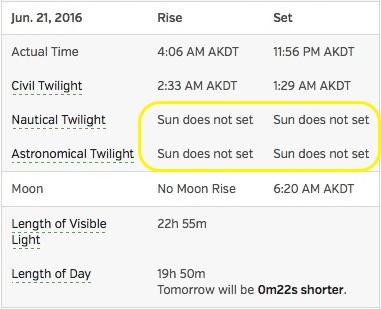
Happy Summer Solstice Day. In Alaska this is a happy day because of the whole “Sun does not set” thing, but it’s also a sad day because the “length of visible light” starts going down from here. Once it gets on a roll, Talkeetna, Alaska will lose six minutes of sunlight per day.
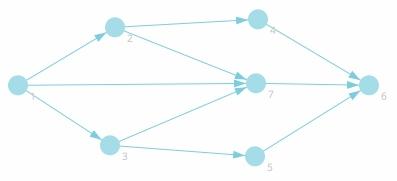
“A visual guide to graph traversal algorithms” is a fun website. As their docs state, “You can draw a new node by clicking anywhere on the visualization canvas. To add an edge between nodes, drag your mouse from one node to another.”
PHP FAQ: How do I remove all non-printable characters from a string in PHP?
I don’t know of any built-in PHP functions to remove all non-printable characters from a string, so the solution is to use the preg_replace function with an appropriate regular expression.
Solution: Allow only ASCII characters
For my purposes I don’t have to work with Unicode characters, so one of the best solutions for my purposes is to strip all non-ASCII characters from the input string. That can be done with this preg_replace code:
$result = preg_replace('/[\x00-\x1F\x80-\xFF]/', '', $string);
That code removes any characters in the hex ranges 0-31 and 128-255, leaving only the hex characters 32-127 in the resulting string, which I call $result in this example.
You can see how this works in the interactive PHP shell. In this example I just want to get rid of the characters ‘ and ’, which don’t work well in my current application:
myprompt> php -a
Interactive shell

php > $string = "‘Hello,’ she said.";
php > $result = preg_replace('/[\x00-\x1F\x80-\xFF]/', '', $string);
php > echo $result;
Hello, she said.
As you can see, the characters ‘ and ’ are not in the $result string.
Note: You can read more about hex and octal character sequences on this php.net page.
Also note that if you prefer octal characters to hexadecimal characters, this code should work as well:
$result = preg_replace('/[\000-\031\200-\377]/', '', $string);
I just tested that on my example and it worked fine, but I haven’t tested it with other strings. (This page is a good resource for basic octal and hex values.)
Possible solution: Use the 'print' regex
Another possible solution is to use the ‘print’ regular expression shown in this example with preg_replace:
$result = preg_replace('/[[:^print:]]/', "", $string);
Per the PHP regex doc, the [:print:] regex stands for “any printable character,” so for my example I thought it would leave the ‘ and ’ characters in the resulting string, but to my surprise the output looks like this:
php > $string = "‘Hello,’ she said.";
php > $result = preg_replace('/[[:^print:]]/', "", $string);
php > echo $result;
?Hello,? she said.
I don’t know why that regex ends up putting ? characters in the resulting string, so at the moment I’m calling this a “possible solution” rather than a solution. Note that if you just echo out the original string, it prints fine:
php > echo $string;
‘Hello,’ she said.
More solutions (Unicode)
As I mentioned, I don’t currently have to concern myself with Unicode characters, so the original ASCII character solution I showed works fine for me. If you do need to handle Unicode characters, this SO page shows a possible solution.
More PHP regular expressions
Finally, while I’m in the neighborhood, here’s a list of PHP “range” regular expressions from the php.net regex page. As the “range” name implies, these patterns can be used to match ranges of characters in PHP strings:
[:digit:]      Only the digits 0 to 9
[:alnum:]      Any alphanumeric character 0 to 9 OR A to Z or a to z.
[:alpha:]      Any alpha character A to Z or a to z.
[:blank:]      Space and TAB characters only.
[:xdigit:]     .
[:punct:]      Punctuation symbols . , " ' ? ! ; :
[:print:]      Any printable character.
[:space:]      Any space characters.
[:graph:]      .
[:upper:]      Any alpha character A to Z.
[:lower:]      Any alpha character a to z.
[:cntrl:]      .
As shown in my earlier example, you actually need to use two brackets with these regex patterns when using preg_replace:
$result = preg_replace('/[[:^print:]]/', "", $string);
Summary
In summary, if you wanted to see how to remove non-printable characters from strings in PHP, I hope these examples are helpful.
I don’t know the origin of this image, but I love this saying.
“‘Hurt people’ hurt people. That’s how pain patterns gets passed on, generation after generation after generation. Break the chain today. Meet anger with sympathy, contempt with compassion, cruelty with kindness. Greet grimaces with smiles. Forgive and forget about finding fault. Love is the weapon of the future.”
~ Yehuda Berg

This pheochromocytoma-paraganglioma tumor (or whatever is going on) gives new meaning to the term, “Manic Monday.” Anybody want to run a marathon? Right now?
Before I go into spontaneous human combustion, here’s the song of the day, Manic Monday, by The Bangles:
| A Machine Learning Bestseller | |
|
|
Hands-On Machine Learning with Scikit-Learn |