


If it feels like you’re not alone, you’re not. :)
Scala, Java, Unix, MacOS tutorials (page 280)
| Algorithms! | |
|
40 Algorithms Every Programmer Should Know |
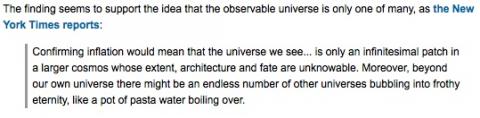
A nice chart showing the relative time latencies of accessing things, with everything being relative to the speed of one cpu cycle.


Where other people might see a baseball game, I see the “Jesus Loves You” guy.


Jake Arrieta looked sharp in his first start of 2014. This photo shows what appears to be his curveball grip.

This code shows how to dynamically add a hidden field to a form with Sencha ExtJS 4:
I’ve been working with Sencha forms a little bit lately, especially Sencha ExtJS 4 forms and the form panel (Ext.form.Panel), and I’ve found these background/theory notes about forms to be helpful:
I can tell you from my own recent experience that if you don’t use the Sencha ExtJS Store load method properly, nothing will happen. After torturing myself twice by mishandling the load method, I thought maybe it would help if I wrote a quick blog post about how to properly use the load method.
I just had to write a Linux bash shell script that has a for loop that reads a file, and that file contains lines with blank spaces in it. This sounds simple, but blank spaces cause major problems in a Bash for loop.
Fortunately there’s a simple solution: Before the for loop, declare the input field separator to be a newline character, as shown in this for loop code:
I’m currently writing a complicated Linux bash shell script where I need to keep a counter in an external file, and to do so, I need to be able to write to a file and then read from that file.
In short, this is how I write my counter to that file:
# create a variable to represent the filename
COUNTER_FILE="counter.tmp"

# write to the file
echo "0" > $COUNTER_FILE
Later in the code I increment the counter and write it to the file like this:
I just ordered this Edible Arrangement for the nurses who helped me through my surgery. I hope they like relatively healthy food.

A Sencha ExtJS checkboxgroup and checkbox listener example:
A Sencha ExtJS checkbox listener and textfield example. First, the checkbox and textfield definitions:
{
    fieldLabel: 'myCheckBox'
    xtype: 'checkbox',
    name: 'myCheckBox'
},
{
    fieldLabel: 'myTextField'
    xtype: 'textfield',
    name: 'myTextField',
    disabled: true
}
Next, how to add a listener to the checkbox, and enable or disable the textfield when the checkbox is clicked:
Here’s a Sencha ExtJS form panel (Ext.form.Panel) example, using an hbox layout:
Here’s an example of a Model and a Store from the Sencha ExtJS Store docs:
| Algorithms! | |
|
|
40 Algorithms Every Programmer Should Know |