


Well played, Sherlock.
Scala, Java, Unix, MacOS tutorials (page 279)
| Algorithms! | |
|
40 Algorithms Every Programmer Should Know |

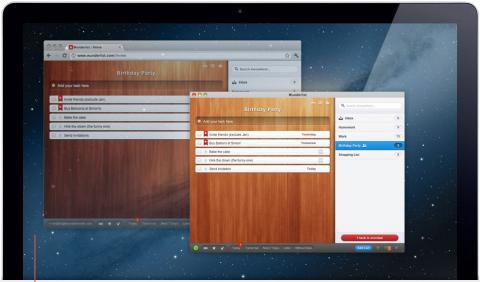
I want to look at converting a recent Sencha ExtJS application into a desktop application, and it looks like TideSDK is just what I need.
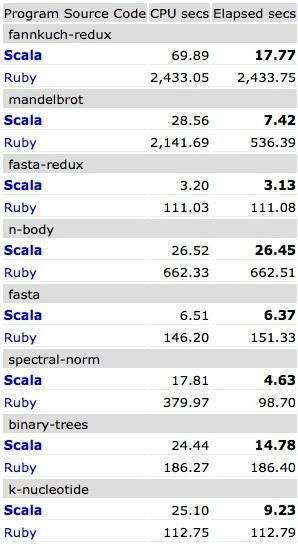
If you like (or hate) computer programming benchmarks, the Benchmarks Game is interesting. Compare Scala, Java, Ruby, Python, Haskell, Erlang, Clojure, and more.

TypeAhead is a continuous predictive text editor. It always tries to help you auto-complete the current word by using words in (a) the current document, as well as (b) a dictionary.
This short video shows a very rough prototype of how this might work:
Improvements
A few improvements are possible and easy.
There are probably better ways to do this, but here’s a JavaScript function I wrote for a Sencha ExtJS application that extracts the text from an anchor tag (hyperlink):
Here’s a quick example of how to use a Sencha ExtJS or Touch DelayedTask:
onMainViewportAfterRender: function(viewport, options) {
    var tabPanel = viewport.down('tabpanel');
    var task = new Ext.util.DelayedTask(function() {
        tabPanel.setActiveTab(0);
    });
    task.delay(250);
}
As shown, the first thing you do is create a task by giving a DelayedTask a callback function. Then you tell the task how long it should delay before executing.
As a quick note today, here are my current Sencha utilities (most of them being string utilities):
I learned today that you break out of a Sencha ExtJS Store each loop by returning false from your function. This code shows the technique:
I went to the ER one day late last year with severe chest pain. I exercise a lot and had been eating well, so I didn’t think I was having a heart attack, but the pain just kept getting worse, so off I went.
[toc hidden:1]
Tommy John, aka, “Patient Zero”. His surgery was a huge story in the 1970s. Photo from this story on ESPN. Reminds me of the movie, Suspect Zero.

Sencha ExtJS - How to dynamically create a form textfield (Ext.form.field.Text)
Without much introduction, here’s a large block of Sencha ExtJS controller code. The code needs to be cleaned up, but at the moment it shows:
The following code shows how to dynamically create a Sencha ExtJS form textfield, i.e., a Ext.form.field.Text field. Maybe one of the best things about this example is that it shows how to get input focus on a textfield:
Without any significant introduction, here are some more Sencha ExtJS code examples. I’m just trying to make my example code easier for me to find; if it helps you, that’s cool, too.
The following code shows:
Here are two Sencha ExtJS Ext.Ajax.request JSON POST and GET examples. The first one shows how to add a Stock by getting all of the values in a Sencha form (Ext.form.Panel). Keys that I learned recently are:
formPanel.getForm()gets the form (Ext.form.Basic)Ext.JSON.encode(formPanel.getValues())JSON encodes all of the form values
Here’s the code:
onStockFormKeyPress: function(textfield, event, options) {
    if(event.getKey() == event.ENTER) {
        Ext.Msg.alert('Keys','You pressed the Enter key');
    }
}
This function is called when the keypress event is handled in the init function of my controller class:
Sencha ExtJS Ext.Msg.show examples
Here’s a simple Sencha Ext.Msg.show example:
Ext.Msg.show({
    title: 'Dude',
    msg: 'Dude, you need to select at least one link.',
    buttons: Ext.Msg.OK,
    icon: Ext.Msg.WARNING
});
I’ll add more Ext.Msg.show examples here over time.
This Sencha Store Ajax JSON proxy reader/writer example comes from the link shown. It shows how to use:
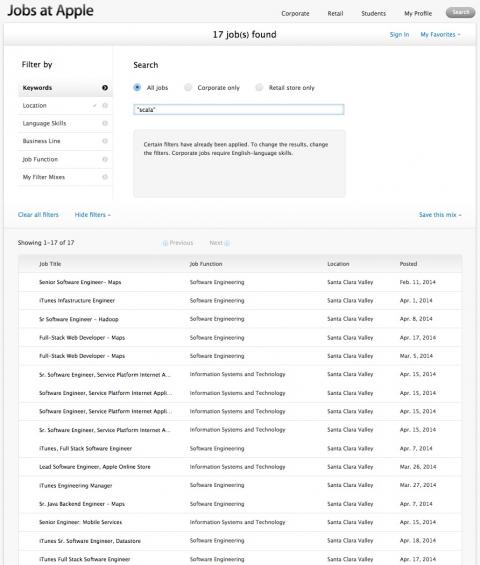
In December, 2013, Apple had six Scala job openings. In April 2014, they have 17.
| Algorithms! | |
|
|
40 Algorithms Every Programmer Should Know |