This is a simple Markdown cheat sheet. I created it for my own needs, so I can find what I use and need quickly. If it’s a helpful resource for you too, cool.
Scala, Java, Unix, MacOS tutorials (page 302)
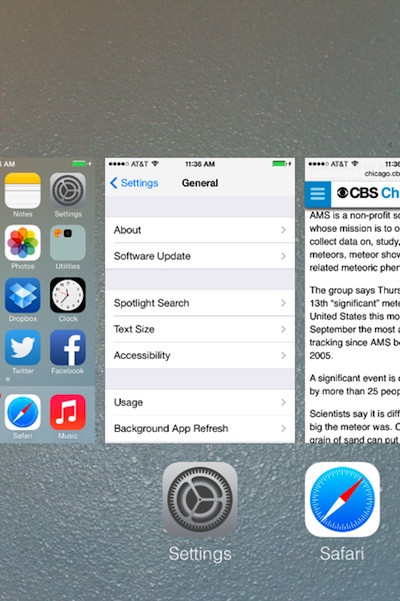
To kill an app on iOS 7, follow these two simple steps:
1) First, press the Home button twice. (Double-press it.) This changes your iPhone display to something like the following image, showing a list of apps that are running, with your most recent app shown first:

2) Next, select the large image of the app you want to stop/kill, and drag it up and off the screen, as shown in this image:
Here’s a link to the Boulder Flood Relief website. Also, here’s a link to their “equipment needed” page.
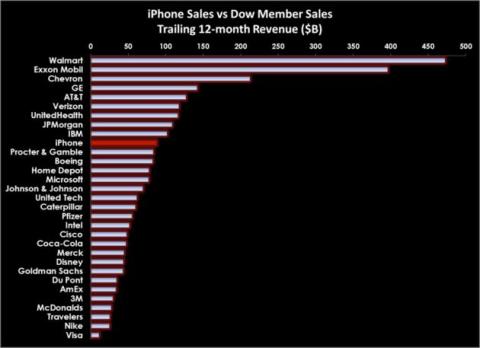
Apple’s iPhone revenues are greater than the revenue of many Dow-Jones companies. I’ll bet that if you looked at profit, the graph would be even more amazing. Not many companies have profit margins like Apple. (Original story at BusinessWeek.)
So a guy walks into a Buddhist auto-repair shop ... it looks like this was created by Mark Stivers.
I listened to The Four Agreements by Miguel Ruiz while driving around the country recently. This is a summary of the basic ideas, though it probably helps quite a bit to listen to (or read) the book.
I woke up to find snow in the mountains west of Boulder, Colorado. Last night was a clear night, so it was probably there two days ago.
The code in this blog post shows how to convert a Seq of Scala objects to their equivalent JSON representation. Specifically, I’m working on an application to display Twitter data, and I want to convert a Seq[Tweet] to its JSON.
The goal
My goal in the following code is to return some JSON that looks like this:
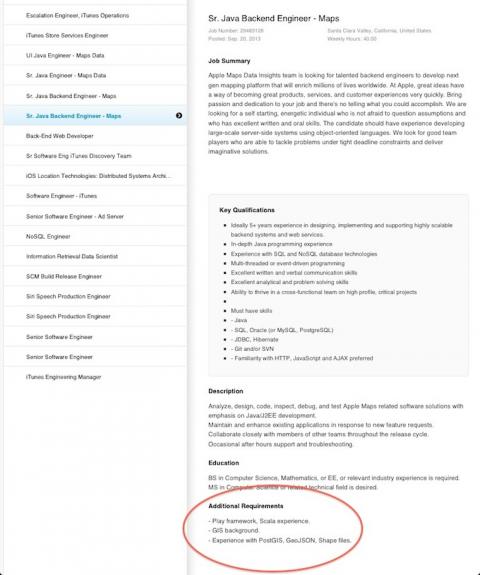
Very cool: Apple has a job posting for developers with Scala and Play Framework programming experience.
Getting started with Sencha Touch 2 is kind of a pain in the rump. Having gone through this experience over the last few weeks, I've found that it really helps if you know about some Sencha Touch concepts that are hidden in the Sencha documentation.
Without any further introduction, here are the concepts that I really struggled with.
There are probably simpler ways to do this, but for the moment, here’s a Sencha Touch 2 panel with a static list of data:
I’ve said it before, so I’ll only say it again briefly: I don’t like the Sencha Touch 2 documentation, I think it could be much more organized, deeper, and with better examples. So, in short, here are some links to the best Sencha Touch 2 documentation I can find.
Sencha Touch Guides (lists UI components):
This is one of many photos from this story/pictorial at The Atlantic.
Source code for a Sencha Touch 2 native dialog:
Ext.device.Notification.show({
title: 'One Button',
message: 'This is a simple notification with one button.'
});
This example comes from this URL.
This is like an Ext.Msg dialog, but native instead. See http://docs.sencha.com/touch/2.2.1/#!/api/Ext.Msg for more information.