



Here's a link to a new tutorial I've published titled "How to get Swing components to grow and fill using the JGoodies FormLayout".
While I'm in the neighborhood, here are a couple of quick links to go with that tutorial:
Here's a link to a new tutorial I've published titled "How to get Swing components to grow and fill using the JGoodies FormLayout".
While I'm in the neighborhood, here are a couple of quick links to go with that tutorial:
If you haven't heard about it already, the new Google Chrome browser includes a number of hidden/undocumented commands that can be entered in the browser's address bar. One of them seems to be an easter egg, the others provide information about the browser itself.
The command names seem self-explanatory, so here they are, give 'em a rip, see what they show about your Chrome browser:
If you ever want to use the Spotlight search functionality from a Mac OS X terminal window, you can access the same Spotlight information using the mdfind command. Here are a few examples of how to use mdfind to find files and directories on your Mac OS X system.
To find files with the word "alexander" in them, from a Terminal window you can use mdfind like this:
mdfind alexander
Now, if you just want to find a file using a portion of the filename, use this mdfindcommand:
I learned a shortcut the other day about how to use the scp or pscp commands to securely copy files between computer systems using SSL. I used to always type an scp command like this to copy a file named myfile.tar from my local computer to my home directory on a remote system:
If you ever want to impress your friends with a fun Mac OS X trick, just minimize a window in super slow motion. Steve Jobs used to do this during his presentations, but I don't know if he's done it in a few years now. Here's an image of what this slow-motion Genie effect looks like:
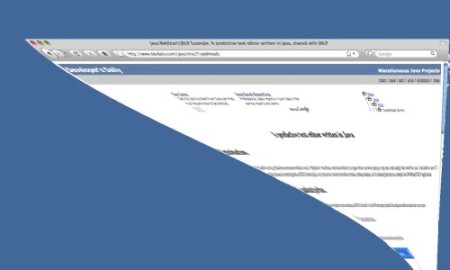
One thing I like about Mac OS X is that it's very easy to minimize an open application window using just the keyboard. Just use the [Apple][M] keystroke when you're focused on a window you want to minimize, and the window shrinks down to the dock. When I work on a Microsoft Windows computer at work this is a feature I really miss.
I'm currently working on a suite of Java and Ruby applications that, in short, require me to keep a number of Microsoft Windows command/cmd (DOS) windows open at one time. Because of this, I like for each command/DOS window to have a unique, custom name in its title bar.
Fortunately, it's easy to open a DOS command window with a custom name in the title bar. First, just open a DOS window (click Start, then Run..., then enter "cmd"), then type a command like this:
Here's an example web.xml configuration file where I show how to configure the Spring Framework to properly load for a Java web application. I'm intentionally trying to keep this Spring example simple, so my web.xml file has almost the bare minimum configuration.
I show how to load the Spring ContextLoaderListener class with the listener-class tag, and also show how to load multiple Spring application context files using the context-param, param-name, and param-value XML tags.
A lot of times when I'm using WinCVS I also need to jump over to the Windows Explorer (the file explorer, not internet explorer, although of course they are kinda-sorta the same), so I thought I'd make a note here of how to do this.
Java FAQ: How do I print system environment variables from a Java application?
Here's a source code example that shows how to print system environment variables from a Java program:
Apple business quotes: Two great quotes from “The trouble with Steve,” a CNN Money magazine article about Apple's Steve Jobs:
All of the shell script tests that follow should be performed between the bracket characters [ and ], like this:
if [ true ]
then
  # do something here
fi
Very important: Make sure you leave spaces around the bracket characters.
I'll show more detailed tests as we go along.
To perform tests on files use the following comparison operators:
For some reason when I use SQL I can never remember how to search for database table fields that are either NULL or NOT NULL. I always try to use the = operator or something else.
So, as a note to myself, here’s an example of how to perform a SQL query and find all records where a field in a database table is NULL:
Earlier today someone asked for the source code for my TypeAhead predictive-text, type-ahead, auto-complete JNLP Swing application. While trying to remember where I put it I realized I was going to have to do some case-insensitive file searching.
I was happy to learn that both of my favorite Unix and Linux file-finding utilities support case-insensitive file searching.
Perl function FAQ: How do I make variables private to my Perl function?
Answer: Just use the Perl my operator. Here's an example that shows how to create a variable named bar that is private to the function name foo:
Question: Using Perl, if I have a string that includes the full path to a file (i.e., it includes both the full path of the directory and the filename), how do I split the string into its directory and filename components?
Answer: Use the basename and dirname methods of the Perl File::Basename module.
The following example shows how to break this string '/Users/al/work/file1.pdf' into its directory and filename components:
If you've ever needed some template/boilerplate code for creating your own Perl module, here's some sample code intended to give you just what you wanted. Feel free to copy and paste the Perl code shown below and use it as a template for creating your own modules.
If you've never created your own Perl module I recommend first seeing how this sample code works. Here's all you have to do to get it running:
Perl subroutine FAQ: How do I return multiple values from a Perl subroutine (Perl function)?
One of the things I really like about Perl is that you can return multiple values from a function (and you don't have to create some type of artificial class to encapsulate them). Here's the basic way to return multiple values from a function/subroutine named foo:
Perl hash key FAQ: How do I test to see if a Perl hash containts a given key?
You can use the Perl exists function to see if a key can be found in a hash. Here's the general case of how to search for a given key in a hash:
MySQL FAQ: How do I create a MySQL database table index?
Here's an example of how to create an index on a MySQL database table. In this particular example my table uses the MySQL InnoDB database engine, but that doesn't matter too much -- it just happens to be a MySQL database engine that supports foreign key relationships.
To get started, here's the SQL definition of a MySQL table I've named ftp_files: