Scala, Java, Unix, MacOS tutorials (page 92)

5-Star Rated on Amazon.com
Domain Modeling
Made Functional

At the time of this writing (September 19, 2019), there’s a lot of bad information in books and on the internet about how to use a Flutter FutureBuilder. That bad information caused me to waste a lot of time over the last two days. I don’t have time today to explain everything, but in short, here’s a technically correct FutureBuilder example:

import 'package:flutter/material.dart';
import 'shared_prefs_helper.dart';

class PreferencesEnableNotifications extends StatefulWidget {
    @override
    PreferencesEnableNotificationsState createState() => PreferencesEnableNotificationsState();
}

class PreferencesEnableNotificationsState extends State<PreferencesEnableNotifications> {

    @override
    Widget build(BuildContext context) {

        return Scaffold(
            appBar: AppBar(
                title: Text("Enable Notifications"),
            ),
            body: FutureBuilder<bool>(
                future: SharedPreferencesHelper.getEnableNotifications(),  //returns bool
                builder: (BuildContext context, AsyncSnapshot snapshot) {
                    if (snapshot.connectionState == ConnectionState.done) {
                        // YOUR CUSTOM CODE GOES HERE
                        return CheckboxListTile(
                            title: const Text('Enable Notifications'),
                            value: snapshot.data,  //the bool in the SharedPreferences
                            onChanged: (val) {
                                setState(() {
                                    SharedPreferencesHelper.setEnableNotifications(val);
                                });
                            }
                        );
                    } else {
                        return new CircularProgressIndicator();
                    }
                }
            )
        );
    }
}

The solution

The key part of this proper solution is everything inside of the “builder:” code. The most important thing to do is to show something like the CircularProgressIndicator while the FutureBuilder is waiting for the data to arrive. In this example the data comes from a Flutter SharedPreference, specifically this method which returns a Future:

future: SharedPreferencesHelper.getEnableNotifications(),

Why this is important

If you don’t write the FutureBuilder code as shown, you’ll be in for a world of hurt when your data is returned slowly (in my case, the data from the SharedPreferencesHelper.getEnableNotifications() method). If your data comes back in 10ms or so, you might be fine without the code shown, but if/when your data comes back more slowly, you’ll get some really ugly exceptions written in yellow text on a red background if you don’t use the code shown. (Just use the code shown. Always.)

I’ll try to write more when I have time, but in short, if you want to create a Flutter FutureBuilder that runs without errors when your data is returned slowly, I can confirm that this approach works successfully.

Update: Still not 100% correct

As I tried to do more complicated things with my app, I found out that the solution above is still not 100% correct, even though it’s much better than other documentation that’s out there.

The big thing I have learned is that you should not directly call a function in the “future: ...” part of the code. Because your build method may be called many times — think 60 times a second — if you call a function in that area, you’ll end up calling that function many times. Instead, what you’re supposed to do is create your future as a class-level variable in a State method like initState.

I’ll show how to do this when I have more time, but this is actually an extremely important point. I found this out the hard way when I started adding some animation into my build method, and suddenly the function shown in the original code above was being called many times, instead of just once.


If you ever need a Dart/Flutter method to format a TimeOfDay variable — i.e., convert a TimeOfDay to a String — I can confirm that this method works:

String formatTimeOfDay(TimeOfDay tod) {
    final now = new DateTime.now();
    final dt = DateTime(now.year, now.month, now.day, tod.hour, tod.minute);
    final format = DateFormat.jm();  //"6:00 AM"
    return format.format(dt);
}

494 miles north of Fairbanks, Alaska. No services for 240 miles. 30 degree temps, fog, and very little visibility. That was a long, cold day in July. (August, actually.) Somehow I drove all the way from Deadhorse (Prudhoe Bay) to Talkeetna, about 770 miles.

494 miles north of Fairbanks, Alaska

When I was trying to debug a problem that I thought was related to Flutter’s SharedPreferences library, I ended up rewriting a preferences method to use code like this rather than the normal approach:

Future<SharedPreferences> fPrefs = SharedPreferences.getInstance();
fPrefs.then((value) {rez = value.getBool(KEY_ENABLE_NOTIFICATIONS) ?? false; })
   .catchError((e) {
       debugPrint("===== ERROR: ${e.error}");
       return 60;
   });
return rez;

While that ended up being a waste of time, the benefit of my side excursion is that I get to show this example of how to use then and catchError with a Dart future. So if you wanted to see a Dart Future/then/catchError example, I hope this is helpful.

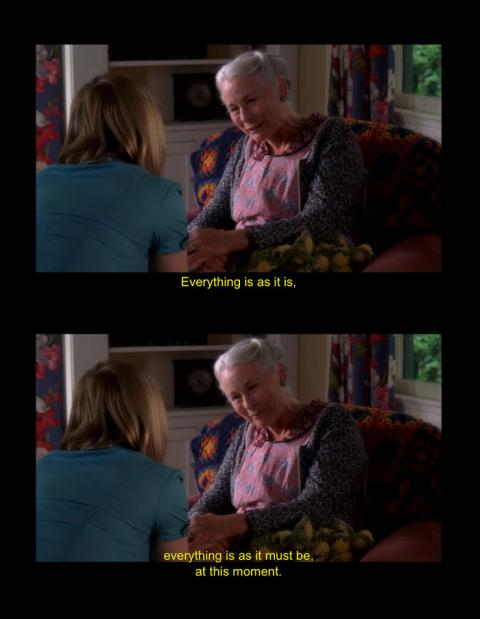
I miss Michael Clark Duncan from The Finder (see Sun-Tzu, life, Buddha), but this quote from one of my favorite episodes of Medium is very good.

A quote from the tv show Medium

As a quick note, here are two examples of how to use a Future with a Duration delay in Dart (and Flutter):

// example 1
Future<bool> _getFutureBool() {
    return Future.delayed(Duration(milliseconds: 500))
        .then((onValue) => true);
}

// example 2
print('1');
Future.delayed(const Duration(milliseconds: 500), () {
    print('Hello, world');
});
print('2');

If you’re comfortable with Dart futures, you know that the second example will (eventually) print this output:

1
2
Hello, world

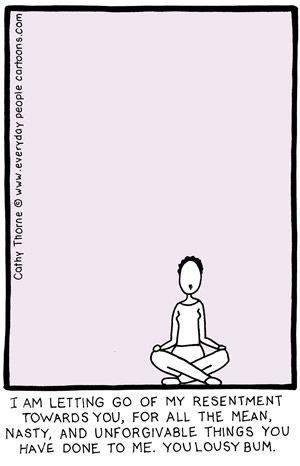
Forgiveness, it’s good for the soul. :)

Forgiveness and letting go of resentment

Here’s a little example of a Flutter time preferences widget, something I’ll be using in the new version of my Just Be app. Probably most important thing about this source code is that it shows an example of how to use the Flutter RadioListTile:

import 'package:flutter/material.dart';

class TimeValue {
    final int _key;
    final String _value;
    TimeValue(this._key, this._value);
}

class TimePreferencesWidget extends StatefulWidget {
    @override
    TimePreferencesWidgetState createState() => TimePreferencesWidgetState();
}

class TimePreferencesWidgetState extends State<TimePreferencesWidget> {
    int _currentTimeValue = 1;

    final _buttonOptions = [
        TimeValue(30,  "30 minutes"),
        TimeValue(60,  "1 hour"),
        TimeValue(120, "2 hours"),
        TimeValue(240, "4 hours"),
        TimeValue(480, "8 hours"),
        TimeValue(720, "12 hours"),
    ];

    @override
    Widget build(BuildContext context) {
        return Scaffold(
            appBar: AppBar(
                title: Text("Time Preferences"),
            ),
            body: ListView(
                padding: EdgeInsets.all(8.0),
                children: _buttonOptions.map((timeValue) => RadioListTile<int>(
                    groupValue: _currentTimeValue,
                    title: Text(timeValue._value),
                    value: timeValue._key,
                    onChanged: (val) {
                        setState(() {
                            debugPrint('VAL = $val');
                            _currentTimeValue = val;
                        });
                    },
                )).toList(),
            ),
        );
    }
}

I initially wanted to create _buttonOptions as a Map, but I ended up creating the TimeValue class to get what I wanted. (I’m still new to Dart, and I couldn’t find a good way to convert _buttonOptions.map from a Map to a List, which is required for the children parameter, so I went with the approach shown.)

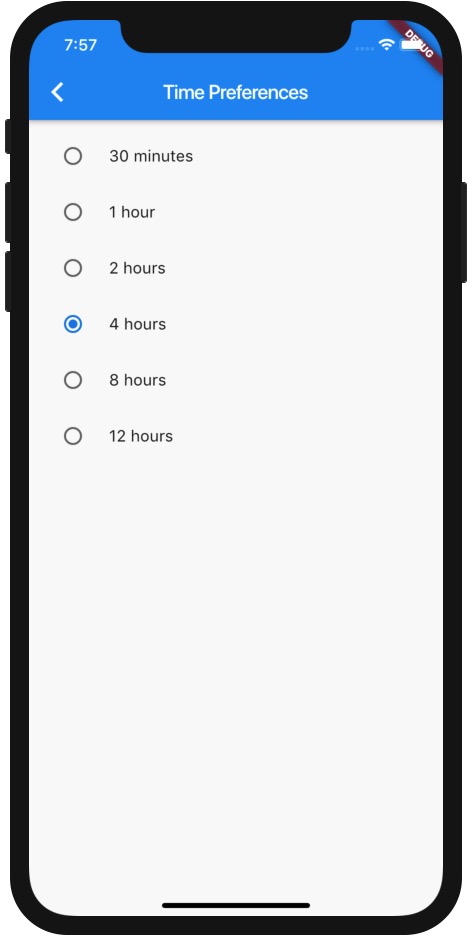
Here’s an image of what this code creates:

An example of a Flutter RadioListTile in a ListView

In summary, if you wanted to see an example of a Flutter RadioListTile inside a ListView, I hope this example is helpful.

Programming is an interesting profession. You fail dozens or hundreds of times a day, then take a moment to celebrate a little victory. Then you move on to your next failure/success.

Programing: failure, success; repeat

Working with yoga is often interesting. You stretch and twist and focus, trying to be very conscious and aware of your movements, and then one day in the middle of a twisting pose you see your left foot coming out from behind your right ear. At first that’s a real surprise, a shock. You think, “Well, that can’t be my foot over there”, and then you realize it is your foot, and with that comes a strong sense of accomplishment, and maybe a little smile.

Then you do the same pose in the opposition direction, but twist and stretch as you might, your right foot doesn’t come out from behind your left ear. You know you can’t push it any more, at least not while doing the pose properly, so you realize you have a little imbalance. You accept that you have some work to do, but it’s a good thing, so you push on.

I think life is like that too, or can be like that. If you enjoy the struggle, if it’s a worthy struggle — Castaneda’s “a path with heart” — the effort comes willingly, and with its own rewards.

Namaste

If you need to supply an initial value to a Flutter TextFormField (and possibly a TextField), the initialValue parameter may not do what you expect it to do. (More on this in the Discussion.) Instead, I just used this technique to populate the initial value for a TextFormField when using it with a TextEditingController:

“Be a true representative of the goodness in your heart, and don’t expect it to be easy or even noticed.”

~ Adyashanti (via Gratefulness.org)

This is a postcard I picked up one day from the Talkeetna Roadhouse in Talkeetna, Alaska.

Talkeetna Roadhouse (postcard)

Sometimes when I embark on little projects like my Scala file-find command, I think, “This is a waste of time, the existing tools are good enough.” But then, if I’m motivated enough — if I really want something — I think, “But I can use this better tool for the rest of my life...”

I just released the file-find command four days ago, and I use it almost every day while learning Flutter and Dart, so I think it’s going to be well worth it.

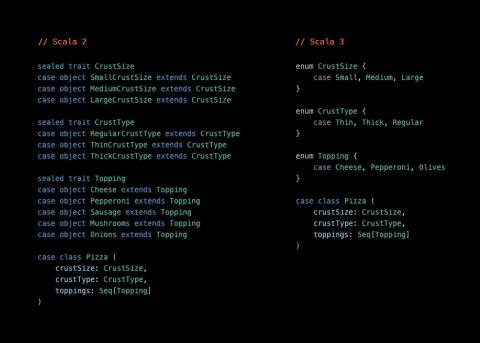
I’ll write about this a little more when I’m awake, but here’s a little look at ADTs implemented in Scala 2 (with traits and case objects) and Scala 3 enums.

ADTs is Scala 2 and Scala 3

“I though it was obvious, but apparently it's not. FP is not about not having side effects at all, otherwise it would be useless. It's just about deferring them for as long as possible, that's all.”

~ Alessandro Lacava, in this tweet

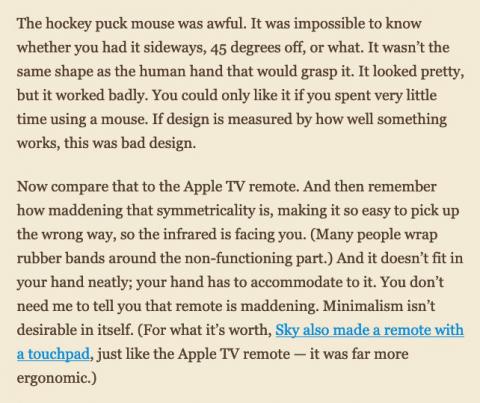
This medium.com article contains a fair balance of pointing out the good and bad of design at Apple under Jonathan Ive. Most people know the good parts, so this image shows a discussion of just two of the worst design decisions made by Apple’s design team. Other bad designs under Apple include pretty much every mouse ever made, the horribly infamous butterfly keyboards, and the trashcan Mac Pro design.

It seems like at some point every design quits thinking about what’s the best for the customer and succumbs to something that looks pretty. As the old saying goes, “Absolute power corrupts absolutely.”

Good and bad design at Apple under Jonathan Ive

“To live a creative life, we must lose our fear of being wrong.”

~ Joseph Chilton Pearce

5-Star Rated on Amazon.com
Domain Modeling
Made Functional