


If you happen to be in the market for a very simple and free text editor for Mac OS X systems, today I'm releasing the binary version of my "JustWrite" application. While it's still very young, JustWrite has the following socially-redeeming features:
Scala, Java, Unix, MacOS tutorials (page 365)
| A Microservices Bestseller! | |
|
Building Microservices |
[Note: This article was originally written in 2010.]
If you’re following along with my Automated GUI Testing (AGT) software progress, I’m showing my latest addition in another YouTube video. In short, if you supply a simple text file to describe your menus and menu items, I’ve created a new tool that does the following:
- Automatically generates menu “click” commands
- Automatically generates menu item “click” commands
- Automatically generates tests/demos for these items
Summary: Notes on my efforts to create a "HAL 9000" voice on my Mac OS X computer.
I've been doing a lot of work with the Mac OS X "text to speech" and "speech to text" system lately, so in my spare time I've been trying to see if I can create a HAL 9000 voice for Mac OS X (i.e., the "HAL" voice from the movie "2001: A Space Odyssey"). (Looking on Google, some people refer to it as "HAL 2001" voice.)
As I keep diving deeper and deeper into the rabbit hole that is the Mac OS X text to speech (voice) capability, I'm reminded that one cool thing you can do is have your Mac OS X system read text to you. Here's a quick example of how to get your Mac to read Alice's Adventures in Wonderland to you.
One cool thing about Mac OS X systems is the built in "text to voice" functionality. I use this from time to time to have my Mac OS X system read a web page or eBook to me, and the voice technology has actually gotten very good.
One thing many people don't know is that you can choose which voice you want to hear on your Mac OS X system by default, so, here's a short tutorial demonstrating how to select a default Mac "text to speech" voice.
Under the category of "Steal this invention", for anyone looking for a great product idea, here's what I have today:
I've always wanted an "always on" computer device in the kitchen, so that when I walk into the kitchen, I can tap the device or speak to it, and it comes instantly, just like the lights. Once it's on, I'd like for it to be able to do all the usual things, but primarily I'd like to be able to:
iMac monitor energy saving FAQ: How can I turn off my iMac monitor without turning off my iMac?
I've hooked up some nice speakers to my iMac and I often use it to play music in the house, and this morning I thought, "Wouldn't it be cool if I could turn off the iMac monitor while it's just playing music?" Hopefully that would help extend the life of the display, not to mention save some energy and be more "green".
Yesterday I created a short YouTube video demonstration of "GUI regression tests" against the Google Chrome browser, using my Agile GUI Testing software. This video is a little more than two minutes long, and demonstrates some simple GUI regression tests on the Chrome browser, in the format of a presentation.
As mentioned, the Chrome browser tests shown in that video are completely automated, using my Agile GUI Testing software (AGT).
Mac speech recognition FAQ: How can I work around the bugs in the Apple Mac speech recognition software?
I'd like to say I've been having a great time with the Mac OS X speech recognition capabilities in OS X 10.6 (Snow Leopard), but the truth is that it seems to have a lot of bugs. Many AppleScript developers on the internet are saying that Apple apparently "broke" the speech recognition server in Leopard, and has never fixed it in Snow Leopard. That's a real bummer, because it's a lot of fun to work with.
AppleScript FAQ: How do I break a long line in AppleScript?
When you program in AppleScript, you can very easily start creating programs with very long lines, which are hard to read. And AppleScript doesn't like it when you use carriage returns to break your long lines, which is a bit of a bummer.
But, fear not, if you need to break a long line in AppleScript, you just need to know the magic keystroke character: Just type the [Option][Enter] or [Option][L] characters when you want to break a long line.
Automated GUI Testing Software: If you happen to be looking for something to do this weekend, here's a very early release of our free (GPL) Agile GUI Testing software (AGT).
In short, just download the file below, and when you un-tar it, it will create a "scripts" folder. That folder contains our GUI testing software, along with two sample scripts. If you'd like to see how the sample scripts work, they are shown in this two-minute YouTube video (Agile GUI testing, basic demo).
Java mouse cursor location FAQ: How do I get the location of the mouse (mouse cursor) in Java?
I just ran into this problem in my Java Robot programming, and the short answer is, to get the current mouse cursor location/position, use the getPointerInfo method of the java.awt.MouseInfo class, like this:
Point p = MouseInfo.getPointerInfo().getLocation();
Java mouse FAQ: How do I create a custom Java mouse cursor (mouse pointer)?
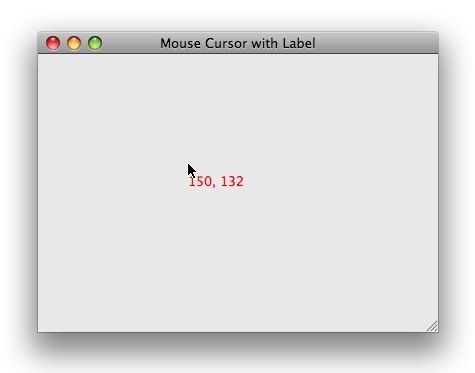
For my Java/Swing XY mouse position/coordinates application I finally dug into Swing and figured out how to create a Java mouse cursor that shows the X/Y position (coordinates) of the mouse cursor at any moment in time. I can't figure the right way to word that, so it may not make sense, but hopefully this picture of what I've done will help demonstrate my custom Java mouse cursor:
Gimp FAQ: How do I draw a circle in Gimp?
Background: Drawing circles with Gimp
I just used Gimp to create several circle images in my iPhone Safari browser privacy and security tutorial, and this is a short tutorial on how I created them. For purposes like that I create hollow circles to highlight something in the original image, so I’ll demonstrate that here, and I’ll also show how to create solid circles in Gimp, which are even easier to create.
Update: I included a video at the end of this tutorial that demonstrates everything I describe in the text that follows.
I don't know how good of an idea it is, but in my Agile GUI Testing software, one thing I'm working on (debugging my old code, actually) is some very basic image recognition software. If/when it works, it will let the tester write a line of code like this to find an image on screen:
Java image FAQ: Can you show me how to create a screen capture in Java?
I don't have any Java screen capture code to share at the moment, but if you don't mind a JRuby screen capture example (which you can easily convert to Java), this JRuby screenshot (screen capture) source code example should help point you in the right direction:
Automated GUI Testing Software: I'm still debating on the name of my GUI testing software (I've been calling it XGT, for eXtreme GUI Testing software), and today I'm calling it Agile GUI Testing (or Agile GUI Tester). None of that matters at the moment, but after pounding away on it some more last night, I thought I'd share a sample script of how this software works.
To that end, here's a sample Agile GUI Testing software script that does the following:
Java Robot class FAQ: Can you show me an example of how to use the Java Robot class?
Answer: Um, yeah, sure ... I say that a little jokingly. Okay, what really happened is that while developing this Java Robot example code on my Mac, I had to reboot it about 10 times. When you use the Java Robot class, you're poking your head out into the native operating system, and if you mess up with your GUI events -- at least on a Mac OS X system -- a lot of bad things can happen.
In the biggest news of the week, well, at least for me, I'll finally be releasing my eXtreme GUI Testing software (XGT) to the public. I was hoping to get everything ready for release today, but other things came up, so bear with me.
As I mentioned in a blog post many years ago, I created XGT to see if I could push the envelope of GUI testing and software QA. Because XGT uses Ruby/JRuby as its scripting language, and because JRuby is backed by anything you want to do in Java, I think this makes for a very powerful, but also very simple, automated GUI testing framework.
Java Mac application FAQ: Can you share a Java/Mac Ant build script that uses the Jarbundler task to make my Java application look like a native Mac OS X application?
NOTE: This solution is for Mac OS X systems running versions of Java prior to Java 7. If I remember right, it only works on those systems, and therefore only on Mac OS X systems 10.6 and earlier. I'm working on new tutorials for Java 7 and Mac OS X 10.7, 10.8, 10.9, and newer.
| A Microservices Bestseller! | |
|
|
Building Microservices |